How to change category group from business to personal?

Windows user, version R64.35. All my medical insurance premium account are under the "personal" group except one where it is under the "business" group. I want to change the group to "personal". I have been able to change the transactions to "personal" but not been able to change the group. Please advise
Answers
-
In Q, "Business vs Personal" is determined by the tax line associated with the category, not the category name or anything else.
Q user since February, 1990. DOS Version 4
Now running Quicken Windows Subscription, Business & Personal
Retired "Certified Information Systems Auditor" & Bank Audit VP0 -
I do not understand the answer from notacpa. Looking for guidance on how to change the one medical insurance group from "business" to "personal" so that all those categories are in the same group. I do not see how I can access the tax lines.
0 -
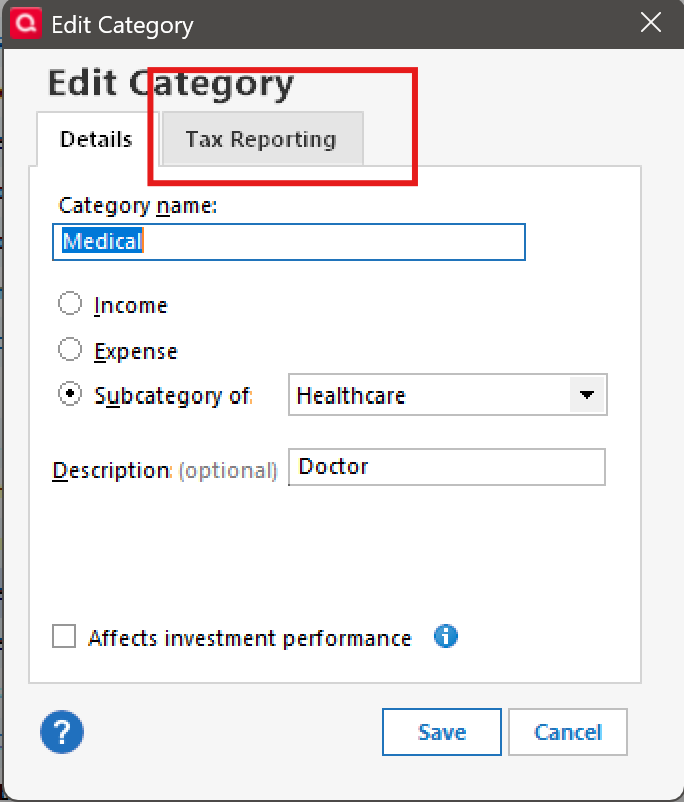
To expand on NotACPA's answer you need to change the schedule in the tax line item from the [Category List] as illustrated below.

To do so, select the problem category and click on the play button…

Then select edit…

From there you will select Tax Reporting and choose the appropriate personal tax line item…
 0
0


Categories
- All Categories
- 6 Product Ideas
- 34 Announcements
- 249 Alerts, Online Banking & Known Product Issues
- 19 Product Alerts
- 266 Welcome to the Community!
- 301 Before you Buy
- 1.5K Product Ideas
- 55.8K Quicken Classic for Windows
- 16.9K Quicken Classic for Mac
- 1K Quicken Mobile
- 834 Quicken on the Web
- 129 Quicken LifeHub