Backup File Name and Data File Re-naming

My Quicken data file name somehow became appended with the release number that was current when I did a restore from backup.
I understand that I can change the name back to original by doing so manually in Windows explorer/file manager.
However there are files xxxxxSyncLog.DAT and xxxxxOFXLOG.DAT with the same name as the data file. Can I or must I change these back to the original name -- meaning delete the release number from them?
Also can i or must I change backup files back to the original name? Will these backups still restore the data file if I need to do so at some point after such a file name change?
WindowsQuicken Busn & Pers R65.17
Thanks for any help
Best Answer
-
Yes it appears this is what occurred.
Backup files created were named:
OriginalFileName-ReleaseNumber-Date.QDF-backupWhereas the restored data file was named:
OriginalFileName-ReleaseNumber.QDF0
Answers
-
You can freely change the data file name. The *.DAT files are just the scrambled log files (because they have personal information in them) which can be viewed with Help → Contact Support→ Log Files. You can rename them or delete them and they will be recreated.
As for the backup files when you open a backup file Quicken asks if you want to restore the the current data file name or a copy with a new name so it doesn’t much matter what the backup file name is.
5 -
@Chris_QPW My understanding (correct me if I’m wrong) is that the restore process attempts to restore without the date-time appendage and if it then detects a possible overwrite, it asks for user input.
So if the backup name is file-release-date-time, it will restore as file-release, or as file-release-date-time. It would never restore to simply file.QDF, which I think was the OP’s direction.
0 -
Yes, you are correct, it seems that they remove the date, but if the release version is in the name that doesn't get removed. This is how @DL36 got the release number in the current data file name.
Given a backup name like this:

If you open it you get:
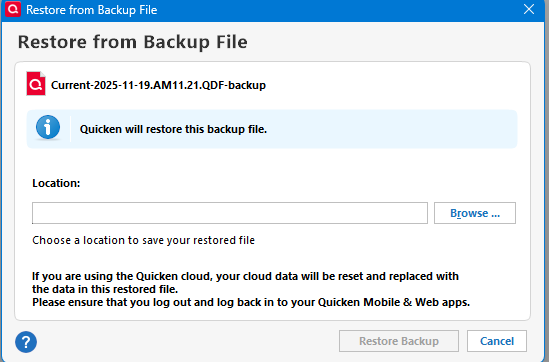
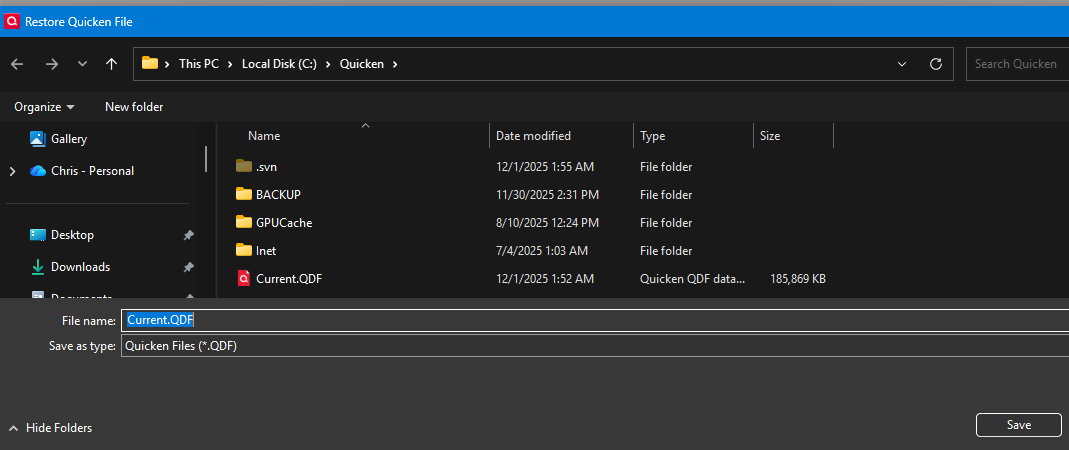
Note it is possible to change the data file name, but this is the default name.
Now doing this with:

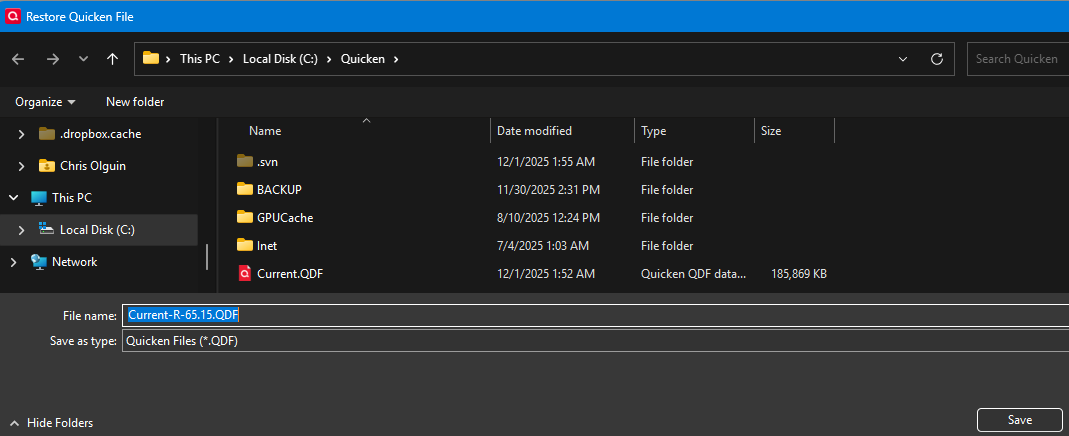 0
0 -
Yes it appears this is what occurred.
Backup files created were named:
OriginalFileName-ReleaseNumber-Date.QDF-backupWhereas the restored data file was named:
OriginalFileName-ReleaseNumber.QDF0

Categories
- All Categories
- 6 Product Ideas
- 34 Announcements
- 249 Alerts, Online Banking & Known Product Issues
- 19 Product Alerts
- 266 Welcome to the Community!
- 301 Before you Buy
- 1.5K Product Ideas
- 55.8K Quicken Classic for Windows
- 16.9K Quicken Classic for Mac
- 1K Quicken Mobile
- 834 Quicken on the Web
- 129 Quicken LifeHub