Cannot connect to Bank of America

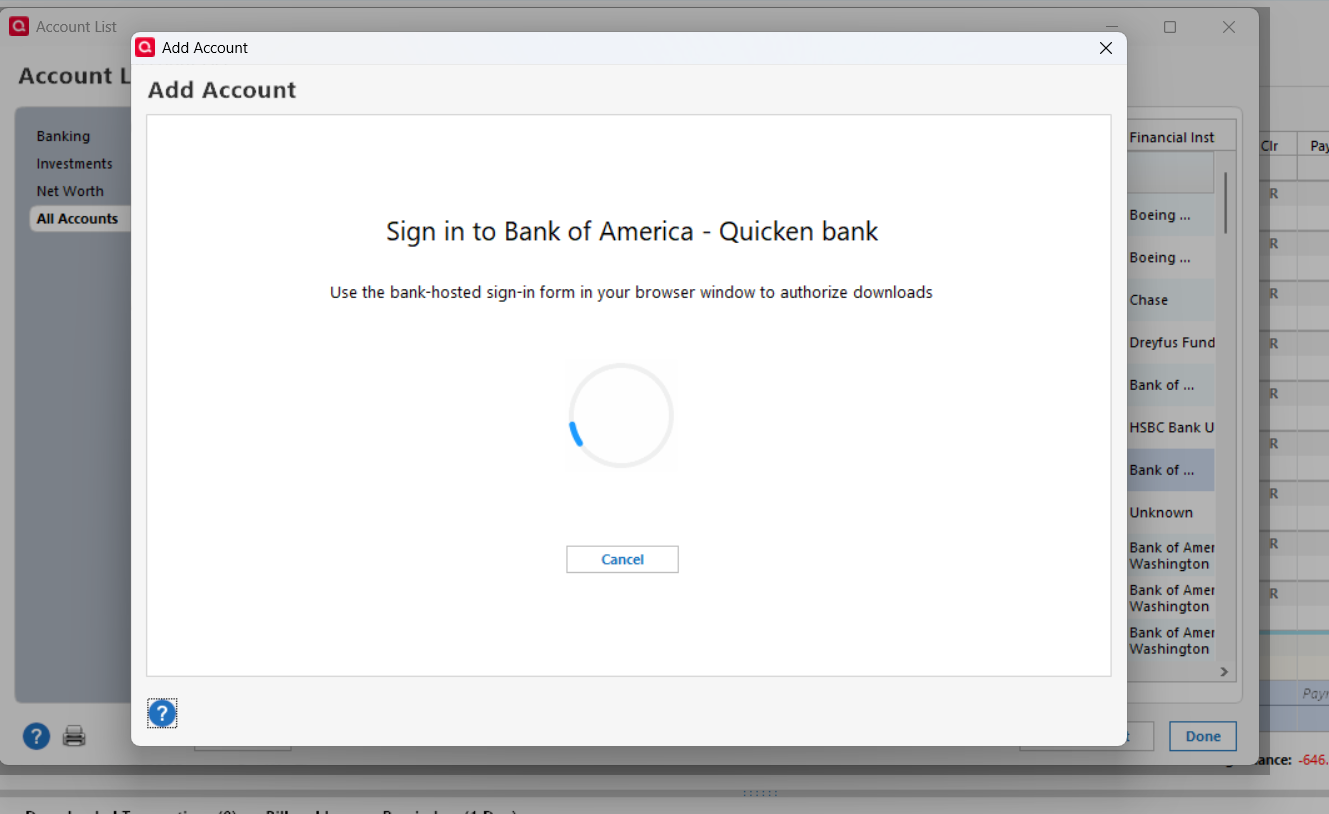
When I click sign-in during the online setup the wheel keeps going. Have to cntrl+alt+del to get out.
Answers
-
Hello @nisarun,
Thank you for sharing your experience.
I have some follow-up questions for you.
- How long has this issue been happening?
- Do you have other financial institutions that are updating successfully?
- How long does the spinning continue before you end the task?
One thing we can try is signing out of your Quicken and signing back in. Please follow the steps below in order to do so.
- Navigate to Edit
- Preferences...
- Quicken ID & Cloud accounts
- Click Sign in as a different user (or it might say Sign in using a different Quicken ID)

- Follow the prompts to Sign Out

- Sign back in using your Quicken ID (email) and password
Once signed back in, try updating your accounts again.
Let me know how it goes.
Quicken Alyssa
Make sure to sign up for the email digest to see a round up of your top posts.
0 -
- I noticed this since September 2025 when Bank of America stopped using QFX file downloads for transactions.
- This connection round robin has been happening since then too. At least I noticed it when I was troubleshooting. Even when I do a set up for say Chase it happens. But I didn't care as much because they download transaction QFX files fine. So the answer is the connection round robin happens to most of the connects I try.
- The longest I waited for to end Quicken is about eight hours. I used think that it may take a long time because the files may be long. But eight hours seemed like a problem.
I will other steps you suggested. Log out of Quicken etc. later today. Stay tuned.
Thanks, Kristina.
0 -
Kristina,
I logged out of Quicken and logged back in, with the email. Quicken loaded ok.
Tried to connect using "set-up" in Account List/Online services.
Appears that it is not connecting. It is spinning for the last two hours. I will let it go on more. But I am not hopeful.
0 -
Additional Comment:
What does the "use the bank-hosted sign-in form your browser browser window…" mean. Quicken does not ask me to sign-in to my bank account before it starts spinning the wheel.
1 -
Continuing the previous comment:
Do I have to sign separately in my Bank of America account before I click the sign-in button shown on the Quicken window?
It appears that when I click the "sign-in" button in the Quicken window, it should ask me my bank user name and pw and then after that the wheel should start spinning. At present when I click sign-in now, it immediately starts spinning, never asking for my bank username, pw.
0 -
Thank you for following up and providing so many details of the process you went through and the results you got.
Yes, when you click the sign-in button, you should then be redirected to the bank's website, where you can sign in and authorize your accounts.
Based on your last comment, it sounds to me like you might need to disable pop-up blockers in your web browser settings. If that doesn't work, I would suggest you try using a different web browser. To do this, you would change your default browser.
Please try those steps and let me know how it goes!
Quicken Alyssa
Make sure to sign up for the email digest to see a round up of your top posts.
0 -
Just checking in, we haven't heard back from you in a while.
Do you still need assistance?
Thank you!
Quicken Alyssa
Make sure to sign up for the email digest to see a round up of your top posts.
0 -
Thanks for asking Alyssa.
I was able to resolve the "connect to the financial institution" problem by resetting my Quicken and Quicken cloud and re-signing as a new user.
I am still unable to sync to Quicken cloud. It does connect to the cloud and sync's the data (based on the "last sync'd date/time stamp) but doesn't disconnect. I guess it doesn't know its's done!
I do not use any mobile devices for Quicken. So, I am going to ignore the problem for now.
0 -
Thank you for following up with additional details.
If you change your mind and wish to continue troubleshooting the issue, don't hesitate to reach back out.
Thanks again!
Quicken Alyssa
Make sure to sign up for the email digest to see a round up of your top posts.
0
