Some Accounts Will not do One Step Update

I have three different Wells Fargo credit card accounts (tracking my two daughter's as well as mine). I can download my account using One Step Update, but when I try to add the other two accounts, it does not work. I also have two different Synchrony cards that I have never been able to update via One Step Update. Does anyone have any ideas to fix this?
Answers
-
Hello @dnardozzi,
Thank you for sharing what you are experiencing with us.
I have some follow-up questions for you.
- Have all three Wells Fargo accounts been added to Quicken successfully in the past?
- If so, how long ago were they working properly?
- Are you the owner of the Wells Fargo accounts?
- Or are these accounts that you are an authorized user on?
- When adding these Wells Fargo accounts, are you going through an authorization process that directs you to the bank's website so you can authorize your accounts for use in Quicken?
- If so, are you seeing all three accounts listed so you can authorize them all, or are these two not listed?
- If you do see them listed for authorization, are they still listed when you are redirected back to Quicken?
- What type of Synchrony cards do you hold, specifically?
- Care Credit, Guitar Center, Home Depot?
- Which instance in Quicken are you using to add/connect these Synchrony cards?
Looking forward to your response.
Quicken Alyssa
Make sure to sign up for the email digest to see a round up of your top posts.
0 - Have all three Wells Fargo accounts been added to Quicken successfully in the past?
-
Alyssa,
Thank you for your response. Answers below:
- Have all three Wells Fargo accounts been added to Quicken successfully in the past?
- If so, how long ago were they working properly?
- Added yes, but the two in question were never able to be One Step Updated
- Are you the owner of the Wells Fargo accounts?
- Or are these accounts that you are an authorized user on?
- Not the owner, but I use their login info
- When adding these Wells Fargo accounts, are you going through an authorization process that directs you to the bank's website so you can authorize your accounts for use in Quicken?
- If so, are you seeing all three accounts listed so you can authorize them all, or are these two not listed?
- Yes to the authorization process, but individually for each account, so I would only see one at a time. The accounts are created manually already. I get an "invalid user ID or password" message when I try to activate One Step Update, but they are correct.
- If you do see them listed for authorization, are they still listed when you are redirected back to Quicken?
- What type of Synchrony cards do you hold, specifically?
- Care Credit, Guitar Center, Home Depot?
- Sam's Club and TJ Maxx
- Which instance in Quicken are you using to add/connect these Synchrony cards?
- From the "Activate One Step Update" link. I get a message that my login credentials are wrong, but they are correct.
0 - Have all three Wells Fargo accounts been added to Quicken successfully in the past?
-
Thank you for following up.
For the Synchrony accounts, please follow the steps in this Support Article to add them, and please try using one of the Sam's Club instances in Quicken when doing so.
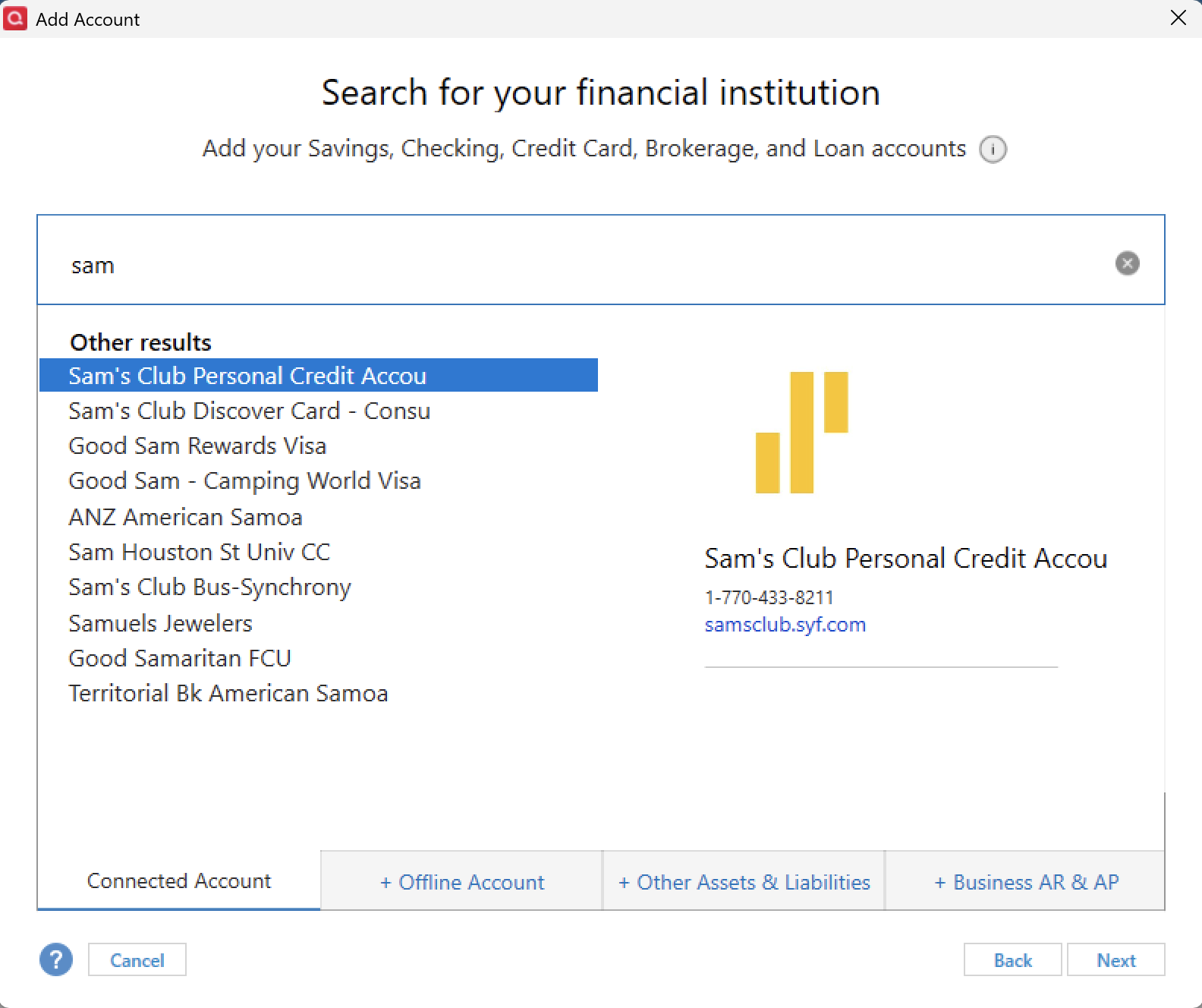
Or is this the process you are already doing when you receive the Invalid Credentials message? From my end, it looks like you are using the Synchrony Bank Credit Cards instance, so I am curious if choosing a more specific option will give you success.
Now, for Wells Fargo, I am a little confused about what is happening there. I think we should go through the whole process together, so I can see where this is failing. Please follow these steps:
1. Save a Backup. Steps can be found in this article if needed.
2. Disconnect ALL Wells Fargo accounts in Quicken. Here are the steps on how to do that.
3. Revoke Quickens Third-Party Access from the Wells Fargo website.
4. Add accounts back into Quicken
Once back in Quicken, you will want to make sure you choose the "LINK to existing" option for any accounts that are already in Quicken.
Let me know how it goes!
Quicken Alyssa
Make sure to sign up for the email digest to see a round up of your top posts.
0 -
Just checking in, we haven't heard back from you in a while.
Do you still need assistance?
Thank you!
Quicken Alyssa
Make sure to sign up for the email digest to see a round up of your top posts.
0 -
Hello again,
Checking in once more before this thread is closed.
Let us know if you still need assistance.
Thank you!
Quicken Alyssa
Make sure to sign up for the email digest to see a round up of your top posts.
0 -
Hello,
Due to the lack of response, I went ahead and closed this post.
If you still require assistance, please feel free to start a new post.
Thank you!
Quicken Alyssa
Make sure to sign up for the email digest to see a round up of your top posts.
0
