Merrill Lynch accounts transactions not downloading in One step update

For the last couple of months, I am not getting new transactions downloaded for my Merrill Lynch Investment accounts. Every day, the One step update summary says the accounts were updated and 8 (I know for a fact that on some days there should be more than 8 or even fewer) new transactions downloaded but none appear in any registers. Multiple times I've tried the recommended deactivate, re-add steps for the accounts but the results are always the same. What can I do to fix this?
Comments
-
Hello @webertod,
Thank you for sharing your experience. I am happy to help!
After reviewing your account connections internally, I don't see anything obviously wrong that stands out, so that's good! I do have some follow-up questions for you.
- To clarify, you have had NO new transactions downloaded for these accounts for about two months?
- On what date are the most recent transactions?
- Is Merrill Lynch the only financial institution that you are seeing this issue with?
- Where is your data file located?
- Is your file being synced/backed up by any third-party services like OneDrive, Dropbox, or Carbonite?
With Merrill Lynch being a bank that uses the Express Web Connect+ connection method, it is also important to revoke third-party access during the disconnect/reconnect process you mentioned. Were you already doing that?
Those steps would be the following:
1. Save a Backup. Steps can be found in this article if needed.2. Disconnect ALL Merrill Lynch accounts in Quicken. Here are the steps on how to do that.
3. Revoke Quickens Third-Party Access from the Merrill Lynch website.
4. Add accounts back into Quicken
Once back in Quicken, you will want to make sure you choose the "LINK to existing" option for any accounts that are already in Quicken.
Let me know how it goes.
Quicken Alyssa
Make sure to sign up for the email digest to see a round up of your top posts.
0 - To clarify, you have had NO new transactions downloaded for these accounts for about two months?
-
No improvements so far….
I have not been able to get any new transactions downloaded through one step update for any of the Merrill accounts for a couple of months. For about a month after the problem started, I was able to download QFX files from the Merrill website and import them into quicken, but Merrill recently removed that option.
Yes, Merrill is the only institution that I'm having trouble with. Even my Bank of America accounts (parent company of Merrill) have continued to download transactions without issues.
My data file is on the C drive of my laptop and I back up the file using dropbox.
I just completed the 4 steps you recommended, including specifically revoking access for Quicken to my Merrill accounts on the Merrill website and the Bank of America accounts on the BofA website. When I re-added the accounts and linked them to the existing quicken accounts it successfully downloaded new transactions for the BofA account but none for the Merrill accounts.
What else can I try?
0 -
I'm still waiting for a response to my previous posting……
0 -
Thank you for following up, and I apologize for the delayed response.
This would be considered Missing Transactions, and we do have steps you can try to resolve it.
If this is the first time this has happened
1. Has the sort order been changed in the register? Confirm that the Sort Order in your account register is by Date; just click the top of the Date column in your account register. It's likely the transactions are in your register, just not where you thought they'd be.

2. Click the Reset button at the top of the register. This will confirm that there's no filtering in your account register.
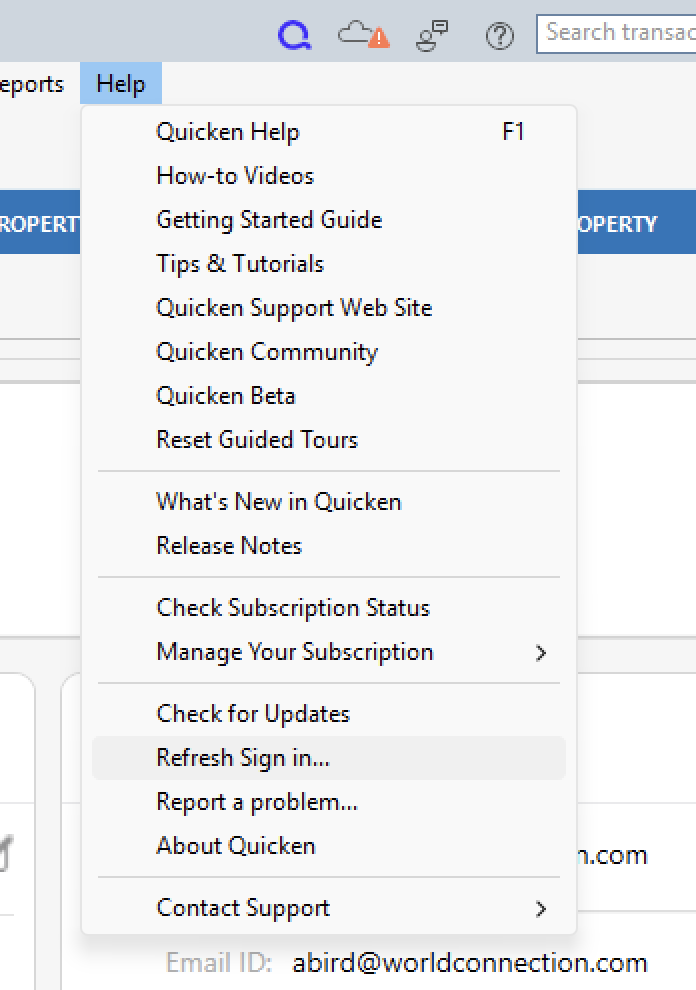
3. Try refreshing your login session: To do this, go to Help > Refresh Sign in. After completing the log-in process, try running a One Step Update again.
4. Are these missing transactions over 90 days old? Transaction download is typically limited to the last 90 to 200 days, depending on the financial institution.
5. Have any transactions been deleted recently? Transactions won't download again after being deleted. If a transaction was deleted in error, you can re-enter it manually (if there's a large group of deleted transactions, it may also be easier to restore a backup).
6. Was the transaction moved from one account register to another? Click on All Transactions in your account bar and search for the missing transaction. If you find the transactions in an incorrect account, you can move the transactions to the correct account: just select the transaction(s), right-click, and select Move transaction(s). Select the correct account and click OK.
7. Was an older backup restored after you accepted the downloaded transaction(s)? The backup file will restore account information up to the date it was created, which may be before the missing transactions were downloaded.
There are other steps listed in the article as well. These are just a starting point. If the steps in the article do not resolve the issue, please contact Quicken Support directly for further assistance.
Thank you!
Quicken Alyssa
Make sure to sign up for the email digest to see a round up of your top posts.
0 -
The problem is not that transactions are missing from the registers of my Merrill Lynch investment accounts. The problem is no new Merrill account transactions are appearing in the "Downloaded Transactions" section below the register after running one step update. All other accounts such as credit cards and checking account are downloading just fine.
I don't think your recommended "missing transactions" step apply here but I tried steps 1-3 and nothing improved.
0 -
Thank you for clarifying that! I apologize for the delayed response.
In that case, I would recommend following the steps in this Support Article. The article mentions first turning automatic entry off, but it sounds like you already have it off.
I think you can start here:
- Choose the Tools menu > Online Center.
- Select the appropriate financial institution and account.
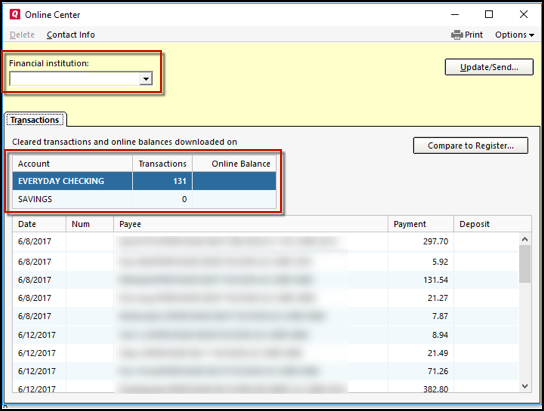
4. Select Transactions.
- If transactions are listed, click Compare to Register and accept the transactions. Note: Compare to Register will display online payments on the initial screen. After accepting your online payments, click Continue, Next, or Done to see the rest of your downloaded transactions.
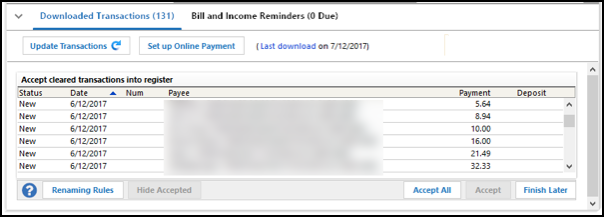
- If no transactions are listed or Compare to Register does not allow you to accept the transactions, proceed to the next section in the article.
If the steps in the article do not resolve the issue, please contact Quicken Support directly so they can walk you through it in real-time and process an escalation if needed.
Thanks again!
Quicken Alyssa
Make sure to sign up for the email digest to see a round up of your top posts.
0 -
Success! I followed the instructions in the linked support article. Things finally worked on the steps following the header "Lastly, correct data issues". As instructed I made a copy of my quicken file, opened it, Validated it, reactivated all of my accounts for downloading, and VOILA….all of the missing downloads appeared in the Downloaded Transactions tab of the registers. Phew!
Thanks.
1 -
Thank you for following up and letting us know how you resolved this issue.
If you need more help, don't hesitate to reach back out!
Thank you!
Quicken Alyssa
Make sure to sign up for the email digest to see a round up of your top posts.
0
