Bernstein Account Values not updating

I noticed lately that my Bernstein Global Wealth Management account values are no longer updating. I don't get any error messages when updating, the green "complete" comes up, but the values never change
Any suggestions?
[Edited-Readability]
Comments
-
Hello @ejvette1998,
Thank you for reporting the issues you are having. I am happy to help!
I have some follow-up questions for you.
- When did this issue start?
- When was your last successful download?
- Did you verify that there are new transactions posted on the bank's website that are not showing up in Quicken?
- Do you have other financial institutions that are updating without any issues?
One thing we can try is resetting the account. To do this:
- Choose Tools menu > Account List.
- Click the Edit button next to the account you want to change.
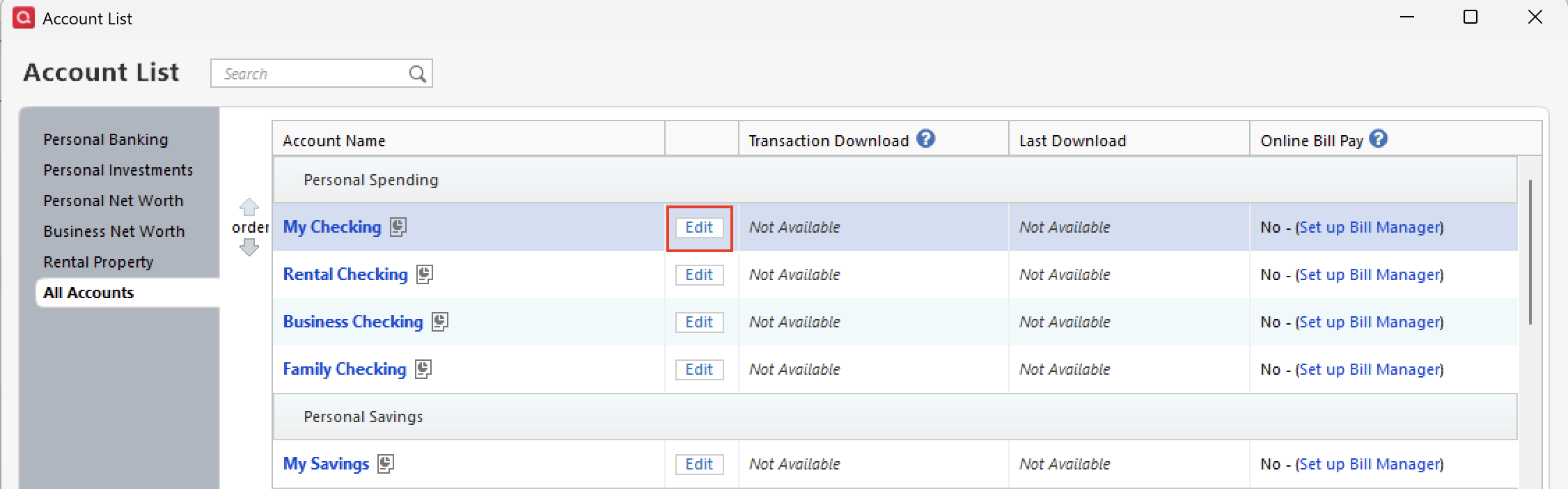
- The Account Details dialog displays. Click the Online Services tab.
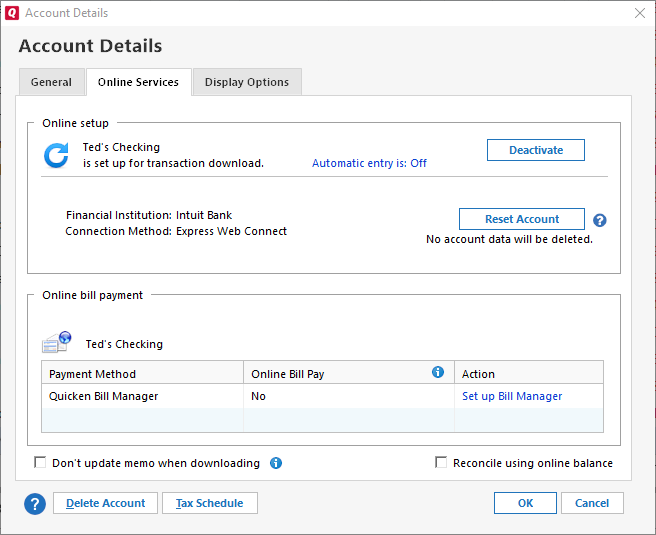
- Click the Reset Account button. Quicken will automatically deactivate and reactivate the account to fix any errors.
Once you have gone through those steps, let me know if you now have new transactions.
Looking forward to your response!
Quicken Alyssa
Make sure to sign up for the email digest to see a round up of your top posts.
0 -
Alyssa
I recently added the Bernstein accounts to quicken maybe 5 days ago
- When did this issue start? Immediatly the next day i saw the account values not updating
- When was your last successful download? only the 1st day I added the accounts
- Did you verify that there are new transactions posted on the bank's website that are not showing up in Quicken? these are all brokerage accounts not bank accounts so all the transactions are securities related
- Do you have other financial institutions that are updating without any issues? No my fidelity brokerage accounts all update without issue
Yes I tried resetting that did not work.
0 -
Thank you for following up with additional information.
Bernstein Global Wealth Management uses the Direct Connect connection method. This method uses the bank's servers, and therefore, we are unable to see the information being sent to Quicken, as we do not have access to their servers.
This would be considered Missing Transactions, and we do have steps you can try to resolve it.
If this is the first time this has happened
1. Has the sort order been changed in the register? Confirm that the Sort Order in your account register is by Date; just click the top of the Date column in your account register. It's likely the transactions are in your register, just not where you thought they'd be.

2. Click the Reset button at the top of the register. This will confirm that there's no filtering in your account register.
3. Try refreshing your login session: To do this, go to Help > Refresh Sign in. After completing the log-in process, try running a One Step Update again.
4. Are these transactions still marked as "pending" on your bank's website? Pending transactions have been authorized by your bank but not cleared and paid from your account yet. Most banks don't allow transactions to download until the transaction clears the bank.
If these steps don't resolve the issue, you will need to reach out to the financial institution for further assistance.
Let me know how it goes!
Quicken Alyssa
Make sure to sign up for the email digest to see a round up of your top posts.
0 -
Just checking in, we haven't heard back from you in a while.
Do you still need assistance?
Thank you!
Quicken Alyssa
Make sure to sign up for the email digest to see a round up of your top posts.
0 -
Hello again,
Checking in once more before this thread is closed.
Let us know if you still need assistance.
Thank you!
Quicken Alyssa
Make sure to sign up for the email digest to see a round up of your top posts.
0 -
Due to the lack of response, I went ahead and closed this post.
If you still require assistance, please feel free to start a new post.
Thank you!
Quicken Alyssa
Make sure to sign up for the email digest to see a round up of your top posts.
0
