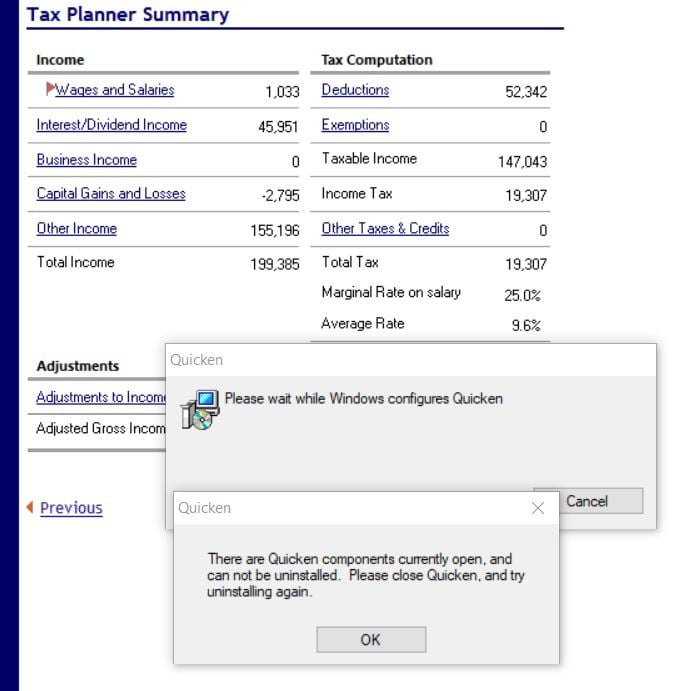
Tax Planner and Lifetime planner are broken after upgrade to latest version

When I click on items in both tools I get an endless loop of error messages. Anyone else see this?
Comments
-
Same for me. I just submitted an error report to Quicken.
3 -
I'm glad you reported it. I tried multiple times to send a report and they also failed. Said file was too big even though I didn't include a data file. Just a capture of the errors wouldn't upload either.
1 -
Try uninstalling, then manually deleting the folders above. Reboot your machine and then reinstall. If it doesn't update to the latest version, use the manual patch.
The error is caused by a "missing" file QShowHelp.dll that some installs seem to need but is not needed after a clean install.
A quick fix is to open Windows Notepad to a new blank file. Then save it as QShowHelp.dll in the Program Files (x86)\Quicken folder. It's one of a few 0-byte files the old code references and moves on if it finds it. I have the issue all the time when I install the beta version for testing. But the last time after I switched back to the production version, I did a complete uninstall, then folder removal as above, and I am not getting the install pop-up.
IMPORTANT- do not delete the Quicken folder under Documents, that is where your data file(s) resides.
1 -
Ran into exactly the same issue after upgrading to 65.17. After clicking through multiple messages (Windows Quicken configuration/components opens etc.) reported that I was missing the Microsoft installer file .MSI. I resolved the issue by logging into my Quicken account on the web and downloaded/reinstalled Quicken classic product.
3 -
Same message for me. I also get this message when choosing "Change Assumptions". I've also had the application completely crash a few times when changing budget items or deleting a test budget.
0 -
The quick fix did not help me since my folder does have the QShowHelp.dll file.
0 -
I contacted support about this and asked if my issue was a known bug. Her initial response was no. Then she said to uninstall/reinstall Quicken because it resolves issues like this. Clearly she knew this was a known bug.
-1 -
I reported this issue to support as well via the Quicken desktop UI. It's happening all over the place.
-1 -
It's not a bug in the software, but rather in the install. Which is why an Uninstall and reinstall fixes it.
If it was a bug in the software, it would still be present after a reinstall.
Q user since February, 1990. DOS Version 4
Now running Quicken Windows Subscription, Business & Personal
Retired "Certified Information Systems Auditor" & Bank Audit VP0 -
Same with me — that file is already there. And I am a little leery of completely uninstalling Quicken. I am nervous I won't get it reinstalled. Can someone talk me off that ledge, or shall I just hope a fix will eventually appear?
0 -
No fix will EVER appear, because the flaw is in the install … not the software.
Just take a backup before you uninstall, which doesn't touch your data, but just in case.
Q user since February, 1990. DOS Version 4
Now running Quicken Windows Subscription, Business & Personal
Retired "Certified Information Systems Auditor" & Bank Audit VP0 -
Forgive the dumb question but how do I reinstall? I don't have CD's; I download a subscription annually, I think this last time from NewEgg.
0 -
Look in the Downloads folder on your PC. A file, probably named "Quicken.exe" should be there.
Q user since February, 1990. DOS Version 4
Now running Quicken Windows Subscription, Business & Personal
Retired "Certified Information Systems Auditor" & Bank Audit VP0 -
Nope not there. I do purge it every few months.
0

