Multiple transaction select does not work

After updating a Fidelity account 2 months of transactions were skipped. I copied the file and then downloaded all transactions to a new account, but the history in this account is limited to a couple of years. I therefore want to move multiple transactions that appear in this account to the original account. When I try to select multiple transactions using either shift-click or ctl-click I only get the transaction I click on. I have tried all the UI fixes and also downloaded prior versions of Quicken (I am running R64.29) going back to R63.xx but I still cannot select multiple transactions. Also tried on another older computer and the same thing happens.
Best Answer
-
Just an FYI. From my testing, multi-transaction select with shift-click or ctrl-click in the register only works in cash accounts. q_lurker is correct about moving transactions for investment accounts.
Deluxe R66.23, Windows 11 Pro
0
Answers
-
1st, take a backup, just in case,
Then, click on the 1st to be moved and while that txn is highlighted, hold down the shift key and click on the last to be moved. Does that not select multiple txn for you?
Q user since February, 1990. DOS Version 4
Now running Quicken Windows Subscription, Business & Personal
Retired "Certified Information Systems Auditor" & Bank Audit VP0 -
I thought to move multiple investment transactions you had the right-click in the transaction list and choose a Move option. Then you would identify the transactions to move. Can’t check myself on that right now.
0 -
Just an FYI. From my testing, multi-transaction select with shift-click or ctrl-click in the register only works in cash accounts. q_lurker is correct about moving transactions for investment accounts.
Deluxe R66.23, Windows 11 Pro
0 -
Clicking on the first investment transaction and then holding down shift and clicking on another transaction does not work, the second transaction is the only one highlighted- that is the issue. Same for clicking on one transaction and then ctl-click a second transaction, only the second transaction is highlighted.
As q-lurker stated, I can right click a transaction and move it, but I want to do multiple transactions - I have several hundred transactions to move.
So reading between the lines of the comments, it is not possible to move or copy multiple investment transactions - it is only possible to select multiple transactions in a cash account? (I did try to select multiple transactions in a cash account and this did work, but I want to do this in an investment account)
0 -
@Alan DC If you right-click on any transaction in the account Transaction list, there is a Move Transactions(s) option.
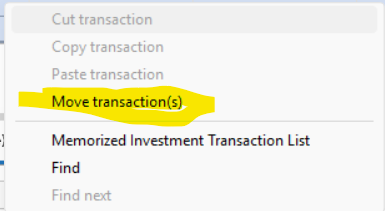
Choosing that option, you can then select multiple individual transactions (the Select box),

or various naturally grouped transactions, and specify to what account you want the selections moved.
 0
0

Categories
- All Categories
- 6 Product Ideas
- 34 Announcements
- 249 Alerts, Online Banking & Known Product Issues
- 19 Product Alerts
- 266 Welcome to the Community!
- 301 Before you Buy
- 1.5K Product Ideas
- 55.8K Quicken Classic for Windows
- 16.9K Quicken Classic for Mac
- 1K Quicken Mobile
- 834 Quicken on the Web
- 129 Quicken LifeHub