How do I make a Business Property and Debt account in Classic Premier?

I just purchased Quicken Classic Premier (Windows). I imported a MS Money file. Quicken successfully imported the data (for the most part) and with a few adjustments I have everything working well as far as account balances go.
In the Accounts bar, a few of my accounts appear in the Business category. That's OK because they are truly related to my business. However, I have a couple of accounts that are in Personal accounts that I would like to move to the Business section. I cannot find any way to do this. I have looked in the account settings and there is no option to make an account business or personal. I tried using the accounts tools that allow accounts to be moved to a different place in the list but the tool will not let me move any account from Personal to Business.
Is there a way to do what I want? What am I missing?
Answers
-
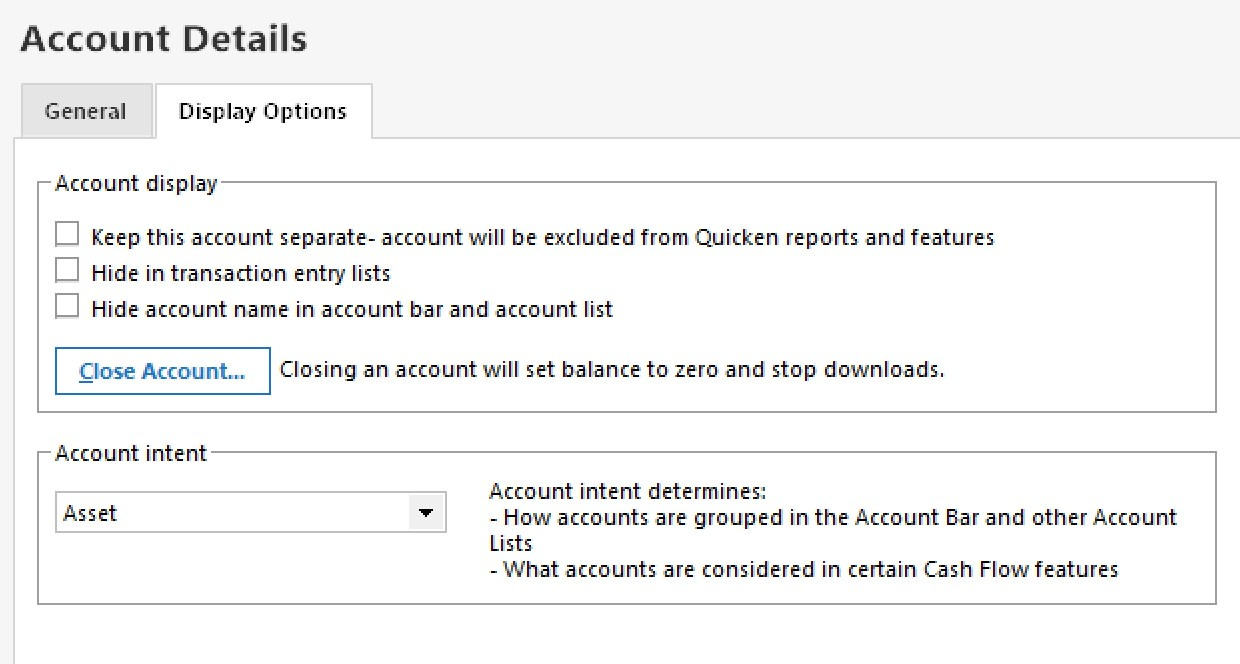
To move account between Personal & Business, do TOOLS, Account List, click EDIT adjacent to the account name, click "Display Options" and set "Account Intent" as you wish.
Q user since February, 1990. DOS Version 4
Now running Quicken Windows Subscription, Business & Personal
Retired "Certified Information Systems Auditor" & Bank Audit VP0 -
Thanks but I don't have that option. All I see in Account Intent is whether to classify it as Asset, Liability, etc.
In searching, I've seen screenshots with a second box that has Personal or Business option, but I don't have that option.
 0
0
