Have Quicken maintain cash in MMF as Fidelity does

Fidelity maintains cash in an MMF. How do I get Quicken to do the same?
Best Answers
-
I tried both options. The last set the cash account to a negative value much less than the amount in the MMF.
The second eliminated the MMF and put the MMF amount into cash. Isn't that the same as setting up cash in a checking account?
I thought the idea was to eliminate cash and keep the MMF? Quicken says it is treating the MMF as cash. So I guess that's the point?
0 -
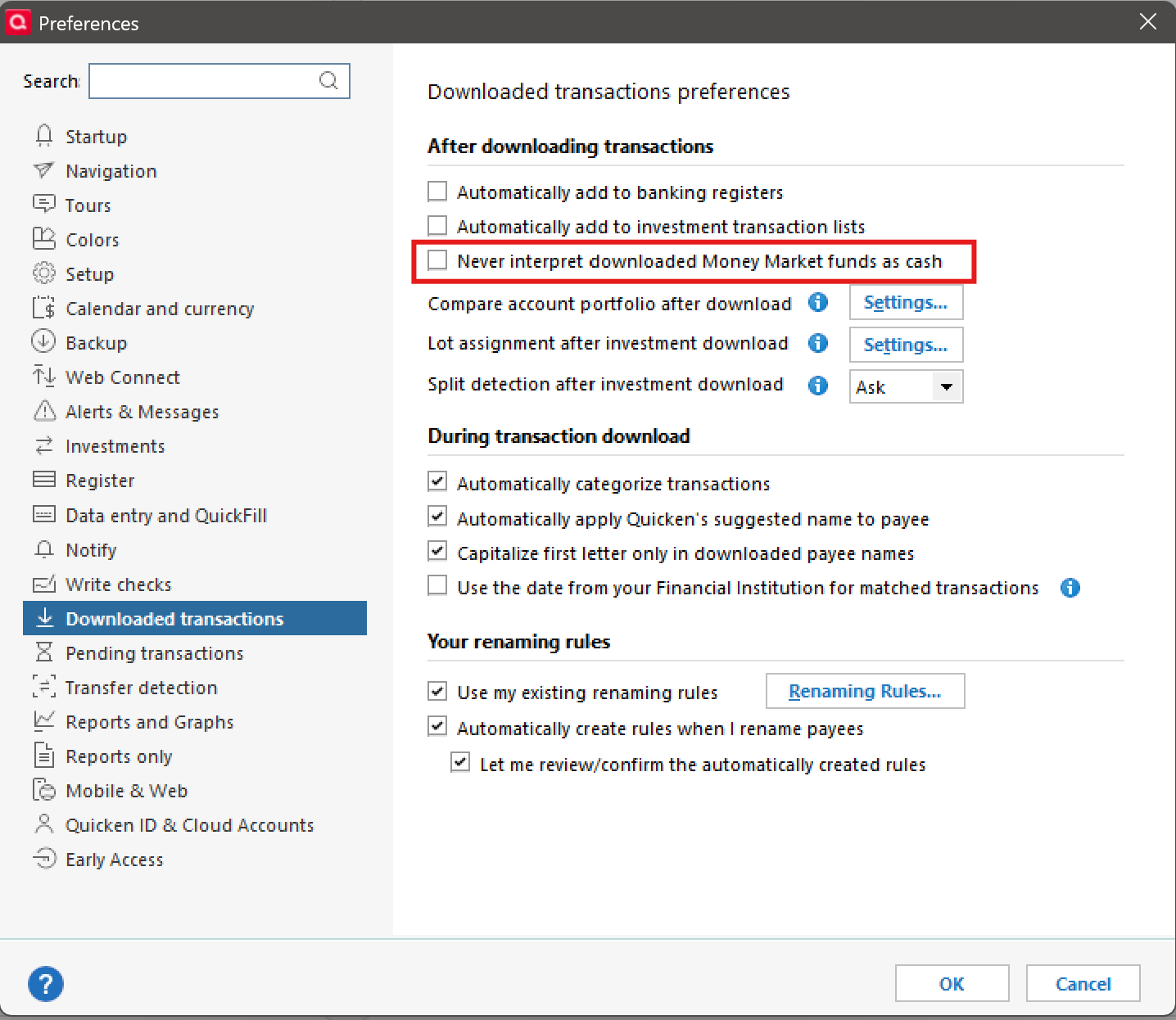
Since this option is new and undocumented, it's hard to say what the exact settings should be. With that said, I have this option unchecked…and I get the expected behaviour.
 0
0

Answers
-
In a non-retirement type account, you can use the "Show Cash in a Checking account", and Q will create a "pseudo-checking" account to carry the cash.
But, what exactly do you expect by "maintain cash"? And I'm a Fidelity client also.
Q user since February, 1990. DOS Version 4
Now running Quicken Windows Subscription, Business & Personal
Retired "Certified Information Systems Auditor" & Bank Audit VP0 -
Fidelity posts all cash transactions to an MMF. E.g., when there is a dividend, the proceeds are posted to the MMF. Stocks and mutual funds are bought from the cash in the MMF.
Right now, in Quicken, cash transactions are posted to "cash", creating a discrepancy in Quicken between what Quicken shows as the balance in the MMF and what Fidelity shows. I have to manually buy or sell shares in the MMF to correct this.
So, I want Quicken to post cash to the MMF, not "cash".
0 -
This is a Fidelity issue, not Quicken. I understand what you want and have maintained my Fidelity account like you want for decades. The key is that you need to handle the buy/sell transactions manually. When Fidelity posts money to cash, simply buy the settlement fund and cash will be $0.00. It's a bit of a chore, but easier than getting Fidelity to change their process.
0 -
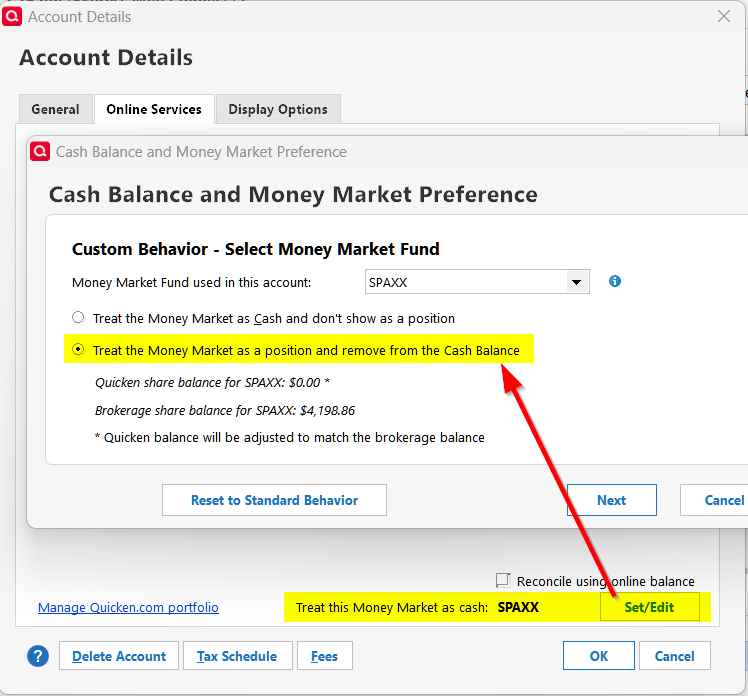
You can do this thanks to a recently implemented feature.
Quicken user since version 2 for DOS, as of 2025 using QWin Premier (US) on Win10 Pro & Win11 Pro on 2 PCs.
0 -
That would be great, but this option does not appear for R65.29 on my install.
0 -
I'm also running R65.29. Are you sure you're on the Online Services tab of the Account Details dialog?
Quicken user since version 2 for DOS, as of 2025 using QWin Premier (US) on Win10 Pro & Win11 Pro on 2 PCs.
0 -
@GeoffG You may need to set Cash Representation by first making a datafile backup, going to the account register, select Cash Balance, Cash Representation, and Change. Then when you restart Quicken and access the account, a pop-up will appear asking how you want to treat your core MMF.

After restarting and accessing the account:
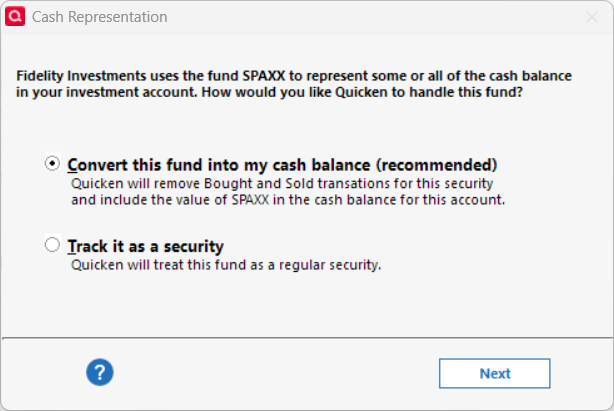
Quicken may make changes to transactions in your register, make sure you have a backup in case you don't like the changes. In my case, I had to manually fix some transactions, but after that, the core MMF has been properly treated a cash. Also, the screens that @Rocket J Squirrel showed appear for my datafile.
[Edited - Removed Partial Account Number]
Deluxe R66.23, Windows 11 Pro
1 -
@leishirsute Good to know. I'll need to decide if this is how I'll want to proceed, but clarifies why I didn't see the option.
0 -
While investigating this option I discovered that I do not have this option available. I've toggled "Never interpret downloaded Money Market funds as cash" without success.
 0
0 -
@GeoffG Curious here. After turning on "Never interpret downloaded Money Market funds as cash" did you try and OSU? I don't know the exact procedure but sometimes as OSU is required (possibly restart Quicken) to show the added Cash Representation features. All the steps are not very well documented.
Deluxe R66.23, Windows 11 Pro
0 -
Does the account have the Reset option described at:
If there exists other non-Fidelity accounts, do they have the Cash Representation feature?
Deluxe R66.23, Windows 11 Pro
0 -
So strange, none of my investment accounts, both brokerage and IRA show that option. All else functions as normal, so I do not believe it to be and install issue.
0 -
@GeoffG Have you tried creating a new test datafile and adding 1 investment account, just to see if it has the Cash Representation feature. That would imply the issue may be datafile related.
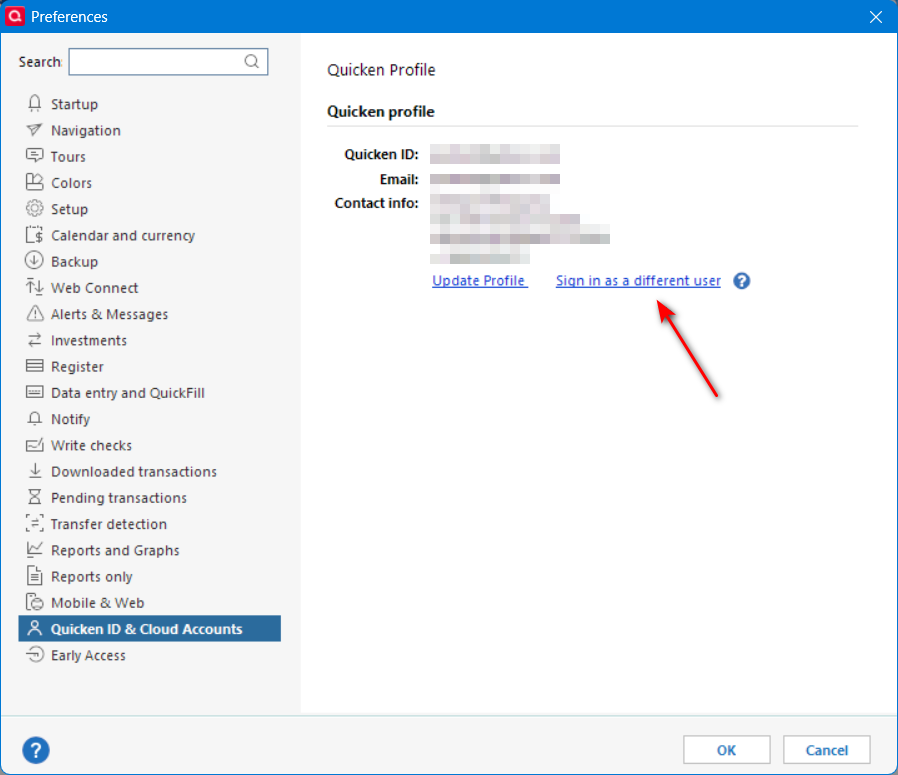
I couldn't get all the features of cash representation working until I started a new datafile from a template copy of my current datafile. I have no clue why that was different although it creates a new cloud id for the template datafile. That forced all accounts to have to be reconnected. Before trying a template copy, you may want to try just logging out of Quicken and re-logging back, then do an OSU and see if that changes anything. It is strange though. Do you have another laptop or PC to try Quicken elsewhere? I sometimes use Windows Sandbox to create a separate instance of Quicken on my PC to try out a new version before putting it into production. Just some suggestions.
Deluxe R66.23, Windows 11 Pro
0 -
I suspect this new feature upgrade may not be fulling backward compatible. I did log out/in with no change. Unless this feature decides to make an appearance, I'm content to handle this as I've been doing.
Thanks for your input.
0 -
So, I recently needed to add an account at Vanguard and the account added to Quicken as expected. What transpired next was a pleasant surprise. I now see the MMF/cash treatment option to all investment and retirement accounts.
0 -
Happy New Year!
Deluxe R66.23, Windows 11 Pro
0 -
Sorry for the late response, but I haven't been getting email notifications on this thread.
To Rocket J Squirrel: Regarding the Custom Behavior, after identifying the MMF and selecting "Treat the MMF as a position and remove from cash balance", the next box presents me with four choices, and I'm unsure which one to select. My MMF currently has the correct balance, and I assume the cash balance is zero since it is not displayed.
0 -
@Ellary Kahan What are the 4 choices?
Quicken user since version 2 for DOS, as of 2025 using QWin Premier (US) on Win10 Pro & Win11 Pro on 2 PCs.
0 -
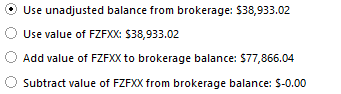
See above
0 -
I've never seen that, so I don't know what to tell you. My guess would be the second choice, but only a guess.
Quicken user since version 2 for DOS, as of 2025 using QWin Premier (US) on Win10 Pro & Win11 Pro on 2 PCs.
0 -
I cannot say with certainty which option is correct for you, but having just gone through this, the last option was correct. I would suggest making a backup then try what you believe should work. If the values are correct, you are good. If not, restore and try the next best option.
0 -
I tried both options. The last set the cash account to a negative value much less than the amount in the MMF.
The second eliminated the MMF and put the MMF amount into cash. Isn't that the same as setting up cash in a checking account?
I thought the idea was to eliminate cash and keep the MMF? Quicken says it is treating the MMF as cash. So I guess that's the point?
0 -
Since this option is new and undocumented, it's hard to say what the exact settings should be. With that said, I have this option unchecked…and I get the expected behaviour.
0 -
My setttings are the same.
I'll monitor after the next download.
Thanks for your help.
0

