Imbalance between Register and Holdings

I have created a new account in QW for an existing investment account with quite a bit of history to it. Strangely, I am having issues with a difference in the balances shown in the ACCOUNTS sidebar, the transaction register and the Holdings window.
The figures in the Accounts sidebar and the Transaction Register agree, but are incorrect (low). The data in the Holdings window is correct and in agreement with my institution's holdings.
Thoughts appreciated!
Answers
-
Hello @MattT,
Thank you for sharing your experience.
You said you have newly added this account to Quicken. I am curious if there are placeholders present that need to be resolved.
When you add a connected account, Quicken downloads recent transactions from your financial institution. This usually represents only part of your entire transaction history. In order to account for the missing transactions, Quicken enters a placeholder entry to your account that makes up for the missing shares of each security.
While placeholder entries serve the purpose of balancing your account, they do not provide any cost-basis information for the missing transactions they're replacing. It's important to resolve placeholder entries in a timely manner by entering missing transactions or estimating the average cost of the security. More info on how to handle these can be found here.
- Open the account that has placeholder entries in Quicken.
- Check the Placeholder Entries window below the register to see any placeholders. You can identify this by the number of placeholders in the window header.
- If you want to remove all placeholders, select Delete All. Otherwise, continue.
- Select Enter Cost to edit the missing transaction. This will open the Enter Missing Transactions screen.
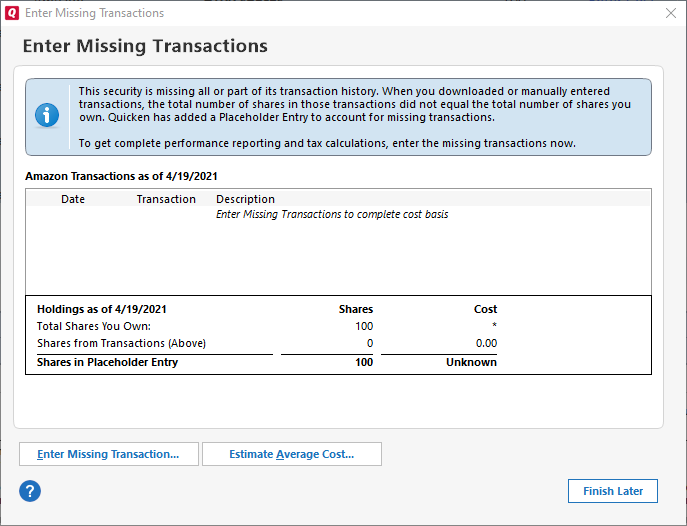
- In the Enter Missing Transactions dialog, select the appropriate option based on your situation:
- Enter Missing Transaction: This option lets you enter a missing transaction manually. Choose a transaction type in the investment transactions dialog and fill in the required information. Enter a date before the placeholder's As of date (displayed on the Enter Missing Transactions dialog). Click Enter/Done, and repeat this step until you've entered all missing transactions.
- Estimate Average Cost: This option lets you estimate historical data for the security if you're willing to do so. Enter the appropriate information, and click OK. Quicken will report approximate values for some performance and tax calculations.
- Repeat the above steps for all securities that have placeholder entries.
Let us know if this resolves the discrepancies you are seeing!
Quicken Alyssa
Make sure to sign up for the email digest to see a round up of your top posts.
0 -
Thank you Alyssa. No there were no placeholders at the time. There were several when I created the account and downloaded the initial transactions, etc. but I resolved all of those.
I checked again today, after a market cycle (yesterday), and everything now appears okay and in alignment. That was all very strange to see the Holdings window total differ from the Transactions register total and the Accounts sidebar.
Never seen that before, but this is a JPMC account [my first dealings with them] and those guys do some atypical things (IMO) with their Cash and Sweep Funds (i.e. when a sell transaction is entered, they put the proceeds into a Sweep Fund, not in cash; when it settles, they move the Sweep Funds to their core MM account, which I have set up to display as cash). However, that by itself did not explain away the delta I was seeing.
I guess I'm okay for now, but it wouldn't surprise me with this JPMC account to see it pop up again…lol
Thanks!!
1 -
Thank you for following up with this additional information.
I am happy to hear that everything ironed out. If you need more help, don't hesitate to reach back out!
Thanks again!
Quicken Alyssa
Make sure to sign up for the email digest to see a round up of your top posts.
0
