Memorized Payees

I recently downloaded Quicken Classic Deluxe.
I uploaded all financial transactions, and after entering the category, it does not memorize for some payees. I make sure the box is checked to automatically memorize payees, and also check the memorized payee list.
Virtual assistant only has the last option to create another copy and repair.
Is this the only option?
[Edited-Readability]
Answers
-
Hello @Qknlpw,
Thank you for sharing your experience. I am happy to help!
I can see why you would be confused by this, as what you are describing is not the expected behavior. I have some follow-up questions for you that will hopefully help us to narrow down what exactly is happening here and why.
- When did you first notice this issue begin?
- If this started very recently, restoring a backup from before the issue began could be our easiest solution.
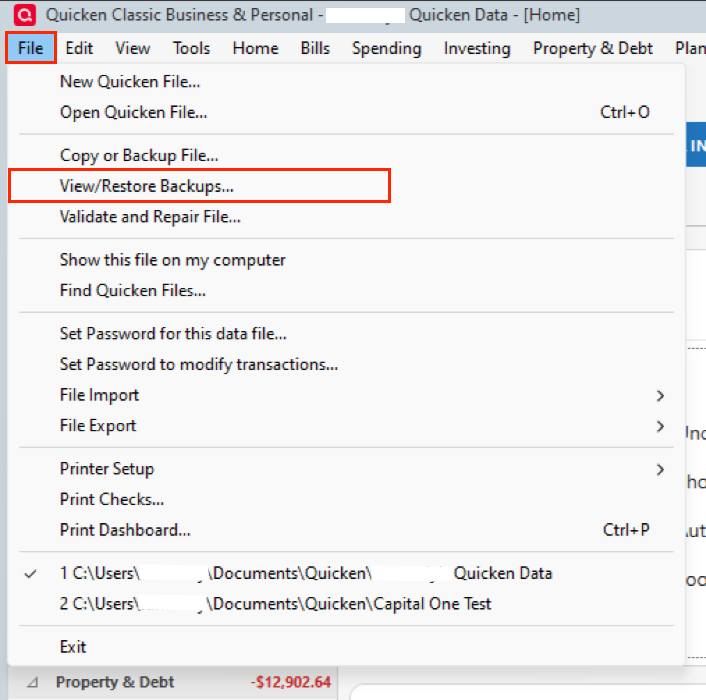
- If this started very recently, restoring a backup from before the issue began could be our easiest solution.
- Are some payees being memorized and others not?
- Is this only happening in one account in Quicken?
- Or is it happening in several accounts?
- Where is your data file located?
- If your data file is not stored locally, it can cause strange file behaviors like this to surface.
- The default location is C:>Users>username>Documents>Quicken, and this is where we recommend keeping it.
- If your data file is not stored locally, it can cause strange file behaviors like this to surface.
- Is your file being backed up/synced by any third-party services like Norton, OneDrive, or Carbonite?
- If so, it is best to exclude the data file that you are actively using from services like this to avoid possible damage occurring to your file.
Looking forward to your response!
Quicken Alyssa
Make sure to sign up for the email digest to see a round up of your top posts.
0 - When did you first notice this issue begin?
-
i just started to use quicken and so this has started since i first entered categories
seems to be happening across all accounts and all payees.
file stored locally C:>programdata>microsoft>windows>start menu>programs>quicken
not using any third pary backup system
0 -
file stored locally C:>programdata>microsoft>windows>start menu>programs>quicken
That can't be right. You appear to be looking at the storage location for the Quicken program icon.
Your Quicken data file typically is stored elsewhere. The easiest way to find the location of the currently open data file is by looking at the File menu in Quicken (see the image provided by @Quicken Alyssa above). The name of the currently open file is stored in the location prefixed with a checkmark and a "1"1 -
I see now.
Here is what it says:
1 C:\User\Lacey\Onedrive\closed Files\client list tracking\quicken\Lacey's quicken data
this seems strange? "close files"?, "client list tracking"?
0 -
Thank you for following up with that additional information.
I agree, the location does seem strange. I recommend moving your data file to the default location and then ensuring it is not being backed up or accessed in any way by other third-party services like OneDrive.
The default location is C:>Users>username>Documents>Quicken.
Once the file is moved, follow the validation steps from my last post and let us know how it goes!
Thank you!
Quicken Alyssa
Make sure to sign up for the email digest to see a round up of your top posts.
0 -
Thank you very much for the info.
I will probably get my IT guy to help me do this , and then get back to you.
1 -
Quicken Alyssa
Make sure to sign up for the email digest to see a round up of your top posts.
0 -
Just checking in, we haven't heard back from you in a while.
Do you still need assistance?
Thank you!
Quicken Alyssa
Make sure to sign up for the email digest to see a round up of your top posts.
0 -
Hello again,
Checking in once more before this thread is closed.
Let us know if you still need assistance.
Thank you!
Quicken Alyssa
Make sure to sign up for the email digest to see a round up of your top posts.
0 -
Due to the lack of response, I went ahead and closed this post.
If you still require assistance, please feel free to start a new post.
Thank you!
Quicken Alyssa
Make sure to sign up for the email digest to see a round up of your top posts.
0

