RE Categorizing multiple transaction?

I'm on Windows Classic Desktop. Somehow I managed to categorize multiple transactions at once (which was great!). I right-clicked on [something] and a window popped up to ask me if I wanted to (re?)categorize all the similar transactions (I did).
I can't seem to replicate this process. Please help.
I understand I can search for specific payees/transactions/etc. but this is NOT what happened. It was a very easy pop-up that appeared…
Answers
-
It sounds like you are using this feature:
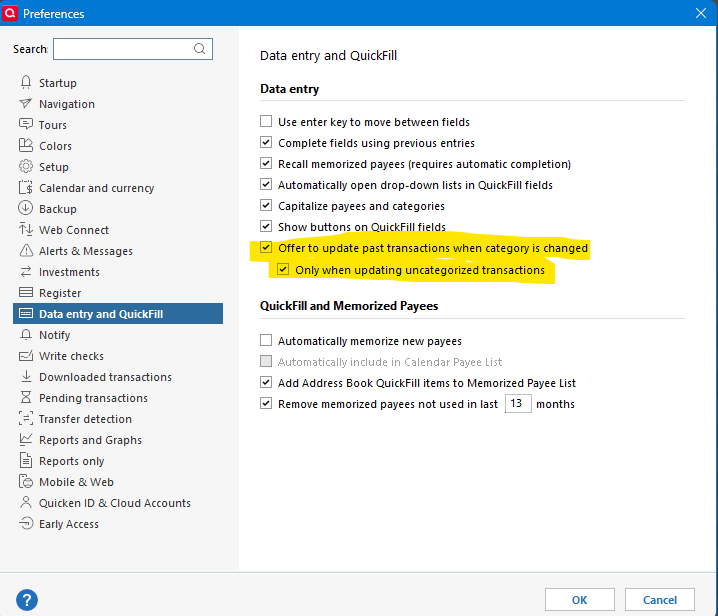
With both selected it will only prompt you if the transaction that you are changing hasn't yet been categorized.
For a more generic way of doing this you can use this procedure.
If this is all in the same register or if you use the All Transactions "register" you can use this procedure.
First to make it easier to select the transactions you need start with the filter at the top left of the register.
Search for what is unique about the transactions either the payee or the category for instance. You can also expand the filters and use selection for dates, type, and such.
Left click the first transaction. Next you have two choices. If you hold down the shift key and then right click the last transaction it will select all the transactions from the left click to the right click. If you hold down the ctrl key and click that toggles the selection on the transaction that you click on.
The right click instead of left click is a short cut. It is just like left clicking to select the transactions and then right clicking to bring up the context menu with the selections, one of which is "Assign category…".
0
