Date range for reports

When getting a report like Itemized Categories or Net Worth, instead of going to ALL Dates, go to Last year or current year, not all the way to the beginning of Quicken usage. The report would generate much faster. I would think most users are trying to get information for the current year or for last year for tax purposes. Never have I wanted a report that covers 20 years!
Comments
-
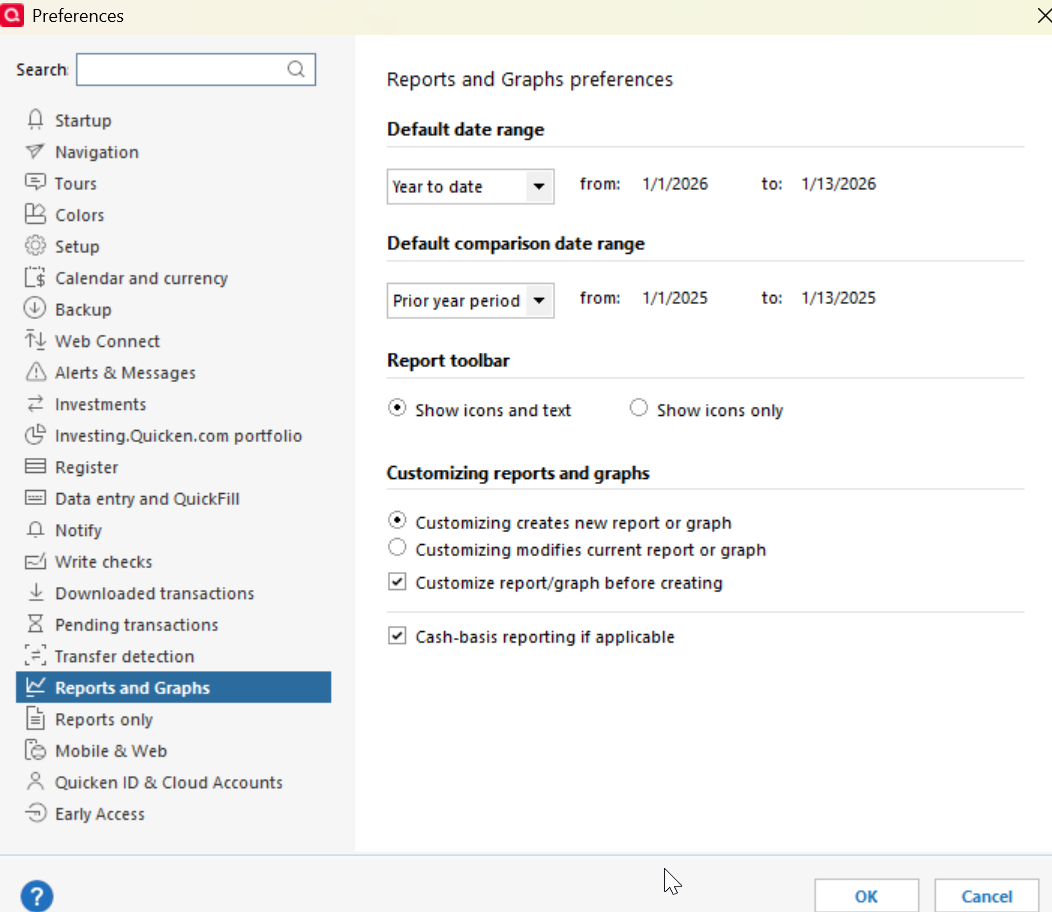
@pjs3015 In my experience, for a freshly generated report, the Date Range defaults to whatever you have set in your Edit > Preferences > Reports and Graphs Settings. I currently have mine set for Year to Date for a freshly generated report. If you modify from that, such as Custom to Date, or anything else, and then Save it, it should open up with however you saved it. I'd be interested in knowing if this addresses the need ??
 1
1 -
In addition, you can open a default report and customize it the way you want. Then do Save As to save it to My Saved Reports….it would be a good idea to save it with a unique name to make it easier to distinguish from the default report. The next time you open this customized report it will open with all the customization that was present when you last saved it. You can do this will all of the default reports.
And once you've saved the customized reports you can then go to View > Customize Tool Bar > Add or Remove Customized Reports > select the reports you want added to the tool bar > OK > Done. This will add icons for the selected reports to the tool bar so all you need to do to open them is just click on them. It's a feature I find very helpful and I use it a lot. Here is what the toolbar looks like with the customized reports added to it (highlighted in yellow).:

Quicken Classic Premier (US) Subscription: R66.23 on Windows 11 Home
0

