Incorrect Net Worth due to "Ghost" accounts after update to Quicken Mac 8.4.2

After updating to Quicken Mac 8.4.2 and resolving the sync issues reported elsewhere, I see an incorrect net worth. When I create a net worth report for all dates and “All accounts (except Separate accounts)” I am seeing a current net worth that is higher than it was before the update, and different from the total account value listed in the sidebar. Expanding the report, I see that it now includes four previously closed and previously zero balance accounts - each for 529 education savings plans. After reopening those account registers they each have zero cash balance in the transaction view; no holdings and a zero balance in the portfolio view for today’s date; and, no holdings in the Dashboard view for today’s date. I can force the net worth to be correct by adding adjustment transactions to the registers but then the register shows a non-zero balance. I can close the accounts and then Quicken adds an adjustment transaction to zero the balance - making the net worth to again be reported incorrectly. Suggestions how to fix this?
Release 8.4.2 seems to be having multiple issues. If I can’t get a quick fix then I’ll try resorting back to the previous version according to the suggestion in “Major issues with Quicken Classic for Mac 8.4.2”.
Comments
-
I contacted support. First call was dropped but only after the agent agreed that the best course of action was to revert to my previous version 8.3.3 of Quicken Mac and to use a good pre-backup data file. He was going to send me a link to the older Quicken version then the call was dropped. Called back and got a different agent. She had me doing restores, going back to 8.4.1 and a number of other things but the issues continue to exist. I eventually went back to 8.3.3 and my pre-update backup and things are now good. Online account updates worked and all register balances and net worth reports are as I expect. I'm dreading updating to the 8.4.2 version - I'll wait a week and see if there are any updates before trying again.
0 -
Expanding the report, I see that it now includes four previously closed and previously zero balance accounts - each for 529 education savings plans. After reopening those account registers they each have zero cash balance in the transaction view; no holdings and a zero balance in the portfolio view for today’s date; and, no holdings in the Dashboard view for today’s date.
I don't know that I have any suggestions, but I want to make sure I understand. These closed 529 accounts show no holdings in the Portfolio as of today and a zero balance, but a Net Worth report as of today is showing a non-zero value for each of these accounts? If you click on the amount in the Net Worth report line, Quicken opens a report showing all the transactions from the starting to the current ending balance; does that give you any insight into the amount it's showing?
Quicken Mac Subscription • Quicken user since 19930 -
Your understanding is correct. FYI, I was using the Net Worth Over Time report where it is not possible to click through to a more detailed view. I'm back to Quicken 8.3.3 which is behaving as I expected - like before the upgrade. When trying the straightforward Net Worth report I can see that the value for each of the education accounts is zero, as expected. Interestingly, when I click through to a more detailed report I get a non-zero "Ending Balance (1/20/26)" for accounts that showed zero in the higher level report. That, I don't understand. I would have expected it to be zero. I checked a number of other accounts. All closed cash accounts (checking, savings, credit card) show zero as expected. Most, if not all, closed investment accounts show non-zero for today's date. This is unexpected. Maybe I don't understand how net worth is calculated in Quicken or maybe this is a bug?
0 -
Aha! Thanks for adding the detail that you were seeing this with the Net Worth Over Time report. It’s one of the “old” reports which are known to have data reporting errors. (The other is “Category Summary”.)
If you don’t know the history, here’s an abbreviated version of a long, twisted road that leads to todays’s Quicken Mac. Quicken Essentials for Mac was developed after development was stopped on the legacy Quicken Mac in 2007, because the legacy program depended on elements Apple was removing from the modern macOS. Quicken Essentials, released early in 2010, was woefully incomplete (no investments, limited budget, no loans, etc.) and underpowered, but it provided a new database architecture and new user interface. After a few years of stumbles and indecision about moving forward, Intuit tasked a tiny team to add features to the Quicken Essentials code base in order to create a next-generation, modern Quicken Mac, which came out in late 2014. It was still lacking a lot of functionality, but over time, the Quicken Mac developers added many missing features and re-wrote some of the Essentials code base. Reports is one such area that was re-written from scratch. But because users had saved reports using the old (Essentials) reports engine, they never got around to removing them. And as the program was modified over the years, some problems surfaced in the old reports which were not present in the new reports engine. They’re never going to fix the old reports, because the new reports were built to replace them. I keep hoping the developers will remove the old reports so users won’t stumble into problems, as you apparently have.
Instead of the Net Worth Over Time report, use the newer Net Worth by Year report. (I’m away from my Mac, so I’m giving that name from memory.) Set the date range for the years you want, and I think you’ll find you have a problem-free report!
Quicken Mac Subscription • Quicken user since 19930 -
Thanks. The "Net Worth by Year" gives me expected results - zero value for today's date. Clicking the "0" takes me to a more detailed report. For whatever reason, the ending amount is non-zero. I'd have to export the report and compare it to the register to figure out why. A project for another day. The top-level reports work for my purposes but it is disconcerting to know that there are "issues" in the reporting. Thanks for taking a look.
0 -
The drill-down report would show a non-zero total unless the date range covered the entire range of time since that account was created; the total is showing the net change for that account within the time range you specified. (Change the time range in the report to All Dates and you’ll find it will total zero.)
To reassure you, I believe there are not known problems with the “modern” reports; only the few “old” Quicken Essentials-era reports which they should have, but for some reason haven’t, removed from the program. 😀
Quicken Mac Subscription • Quicken user since 19930 -
I took a look at the Net Worth By Year report & noticed a couple differences between that and the sidebar that made it impossible for me to get the two to match up for certain accounts.
One is that future transactions (occurring after today's date) are included in the Net Worth report but will not be included in the sidebar unless you have it set to show Projected Balances.
The other is that transaction reminders are not included in the Net Worth report but may be included in the sidebar depending on which balance it's set to show. If it's set to Online Balance then that won't include any reminders, if it's set to Today's Balance it will include reminders on or before today's date but not future reminders, and if it's set to Projected Balance it will include all reminders that the register is set to display.
No matter what settings I chose for the sidebar & report I could not get the two to match for every account because one of the above issues would always be causing a difference somewhere.
I took a quick look at the old Net Worth Over Time report & the same issues seem to be at work there but I didn't look at it in detail.
Hopefully this will give you some ideas for what to look for in your accounts.
0 -
These differences between the left sidebar and a Net worth report are exactly why the developers a few years ago changed the sum at the bottom of the left sidebar from being called "Net Worth" to "Total". Because users can changes various settings of what is included in the sidebar, the sum at the bottom can only be a total of what is displayed, which is not necessarily your net worth today.
future transactions (occurring after today's date) are included in the Net Worth report
I'm not following this, @Jon. A future-dated transaction does not show up in a Net worth report dated today. It shouldn't, and I can't get it to. If I do a Net Worth report as of today, and then I enter a transaction dated tomorrow, nothing changes in the Net Worth report.
(I've never created a Net Worth report for a future date. I guess if you're someone who tries to project your future by entering nearly all your income and expenses as scheduled future transactions, you might, but I don't. I don't think the Net Worth report is supposed to be a future forecasting tool; it's a tool to tell you what you have as of today, or a date(s) in the past.)
Quicken Mac Subscription • Quicken user since 19930 -
I'm not following this, @Jon. A future-dated transaction does
notshow up in a Net worth report dated today. It shouldn't, and I can't get it to.@jacobs Sorry, I left something out of that comment that I meant to put in - I was looking at the default Net Worth By Year report, which doesn't end on today's date but ends on the date of the last transaction in any of your accounts. You're correct that if you edit the report to end on today's date it won't show future transactions but you have to edit the report to get that, it doesn't come up that way by default. (Edit: Unless, of course, you don't have any future dated transactions.)
0 -
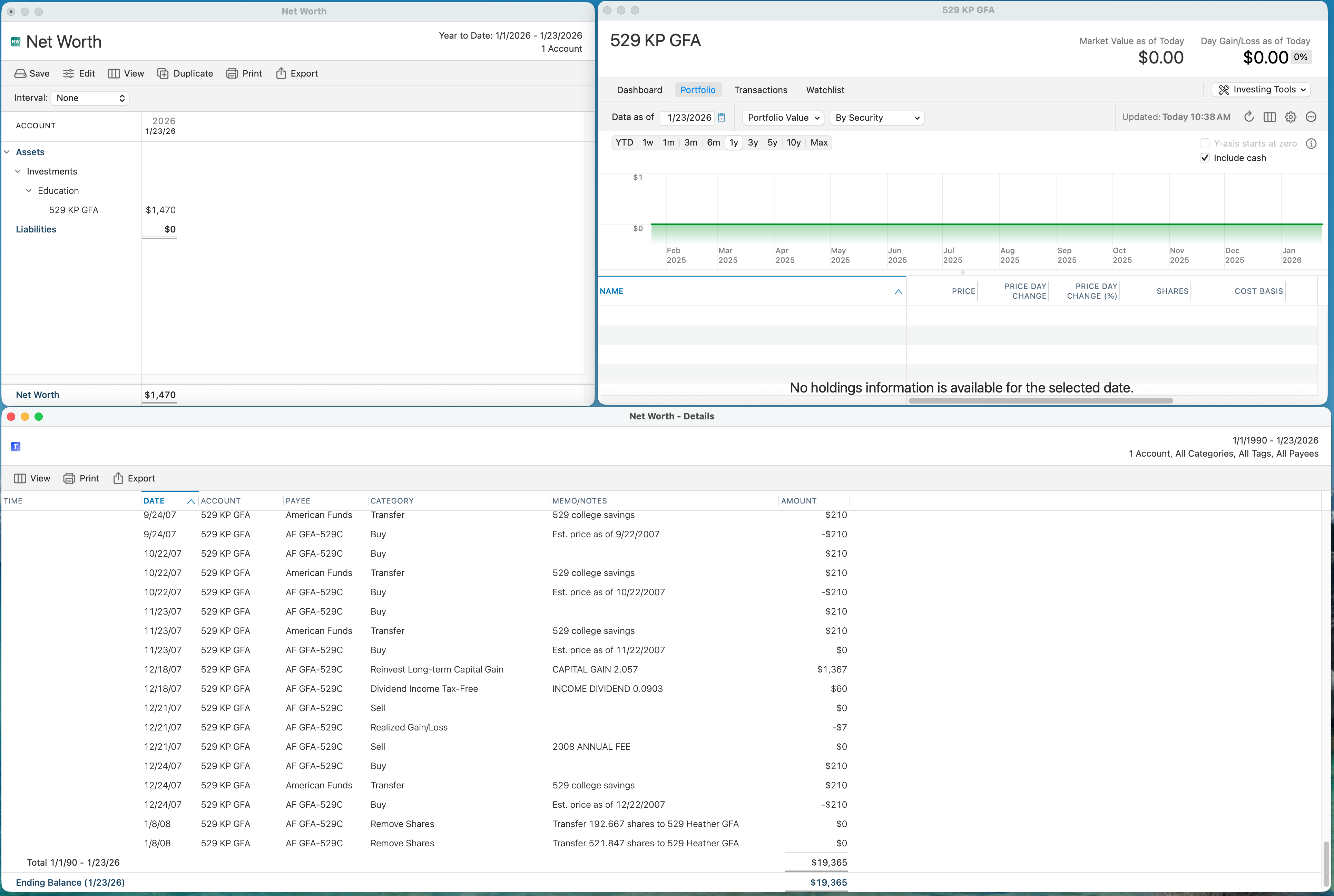
I was brave enough to redo my update to 8.4.2 after making sure I'd updated accounts and created a coupe of good backups. As I mentioned earlier, with 8.3.3 my net worth was being correctly reported. After my second update to 8.4.2 I got no sync errors and all seems to be good excepts that the four "ghost" 529 accounts reappeared in the net worth reports. I did a screen shot for the data associated with one of the accounts. Keep in mind that it is a closed account and has a register balance of zero and no current investments. I need some help in understanding how each of the windows can be true…
 0
0 -
I see you have a bunch of $210 transactions in that account. It’s interesting that the net worth on the report is exactly 7 times that amount, that’s one heck of a coincidence.
0 -
It’s also weird to me that some of your Buy transactions have a positive amount while others have negative amounts. What’s up with that?
Edit: I took a look at the Net Worth report & I'm seeing the same thing with buy transactions being listed twice with opposite signs, but I'm not having a problem with the net worth being incorrect because of that. So maybe I just don't understand what the Net Worth - Details window is trying to tell me.
0 -
Thanks for taking a look. I'm trying, unsuccessfully, to make sense of the detailed/drill-down net worth report. I'm working on the assumption that it doesn't seem to account for the value of any shares owned - only the cash transactions in the account. This leads me to believe that any shares added or shares removed transactions may not be properly accounted for. We had three daughters for which we had plans. When one daughter finished university, it looks like I removed shares from one account and added them in the remaining accounts. In this way, "worth" was moved from account to account without it showing a related movement of value. This was all done a long time ago so I'm surprised it is only now becoming an issue. Anyway, I don't really care about the drill-down detail but I would like to get the top-level net worth to properly show as zero for these four ghost accounts. Will keep at it.
0 -
@2wheelscuba When you moved the shares from one account to another, did you use Remove Shares and Add Shares transactions? It appears from the last two transactions in your screenshot that you did. When you do an Add Shares transaction of 100 shares of XYZ in any account, then the value of those 100 shares will be included in your Net Worth from that date forward, created out of thin air.
What happens when you open the account you have pictured and view the transaction register. This will show a running balance of the cash value in the account. Does it shows the running balance went to zero as of the end of 2007? I suspect it does.
One thing of interest is that you have non-linked Transfer transactions shown; that is, instead of showing "Transfer:[American Funds]", you just have "Transfer". the former would ave generated a corresponding transaction in the American Funds account, while the latter simply makes money appear in or disappear from an account. OPerhaps you had the offsetting transactions entered as non-linked transactions in the American Funds account, so this may not be relevant to anything.
The Buy transactions which are positive and negative which @Jon noted seem to be normal for a drill-down report from a Net Worth report; I just generated a Net Worth report and drilled down on an account to find every Buy and every Sell has offsetting positive and negative transactions. I suppose that's because a Buy uses up cash but adds a holding of the equivalent amount, and a Sell creates cash but removes a holding of equivalent value — so your Net Worth in unchanged by a Buy or a Sell.
But here's the thing: if you used Add or Remove shares in an account, you made value appear or disappear out of the blue. So if you look at the Remove Shares transactions at the bottom of your screenshot, they show $0 in this report. But they removed value from the account, and decreased your Net Worth. What this means is that the total of the transactions in the drill-down does not total to or represent the current net worth of that account. When I drill down on accounts I have which had transfers from other accounts done via Add Shares, the total of the drill-down report doesn't match the current value of the account. It can't, because the drill down report is only showing the cash value of transactions, but isn't accounting for the value manufactured or vanished by Add or Remove Shares transactions. Conversely, when I double-click on an account which has not used Add or Remove Shares, the total of the drill-down report does match the value of the account in the Net Worth Report.
So my conclusion is that everything is correct! Now that you're using the Net Worth or Net Worth by Year report, you're seeing a value of zero for the accounts which should be zero. They are also zero or not present in your portfolio ad your Dashboard The only place you're seeing a non-zero value is in the Net Worth drill-down report, and that's expected because you used Add or Remove shares.
Quicken Mac Subscription • Quicken user since 19930 -
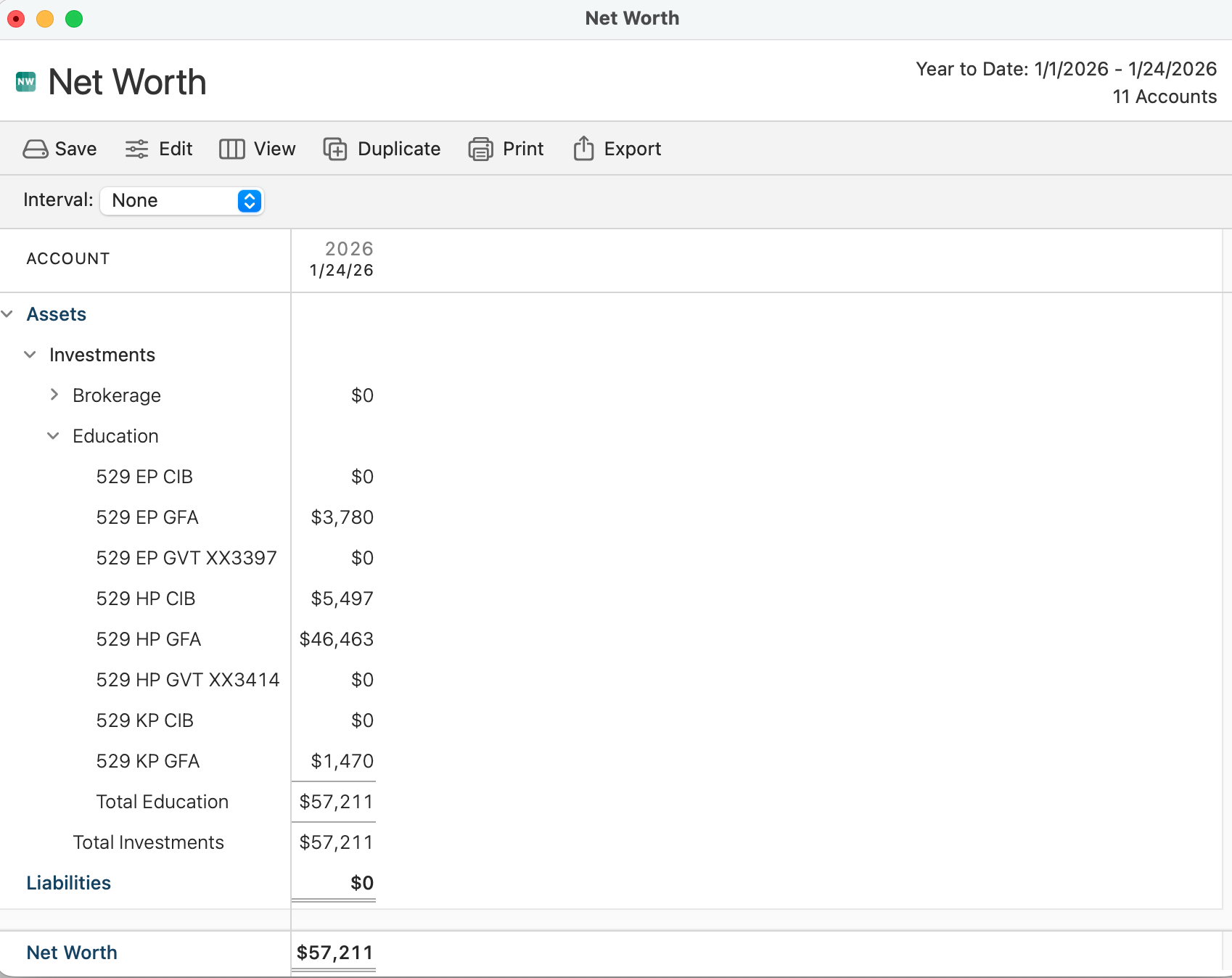
@jacobs, you've given me a lot to think about. Still, using the top level basic Net Worth report, I see balances in four closed accounts. I'll go back into the registers with your clues in hand. I'm starting to remember that I might have had to play tricks when closing these accounts out. They were originally created in Quicken for Windows so there might be related issues there.
 0
0 -
@2wheelscuba Sorry, I'm confused. Earlier in this thread, after I mentioned no using the old Net Worth over Time report, you tried the Net Worth by Year report and reported "The 'Net Worth by Year' gives me expected results - zero value for today's date." So what was different between then and what you're showing now with the non-zero values? Is there a difference between Net Worth by Year and Net Worth reports?
I'm starting to remember that I might have had to play tricks when closing these accounts out.
Yes, I suspect you'll find you made some adjustment which created the ghost value in those accounts. But I'm confused that your earlier screenshot above shows the $1,470 account value while the Portfolio for that account shows no holdings, no cash, and zero value.
I have noticed in looking at my own files that the value of investment accounts in the sidebar and in a Net Worth report can be off by a penny or a few cents, so the values are apparently calculated differently in the two places. I hadn't noticed that before, so I don't know if it's something which has changed in the code or I simply never looked at it closely in the past.
Quicken Mac Subscription • Quicken user since 19930 -
I found something unusual in the affected accounts. Those showing a non-zero net worth have odd transaction details, for example…

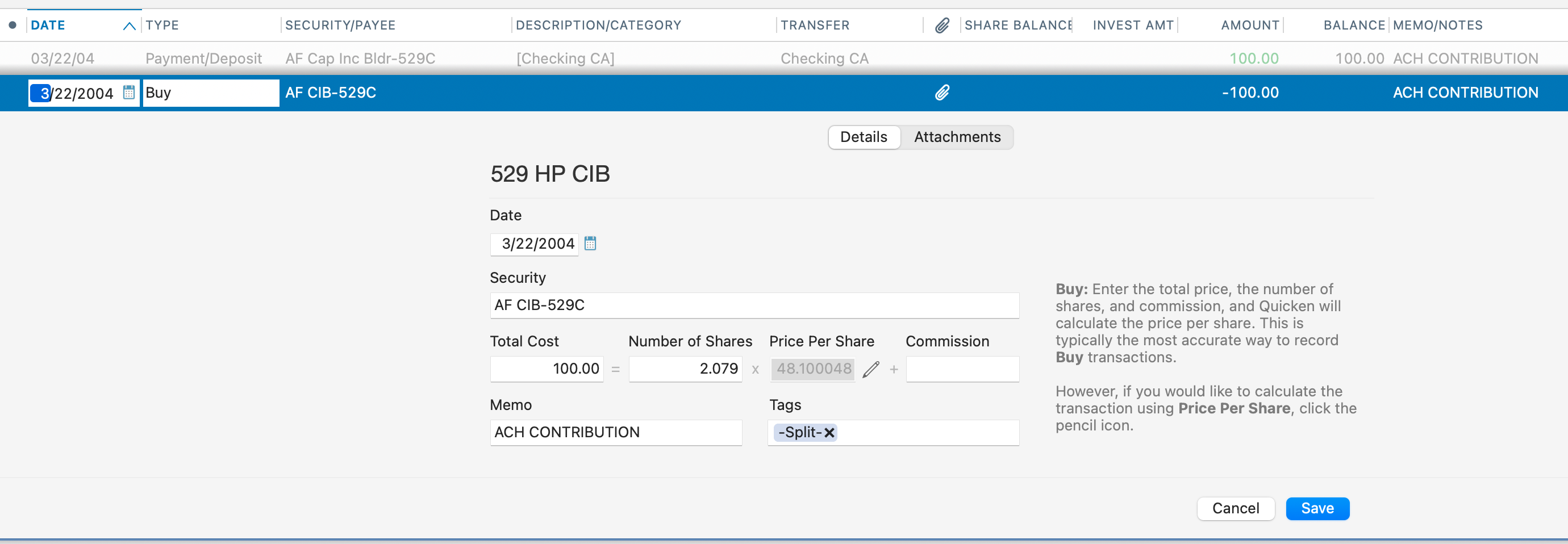
What's with the "-Split-" tag above?
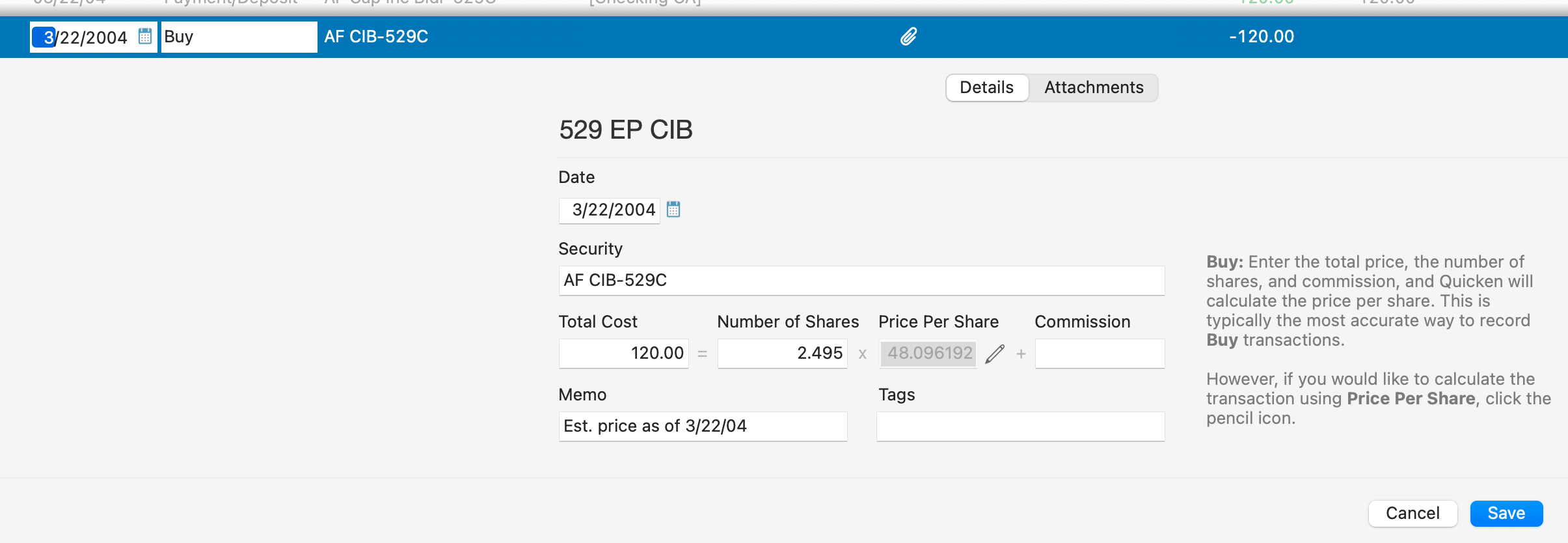
Whereas those with a properly recorded zero net worth look more like expected, for example…

 0
0 -
I don't think anyone can answer why there is that odd tag. My guess is that it's something which got messed up in your migration from Quicken Windows to Quicken Mac. Or perhaps in Quicken Windows, the deposit into the account and the share purchase was recorded as a BuyX transaction; since Quicken Mac doesn't support BuyX and SellX, the conversion to Quicken Mac should have created two separate transactions for the deposit and the Buy, and maybe the converter added the "-Split-" tag as a way to document this (without messing up whatever was in the Memo field). Sorry, I never used Quicken Windows, so my knowledge for conversions is limited to what I have read from other users. You can do an All Transactions search for the Tag field only to search for " -Split-" to see if it gives you any clue about what happened 20 years ago. 😉
Now that you're looking at the transaction register for the account, what is its Balance? Is it zero, or $1,470?
Quicken Mac Subscription • Quicken user since 19930 -
Hmm! I wasn't clear. The comment about expected results related to me restoring back to Quicken 8.3.3 where the report type you suggested worked. However, after retrying the upgrade to 8.4.2 I am still seeing non-zero net worth for four of the closed accounts - even when using the report you recommended.
About the account with $1,470 net worth but zero in portfolio, that was on Quicken 8,4,2 (both after the initial upgrade to 8.4.2 and the redone upgrade to 8.4.2). This is the main issue I'm trying to resolve.
I think I'm closing in on the issue. See my post about the odd transaction details.
0 -
Register value is zero. I tried redoing one of the odd transactions. Just editing it didn't change the net worth but deleting and manually re-entering seems to make a difference. Will redo some more transactions and see if it converges to zero net worth.
0 -
Hilarious! I can duplicate one of the oddball transactions (it gets a few extra lines with amounts listed) and delete the original and it changes the net worth. Seems like I'm onto something.
0 -
I was going to suggest exactly that: create a new transaction — I was going to say to do it manually, not duplicate the existing one — and delete the original. I think I recall the former Quicken Mac product manager once describing some hidden part of transactions they needed to create in Windows > Mac conversions.
Out of curiosity, what extra lines show up in the register when you duplicate the transaction?
Quicken Mac Subscription • Quicken user since 19930 -
I got one of the accounts fixed!!! And, the issue is with these oddball transactions; some but not all.
In this next account I'm going to attack, I predict there will be $3,780 (reported net worth)/$180 (monthly contribution) = 21 corrupt entries. A corrupt entry, one that contributes to a non-zero net worth, looks like this..

Whereas an entry that impacts net worth correctly looks like this…

Notice the "account for cash" line. I've no idea how the different entries were created, but I now have something concrete to work on.
To fix, I manually create a new entry with the correct investment amount and the number of shares acquired. Then I delete the corrupted entry.
To answer your question about the duplicated transaction, here is what it looks like for the 5/24/04 transaction…

And for the 6/22/07 transaction…
 0
0 -
Wow, those are crazy-looking transactions! I'm sure that must have been something created in the conversion from Quicken Windows. If you replace them all with regular Buy transactions and delete the screwy ones, I think you'll be good. Let us know!
Quicken Mac Subscription • Quicken user since 19930 -
Thanks all for you help and suggestions. I eventually got these four accounts fixed. Net worths properly show as zero. I manually entered new transactions and deleted the corresponding oddball transaction. There were a few extra issues of much the same nature related to account fees/commisions that had some weird line items that were also fixed by manual entry. Beats me why this wasn't an issue for Quicken 8.3.3. I'm guessing Quicken fixed a bug that then allowed data that had previously been ignored to now be included in the calculations. Done with this issue - everything seems to be back as expected.
0 -
Glad you were able to work through it and get it all resolved!
Quicken Mac Subscription • Quicken user since 19930
