Inaccurate investment account

After using Quicken Classic for Windows 11 for some 25 years, my investment account has placeholders that Quicken will not let be resolved. Consequently, Quicken disagrees with my brokerage statement although I have downloaded directly from the brokerage for all those years. I have tried to remedy this before, but have never found anything that works. How do I fix this step by step?
Comments
-
Here is some background on Placeholders and how to resolve them:
To make Placeholders visible, go to Edit > Preferences > Investments and make sure the “Show hidden transactions” box is checked.
Placeholders will have a gray background in the account’s transaction list (register) even if they are not selected, and will have “Entry” in the Action column.
Placeholders compensate for missing, duplicate, or incorrect investing transactions by forcing Quicken’s share balance for a security to match a specified value on the date of the Placeholder. This is usually the share count downloaded from your financial institution (FI).
Because transactions are missing or incorrect, Quicken will not be able to compute the cost basis or performance for the affected securities. You will see asterisks in the Portfolio views for this data.
Often Placeholders are due to rounding errors in the downloaded data, so for example you will see a Placeholder that adjusts the share balance by .0013 share following a dividend reinvestment. In this case you can adjust the number of shares in the Reinvest transaction so that the Placeholder is zero, then delete the Placeholder.
Placeholders also prevent new transactions like Div, Bought and Sold prior to the security’s Placeholder date from affecting the account’s cash balance. This shows up as N/A in the Cash Amt column of the transaction list. Quicken does this by creating a linked Cash Balance Adjustment just before the affected transaction. Deleting one of the transactions will delete them both.
To allow the cash balance to change when entering missing transactions that affect the cash balance, you must first delete all the Placeholders in the account for this security that have later dates than the transaction you are entering. Because of this, if you are entering a series of missing transactions it will be easiest to work in reverse chronological order.
Always back up your data file before changing historical transactions.
For more information on resolving placeholders, please see this FAQ:
QWin Premier subscription1 -
I updated my investment balances and they DOUBLED!! Nice if it were true, but it isn't. The system will not allow me to enter the correct values. WTH Intuit/Quicken???
-1 -
I repeat. Resolving placeholders function Does Not Work. I have repeatedly tried every option out there. The placeholder function has been a mess for years, and no amount of reading articles about what they are or what they do or how one can supposedly fix them solves the problem. I need a clean, effective and safe workaround to get past this.
0 -
Please tell us what you have done to try to resolve the Placeholders.
I agree that going to a Placeholder and clicking on Enter cost may be working as designed, but it does not resolve the cash balance issues.
Until the Placeholder has been deleted, it will prevent earlier transactions from affecting the cash balance, even if the Placeholder amount is zero. I believe the instructions I posted above are the only way to fully resolve Placeholders. I have modified them slightly to clarify the needed steps.
Placeholders prevent new transactions like Div, Bought and Sold prior to the security’s Placeholder date from affecting the account’s cash balance. This shows up as N/A in the Cash Amt column of the transaction list. Quicken does this by creating a linked Cash Balance Adjustment just before the affected transaction. Deleting one of the transactions will delete them both.
To allow the cash balance to change when entering or correcting transactions that affect the cash balance, you must first delete all the Placeholders in the account for that security that have later dates than the transaction you are entering and delete any Cash Balance adjustments that associated with these transactions. Because of this, if you are entering a series of missing transactions it will be easiest to work in reverse chronological order.
Always back up your data file before changing historical transactions.
Please try this process exactly as described and let us know the result.
QWin Premier subscription0 -
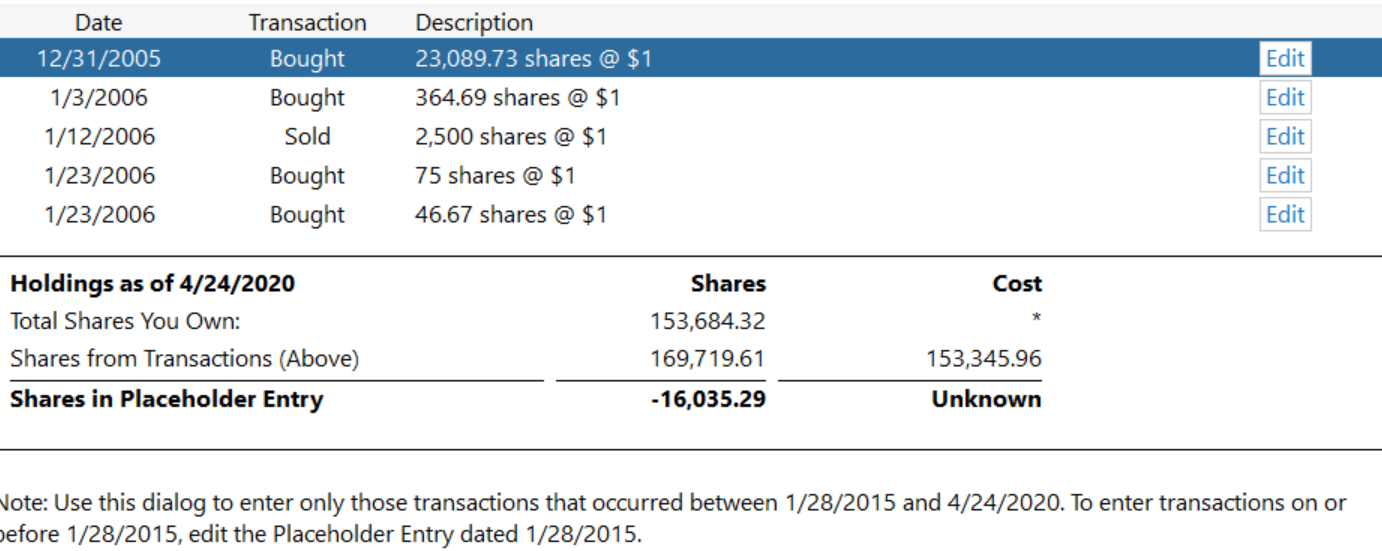
At this point I'll try anything. But I have no idea how to proceed with the process you suggest. There are no N/As in the cash amount of any transaction. When I click on a placeholder and go to the add history screen I get this:
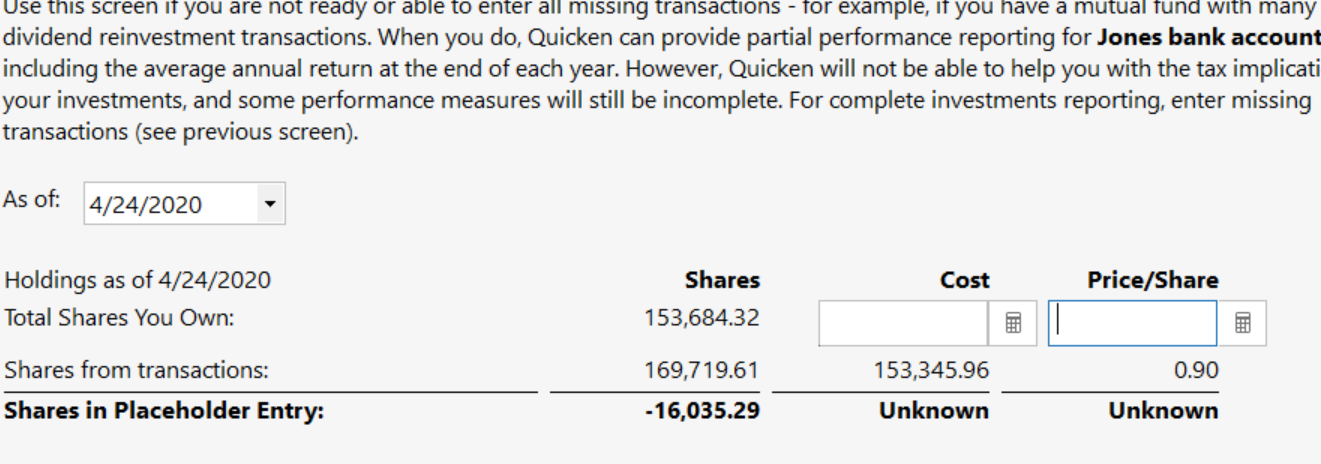
If I go to estimate cost, I get this:
If I go to enter missing transaction I get this:
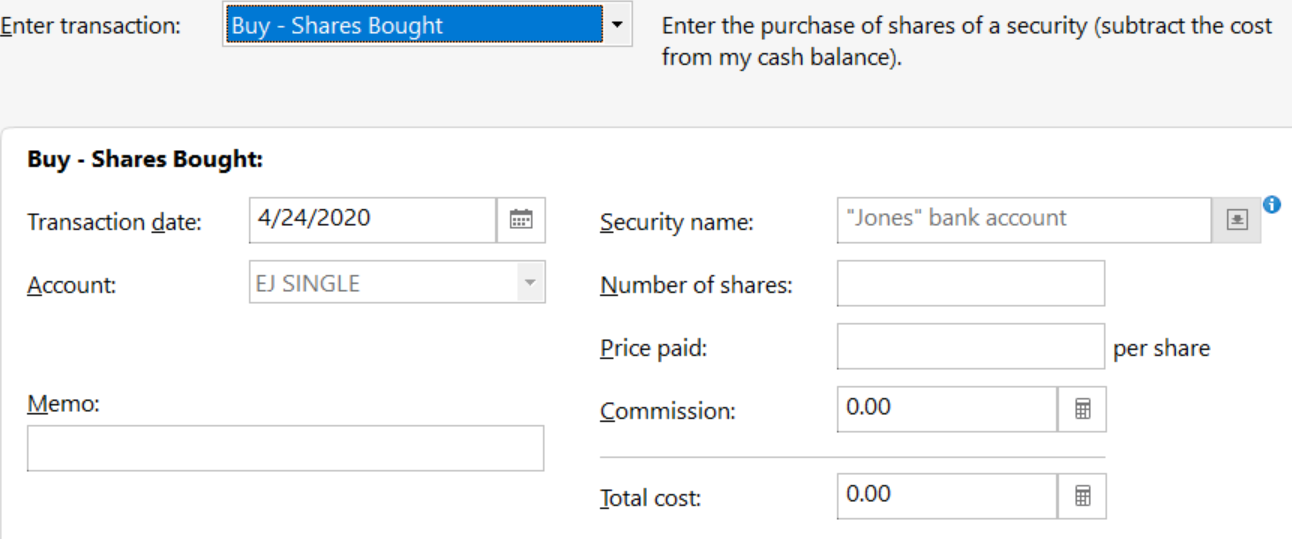
There are 4 more placeholders like this, all in the same security that I still own, in 2015, 2014, and 2011. (Jones bank account is a made up name).
I have 2 more placeholders. One from 2010 for a security that split and that I no longer own, and one from 2020 that I still own.
I don't have statements any longer from any of those years.
Over the years I have tried every suggestion I have come across, with no success. Recently I have tried deleting placeholders, which did not resolve the balance issues in the account as a whole, and I think made them worse. I have tried archiving, which did nothing useful.
If you can sort this out for me I will be forever grateful. I appreciate the time, knowledge and effort you have put into this.
0 -
What I am saying is don't try to use the Placeholder Add History or Estimate cost process.
I can't tell you exactly what to do because I don't know exactly what the disagreement between Quicken and your brokerage statement is or what you have already done to try to correct these errors.
Does the account have a cash balance, and if so is it wrong? Are the share quantities of one or more securities wrong? Are the securities in the Holding view different from those you actually hold?
You can see a summary of your current holdings in Quicken are by clicking on Holdings. If several securities are wrong, let's just focus on one of them and see if we can fix that.
QWin Premier subscription0 -
Yes, the cash balance is wrong and has been for quite some time. The share quantities of the "Jones Bank Account" are currently wrong, but I need to see what the end of month updating does, as occasionally that remedies that. I have just gotten some information from my brokerage about the transactions in the security that I no longer hold, and I think the shares of the other remaining security I still hold are correct. Let me see what I can do with the information I just received from the brokerage and then I'll get back to you.
0 -
Ok. I have no new information for the "Jones bank account" placeholders, one of which I shared screen prints, above, and have no idea how ro fix them. The statements for the stock that split and I no longer own show the following placeholder screenshot is in agreement with the statement,
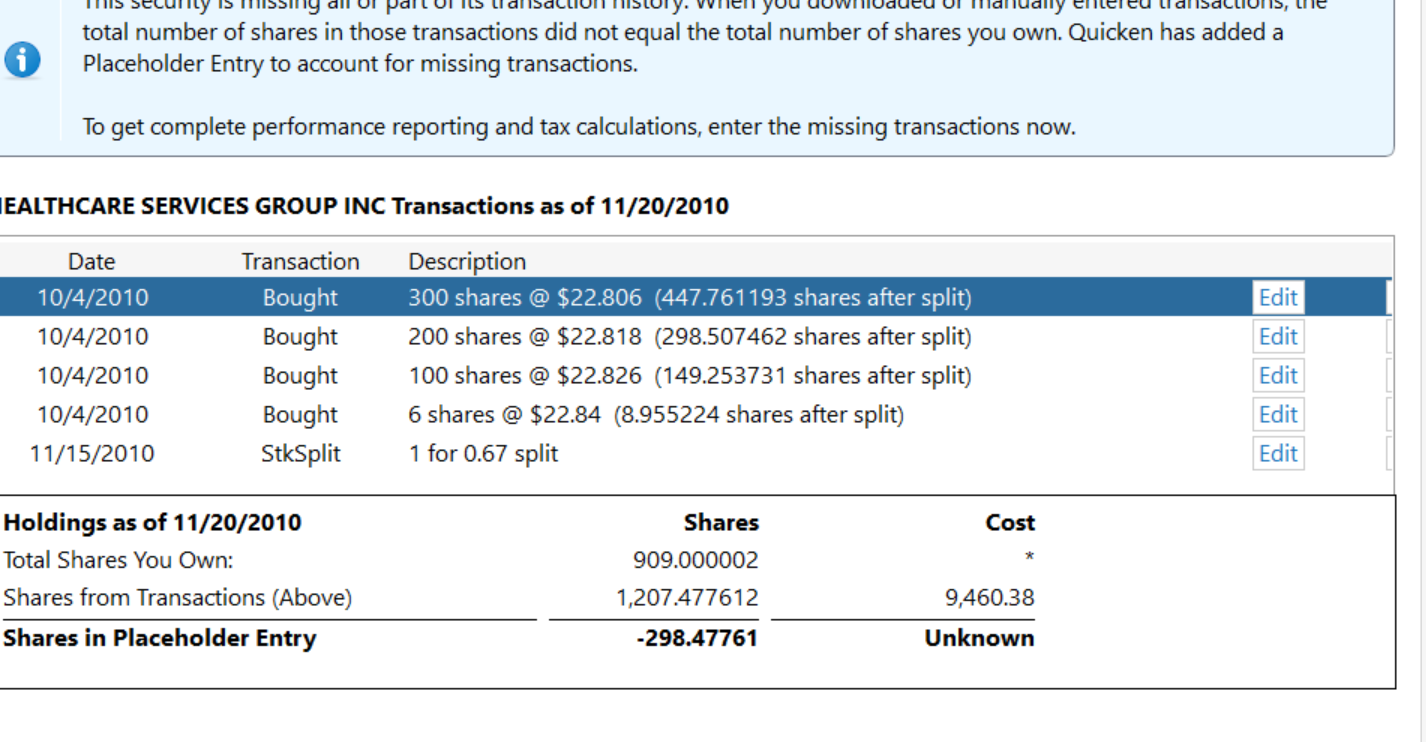
except the statement shows the stock split like this

So, at the time of the split, I had 606 shares, and the split increased the total to 909. I have no idea why the placeholder shows the holdings at shares I own as 909.000002 and from transactions (above) as 2,207.477612. And I have no idea how to fix it.
0 -
Back up your data file before making these changes:
Edit the split on 11/15/2010 so that it looks like this except the date should be 11/15/2010
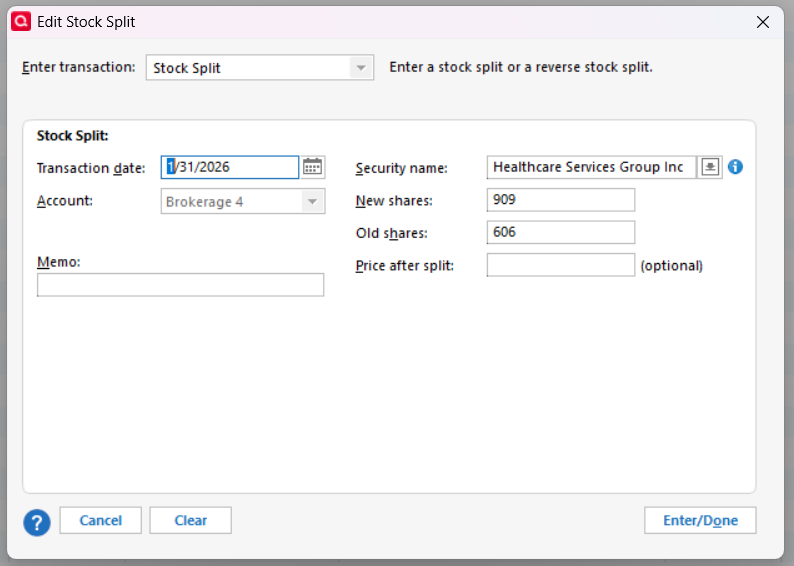
There should not be any other transactions in your register between 11/15 and 11/20, not an Added of 303 shares for example. If there are any, you should delete them.
If you make those changes the Placeholder on 11/20 should be reduced to zero and you should delete it.
QWin Premier subscription0 -
Ok. I did that, and am left with this after the sale of the security:
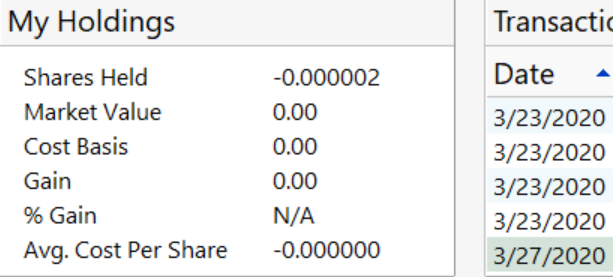
Do I just do a share added of a plus 0.000002 prior to the date of the sale?
0 -
Well that's a lot closer than you were before …
But to get rid of that last tiny fraction of a share due to a rounding error, make sure in the Sell transaction the "Sell all shares in this account" box is checked. That should reduce your holding to zero.
But from your screen shots, it appears that the issue may be that your broker is saying you have 909.000002 shares after the split. Perhaps entering that number in the "New shares" box of the Split transaction will resolve the issue.
If neither of these changes fixes it, you can enter a Shares Added transaction for .000002 shares after the final sale.
QWin Premier subscription0 -
Whew! Checking "Sell all shares" took care of it. Thank You!
Now, can we go back to "Jones Bank Account" for which I posted the screen shots above?
You said earlier I would need to delete all Placeholders for that Security (those are the only placeholders I now have left). Can I do that simply by clicking "Delete all" at the bottom right of the Placeholder box at the bottom of the transaction register? If yes, how would I find the Cash Balance Adjustments associated with the placeholders - or would they go too? In no, same question.
The 4/24/20 placeholder above is the most recent. I deleted the placeholder entry, but the only Cash Balance Adjustment I see following that day doesn't show up until the end of June of that year and it is specified as cash transferred elsewhere in the account.
And there are 4 more placeholders to go.
Thank you for your patience and assistance!
0 -
You can delete all the Placeholders at once, but it may make it harder to find and fix all the problem or missing transactions. If you start with the most recent one and work backwards, you only have to deal with transactions between the one you deleted and the next older one.
QWin Premier subscription0 -
Ok. Deleted remaining placeholders one by one, searching for any Cash Balance Adjustments or related additions or missing transactions and finding none. Remaining security shares and values do match my statement. However, Quicken's Cash Balance is still off by the same amount (about -25,000) as it was before all these placeholder efforts, and the total market value still doesn't match my statement.
Now what?
0 -
Are these all shares at $1.00, as shown in your screenshot?
I suspect there may be missing transactions, maybe missing deposits or cash transfers into the account, or Added transactions with an incorrect cost basis and/or Removed transactions that are still affecting this security and the account as a whole.
QWin Premier subscription0 -
Scanning the security detail transactions, all shares are at $1.00 with some exceptions. There are dividends that have no price paid, one Shares removed with no option to identify price, and the following:
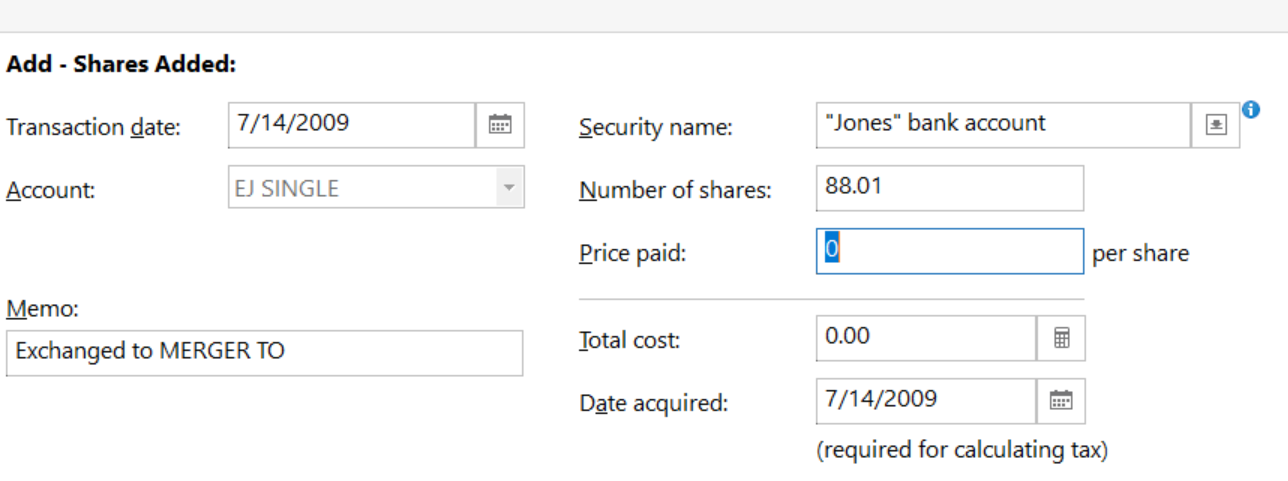 0
0 -
It's fixed. I scanned through 20+ years of transactions in my investment account to make one last try at resolving incorrect total market value and Cash Balance footer errors that had been plaguing me for years. I found placeholders that had never surfaced before and resolved them one way or another - discovering along the way that I was resolving them in an Archive I didn't know existed, which is why they never turned up in the active account search. Imagine my surprise when I discovered that now all Quicken values in the active account match my most recent brokerage statement.
Thanks to Jim Harman for his help along the way.
0

Categories
- All Categories
- 18 Product Ideas
- 34 Announcements
- 246 Alerts, Online Banking & Known Product Issues
- 19 Product Alerts
- 518 Welcome to the Community!
- 682 Before you Buy
- 1.5K Product Ideas
- 55.7K Quicken Classic for Windows
- 16.8K Quicken Classic for Mac
- 1K Quicken Mobile
- 834 Quicken on the Web
- 127 Quicken LifeHub