HSA Bank CC-502

Hi,
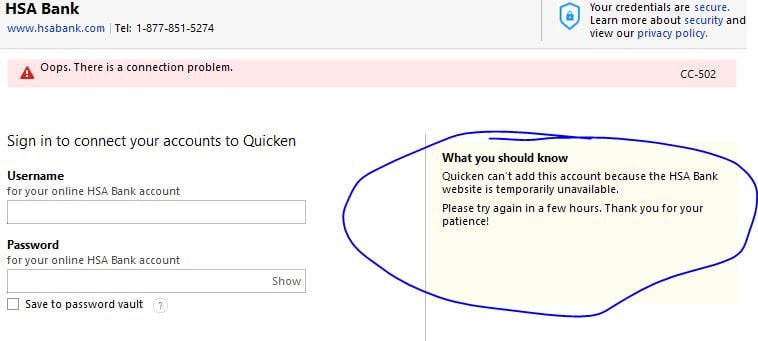
Trying to add this account to my Quicken. Their website is working fine, and the web address in Quicken is correct, yet I receive the following error when trying to add my account.
[Edited-Readability]
Comments
-
Hello @Sparksnorthern,
Thank you for reporting the issue you are seeing with HSA Bank.
I reviewed your connections internally and can confirm you are receiving the CC-502 error. This is not currently a known or widespread issue.
A CC-502 error is caused by maintenance on the bank's servers that Quicken uses to download transactions. Do not deactivate and reactivate your account(s) to troubleshoot this specific issue, as it could cause other problems.
Refresh your account information
- Open the transaction register for the account with the error message.
- Click the Gear Icon in the upper right of the register and select Update Now.
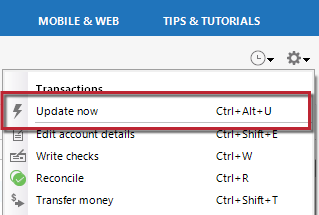
3. Follow the on-screen instructions to complete the update.
4. Repeat these steps for each account with this error.If refreshing your accounts does not resolve the issue
Try waiting one business day. This error message is typically caused by maintenance on your bank's website. You can try updating again in a few hours or the next business day. If the issue still occurs after one business day, try the steps above again.
If the issue persists after following the steps above, please contact Quicken Support directly for assistance. Further investigation and escalation may be necessary.
Thank you!
Quicken Alyssa
Make sure to sign up for the email digest to see a round up of your top posts.
0

Categories
- All Categories
- 6 Product Ideas
- 34 Announcements
- 249 Alerts, Online Banking & Known Product Issues
- 19 Product Alerts
- 266 Welcome to the Community!
- 301 Before you Buy
- 1.5K Product Ideas
- 55.8K Quicken Classic for Windows
- 16.9K Quicken Classic for Mac
- 1K Quicken Mobile
- 834 Quicken on the Web
- 129 Quicken LifeHub