Missing Transactions dont add to Quicken [Edited]

Long-time Quicken user, I noticed one account hasn't updated transactions, tried to activate it, Citibank came up logged in, showed my six accounts, tried a few times, clicked just the one account to activate, and when done, Quicken said don't add to Quicken. Tried checking all accounts, and all said don't add to Quicken. Once an account had an option with a pull-down, the correct account wasn't an option. Very frustrating, any help would be appreciated.
[Edited-Readability]
Answers
-
Hello @Dennis4@,
Thank you for sharing your experience and reporting the issues you are seeing.
Please try the following steps below and see if it resolves the issue:
- Create a backup of your Quicken file first.
- Deactivate all Citibank accounts in Quicken.
- Select the Tools menu and select Account List....
- In the Account List, select the account you want to deactivate, and then click Edit.
- In the Account Details window, click the Online Services tab.
- Click Deactivate next to the service you want to disable.

- Click Yes to the message confirming if you want to disable this service. Note: If you do not receive this message, additional information is available below.
- Click OK to the confirmation message.
- If you have an investment account that is linked to a cash account, you need to deactivate the online services from the investment account, which will automatically deactivate the linked cash account.
- Important: If you are deactivating/reactivating an account to fix an issue, you'll need to deactivate all the accounts with the affected financial institution that you have activated in Quicken (including hidden ones). Once they're all deactivated, then you can follow the steps to reactivate.
- Revoke Quicken’s third-party access from the Citibank website.
- Reactivate the accounts in Quicken.
- Go to Tools > Add Account.

- Select the bank for the deactivated account(s). If prompted, select the connection method.
- Enter your credentials and click Connect.
- When the list of located accounts appears, choose LINK next to each account you want to reactivate.
- Click Next, then Done on the last prompt.
- Go to Tools > Add Account.
Let us know how it goes!
Quicken Alyssa
Make sure to sign up for the email digest to see a round up of your top posts.
0 -
Thank you, that was an option I considered however, when reactivated wouldn't I get tons of downloaded entries? Why does quicken limit my options in the pull down? Why not show me all my options to make this process so much simpler?
0 -
Thank you for following up!
When Quicken displays the "Do not add", that you are seeing, it's because it thinks the account is already connected.
Ideally, no, you wouldn't get tons of downloaded entries, just the ones that are missing. You can always save a backup first.
Back up in Quicken for Windows
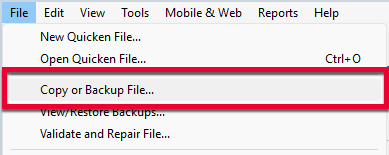
1. Select File > Copy or Backup File...
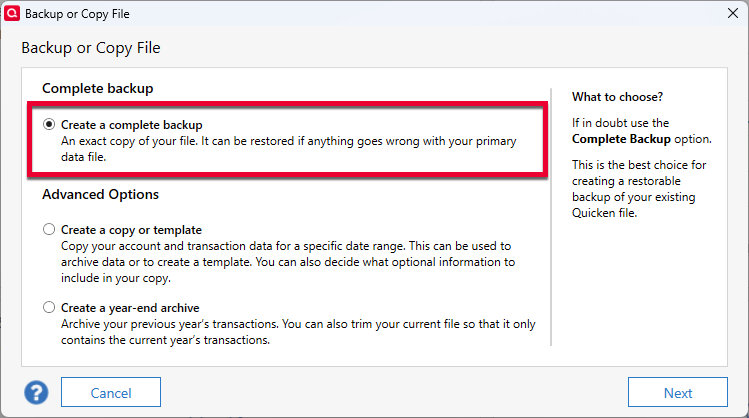
2. Select Create a complete backup and click Next.
3. To make it easier to identify your latest backup, you can put a check next to Add date to backup file name.
4. Quicken will show you the location where your backup will be saved, along with the name of the backup file (this is typically your Quicken file name followed by .QDF-backup).
- The default save location for backup files is C:\Users\[your name]\Documents\Quicken\BACKUP and we recommend to leave this unchanged.
- If you need to change this location, click Change... then select a folder to save the backup to. After making your selection, click Save.
5. Click Create Backup.
This way, if it doesn't go well, you can easily get back to where you started.
Hope this helps!
Quicken Alyssa
Make sure to sign up for the email digest to see a round up of your top posts.
0 -
Just checking in as we have not heard back from you in a while.
Do you still need assistance?
Thank you!
Quicken Alyssa
Make sure to sign up for the email digest to see a round up of your top posts.
0 -
I went through months of statements, to manually add or remove the differences, All matched up yet there was discrepancies with Quicken, who knows how far back I had to go. So I gave up and reconciled the account and adjusted the balance. Thanks for the follow up.
1 -
Thank you for following up and letting us know how you decided to proceed.
If you need more help, don't hesitate to reach back out!
Thanks again!
Quicken Alyssa
Make sure to sign up for the email digest to see a round up of your top posts.
0
