Subtotal by Memo

Please add the Memo field as a selectable subtotal option to the transaction based reports. The use case is using this field to group transactions for something like travel expenses for a trip. Usually a short-term grouping. Using tags for this gets real messy fast as it would required adding a tag for every trip taken.
Comments
-
As a workaround for the time being, you can filter the reports by the memo field. For example you can say "Memo contains: Florida". Also you have the ability to sort by the memo field in the Transaction reports but perhaps too messy as well. You are probably already aware of these options but just in case.
- Q Win Deluxe user since 2010, US Subscription
- I don't use Cloud Sync, Mobile & Web, Bill Pay1 -
Using tags for this gets real messy fast as it would required adding a tag for every trip taken.Actually I have not found that to be true. I use Tags to track trips but only for major ones or for places I go frequently. For minor trips, I just leave the Tag field blank.
For example, I often take several trips to Denver each year and tag them as Denver. That way, if I want to know how much we spent on trips to Denver over a given time period, I can filter on the Denver Tag. If I want to know the cost of a particular trip to Denver, I select its Tag and set the time period accordingly. If I want to know the total spent on Travel over a period, I select the Travel Category and don't specify any Tags.
QWin Premier subscription1 -
I think my use case is different. Many different trips to different locations. 20 different trips alone last year. 30 the year before. thats what makes tags difficult, and even bigger pain to filter by memo. The report I want to see is last years Travel expenses, by destination (destination is in the Memo field). As far as I can tell, the only way to do that is export to Excel and subtotal there via pivot table.,
0 -
Yeah I can see that 20-30 trips would require you to create 20-30 tags or reports and then they just add up. btw, another field you can use is the Check # field (you can create anything you want there) and in the Transaction reports it is displayed as NUM. Works similar to tags but is is not included in the subtotal drop down either - back to square one.
Why not, just up-voted.
- Q Win Deluxe user since 2010, US Subscription
- I don't use Cloud Sync, Mobile & Web, Bill Pay0 -
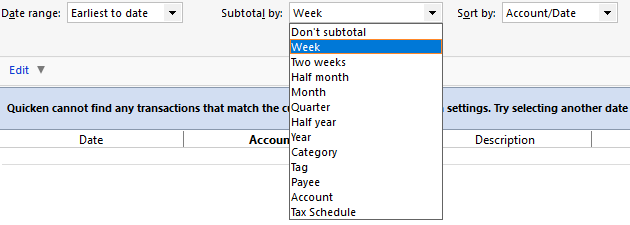
Check# does not show as a selectable subtotal field either. As I look at this list of available fields, it would seem fairly simply to add Memo as selectable field. Its already an element in data as a filter is available.
 0
0 -
Check# does not show as a selectable subtotal field either.
Yes, that is what I wrote as well - hence back to square one! LOL
- Q Win Deluxe user since 2010, US Subscription
- I don't use Cloud Sync, Mobile & Web, Bill Pay0 -
With Tags you can already subtotal on them using the Spending > Itemized Tags report or the Banking reports.
Also it is a dropdown list so you don't have to type them in and remember whether you called the trip New York or NYC for example. If the list is long, you can just type in the first few letters.
To shorten the list, you can hide Tags you no longer use, and if you delete them, the transaction just becomes untagged.
QWin Premier subscription0

