Watch List (WL) pricing not updating

Run OSU daily, line at bottom of WL reflects current update, pricing remains days old. I've run manual updates from WL gear, (Download Latest Quotes), same result.
Comments
-
What securities are in your Watch List? Are those securities still checked to Download quotes on the security list (Ctrl-y)?
0 -
The securities I want to watch are on my Watch List. Those that are also on my security list and are checked to download quotes.
0 -
Are these securities that you own and download transactions for?
Are they publicly traded securities with ticker symbols, or private funds as often found in a 401(k)?
If you look at the Price History for these securities, does it include High and Low prices, or just the closing price for each day?
Your answers will indicate whether the quotes have been coming from Quicken's quote provider or from your broker.
QWin Premier subscription0 -
I own some, I'm watching some but do not own, and some are indices.
Publicly traded w/tickers.
Right click on security I own and selecting "View a price graph of this security" only shows closing price.
0 -
The actions you describe - manual updates from Watch List gear, Download latest quotes, and Right click on security and select View a price graph of this security - are not anything I have seen in Quicken Classic for Windows. Is that what you are running? If so, please describe where you are seeing these options and exactly what they are called.
[update] Sorry, I found it. This is the Watch List widget on the classic Home tab. For me the prices appear to be updating correctly. Today, Sunday, the most recent prices are from last Friday.
To see the price history, click on the security name to open the Security Detail view. Click on More then select Edit price history. If the entries have High, Low, and Volume, they almost certainly came from Quicken's quote provider. If not, they probably came from your brokerage.
QWin Premier subscription0 -
? I've been seeing in for over 30 years…
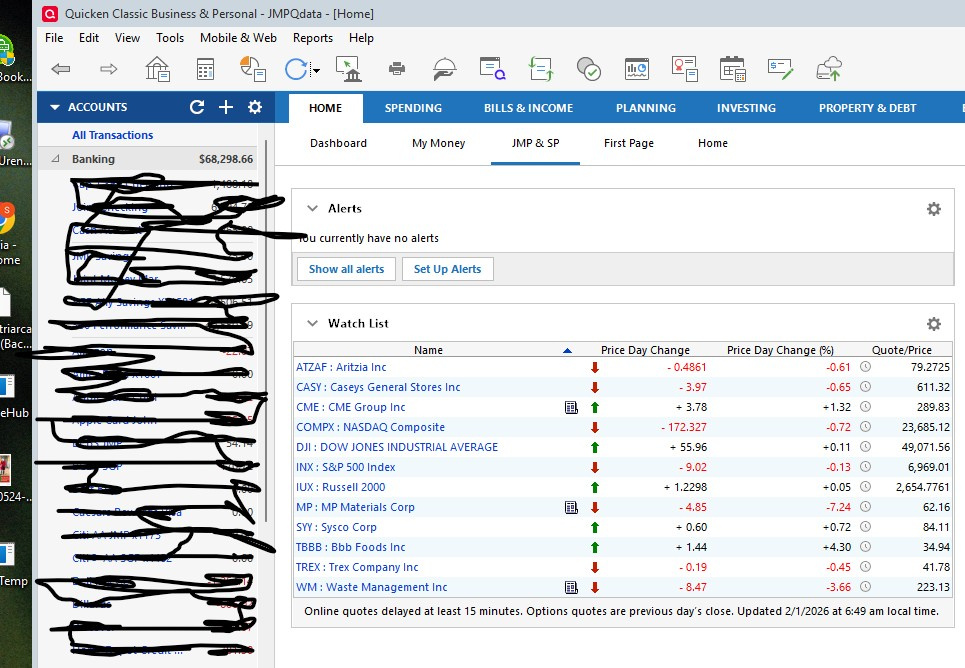 0
0 -
I'm aware of that. My problem appears to be intermittent. I'll keep an eye and respond when it reoccurs.
0

Categories
- All Categories
- 6 Product Ideas
- 34 Announcements
- 249 Alerts, Online Banking & Known Product Issues
- 19 Product Alerts
- 266 Welcome to the Community!
- 301 Before you Buy
- 1.5K Product Ideas
- 55.8K Quicken Classic for Windows
- 16.9K Quicken Classic for Mac
- 1K Quicken Mobile
- 834 Quicken on the Web
- 129 Quicken LifeHub