Please add the Category, Tag, and Memo fields to the Bill and Income reminder list

I print out the scheduled transactions list periodically to keep in a hard file. It would be great if these 3 fields were made part of the report layout. Or at least give us the opportunity to add/delete fields to show in report.
Also, I think a scheduled transactions report should be listed in the "Reports and Graphs" Center.
Comments
-
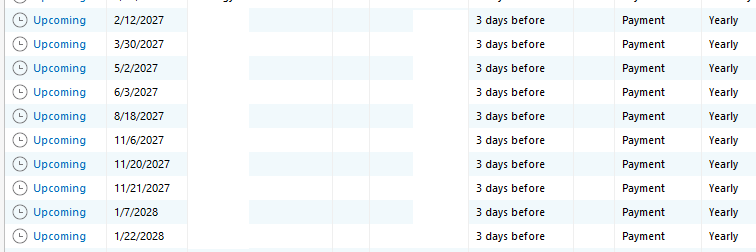
When a user has numerous reminders with each having the same payee, they're unable to know which is which. An exception to this may be that each reminder has a very different dollar amount which the user might memorize over time.
For example, I use "XYZ" to host a company website and the employees' email accounts. There are numerous charges which hit at different times of the year, but I want all of the transactions to have "XYZ" as the payee for reporting purposes.
I would like to be able to glance at the Reminders list and be able to quickly know which is which. Many of these in the list below are the same dollar amount.
The request: add Memo (and also maybe Category) as a column in the Reminders list.
Quicken user since 1991
VP, Ops & Tech in the biometric space
1 -
good luck with this request. I've posted about this myself a couple times but it goes nowhere. Having the Reminder's Memo field visible with the Reminder is a natural. I vote for this strongly!!!
----Quicken User since 1998 ----
1 -
I saw your post about a search/filter but didn't see that it asked for the Memo column to be added…or I'm just blind and can't read which quite likely.
Quicken user since 1991
VP, Ops & Tech in the biometric space
0 -
I support this request. I have the same issue. For instance, I have a number of payments to Apple. As a work around, I set up the scheduled reminders with the payee field containing "Apple - Apple Care for Iphone", "Apple - Cloud Storage", "Apple - Apple Care for Ipad". This keeps Apple as the payee but adds a little more description when I print out the scheduled transactions report.
1 -
I have this one in a different category.
Add Columns to Bill & Income Reminders View Component — Quicken
Then there was this one.
Add a note field to Bill and Income Reminders — Quicken
Seems like I had another but I can't find it.
I guess it's officially called the "Memo" field of the reminder. Also, there's at least 3 different views of the Bill and Income Reminders that I'm aware of. I use the one that you can add to your own custom view on the "Home" tab. I think you're referring to the main List here but it's all the same idea. The Memo field is very important when viewing Reminders so it should be available in any listing.
----Quicken User since 1998 ----
0 -
Yes, I have same issue. Several payments to same vendor, but for different reasons. Need more details in the Transaction List. Or at least let us control what we see on the "Reminders" list.
0

