Fidelity status

Is there a post/page that summarizes any remaining issues between Quicken and Fidelity problem? I had disconnected in October and have been manually entering transactions to Q. Would be nice to know when things are working and I can reconnect.
Thanks
Comments
-
Hello @dkirin,
Thank you for posing this question!
Yes, we do have a post that summarizes everything. It was last updated 12/19/25. You can see that here.
I will say that most people have connected successfully now, and I think it's safe for you to reconnect. Save a backup before you go through the process in case you need or want to get back to where you started.
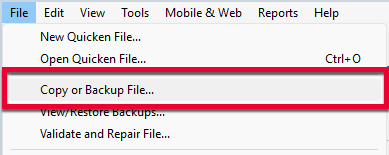
1. Select File > Copy or Backup File...
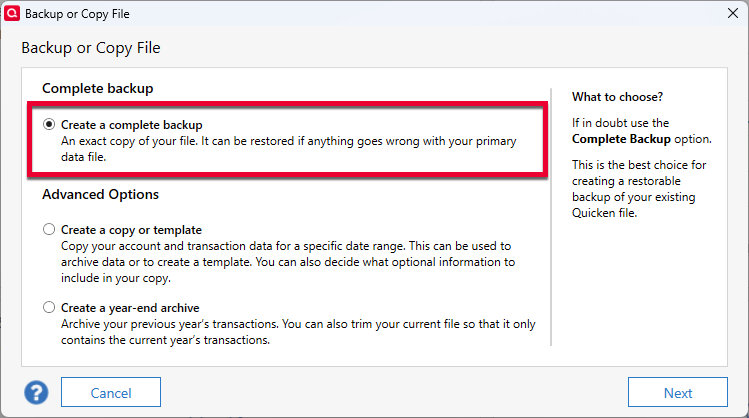
2. Select Create a complete backup and click Next.
3. To make it easier to identify your latest backup, you can put a check next to Add date to backup file name.
4. Quicken will show you the location where your backup will be saved, along with the name of the backup file (this is typically your Quicken file name followed by .QDF-backup).
- The default save location for backup files is C:\Users\[your name]\Documents\Quicken\BACKUP, and we recommend leaving this unchanged.
- If you need to change this location, click Change... then select a folder to save the backup to. After making your selection, click Save.
5. Click Create Backup.
If you run into any issues along the way, let us know, and we will be happy to help!
Thank you!
Quicken Alyssa
Make sure to sign up for the email digest to see a round up of your top posts.
0 -
Just checking in, we haven't heard back from you in a while.
Do you still need assistance?
Thank you!
Quicken Alyssa
Make sure to sign up for the email digest to see a round up of your top posts.
0 -
Hello again,
Checking in once more before this thread is closed.
Let us know if you still need assistance.
Thank you!
Quicken Alyssa
Make sure to sign up for the email digest to see a round up of your top posts.
0 -
Due to the lack of response, I went ahead and closed this post.
If you still require assistance, please feel free to start a new post.
Thank you!
Quicken Alyssa
Make sure to sign up for the email digest to see a round up of your top posts.
0
