No deactivate button to disable web connect

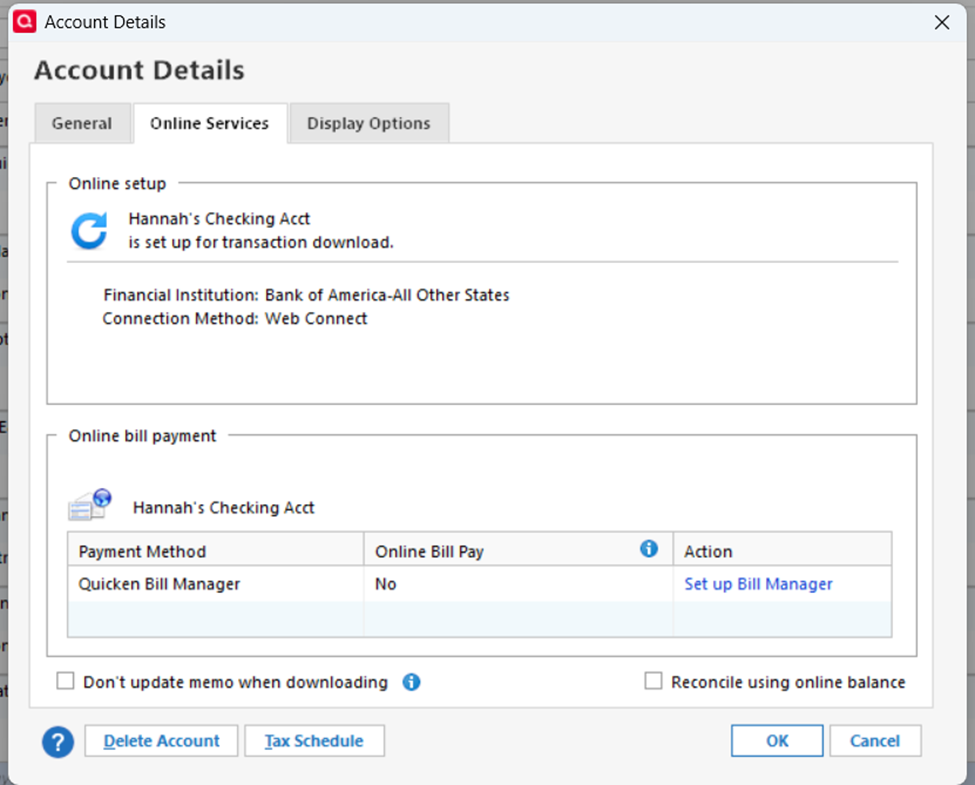
Having an issue trying to switch to web connect+ for Bank of America, when i go to deactivate web connect there is no box. I have validated and super validated. Any help greatly appreciated!
Answers
-
There's no "deactivate" because the downloads only happen when you manually initiate them from the FI's website … i.e., nothing is "activated".
Also, "Bank of America-All Other States" is an FI name that BofA quit using last year (or so).
SO, take a backup, just in case, then,
create a new account in Q,
move all transactions from the old account to the new account
connect the new account to "Bank of America - Quicken"WATCH for duplicates in your 1st download … they're almost certain to happen. You might want to reconcile the new account before that 1st download so that any new duplicates will show as not being reconciled.
Q user since February, 1990. DOS Version 4
Now running Quicken Windows Subscription, Business & Personal
Retired "Certified Information Systems Auditor" & Bank Audit VP0

Categories
- All Categories
- 18 Product Ideas
- 34 Announcements
- 246 Alerts, Online Banking & Known Product Issues
- 19 Product Alerts
- 518 Welcome to the Community!
- 682 Before you Buy
- 1.5K Product Ideas
- 55.7K Quicken Classic for Windows
- 16.8K Quicken Classic for Mac
- 1K Quicken Mobile
- 834 Quicken on the Web
- 127 Quicken LifeHub