TARGET CIRCLE CARD and BANANA REPUBLIC CARD

Neither one will connect. Target has been an issue for a long time. The Circle card, when logging in on their actual site, is https://mytargetcirclecard.target.com/ which is different from selecting Target National Bank from Quicken's choices. Could this be why that one won't work any longer? It's incredibly frustrating when the price just increased, and there doesn't seem to be any help with a resolution
Banana Republic Card, I have no idea. I select the proper option offered by Quicken, and it still tells me the credentials are wrong. Which they aren't. Sometimes, it even says there is no account associated. Which is not true.
[Edited-Readability]
Comments
-
Hello @lsjrlsjr70,
Thank you for sharing your experience.
We do have an Alert for Target National Bank/Target Red Card. We do not have an instance for Target Circle Card specifically.
To have this added to Quicken, the bank would need to reach out to us to make that happen. What you can do is call the financial institution and let them know you would like to be able to access your account from Quicken.
With Banana Republic, you are getting an FDP-103 error internally. These errors occur when your financial institution tells Quicken that your login credentials are incorrect or there are outdated login credentials stored in Quicken for Mac and/or the Keychain app. Check out this Support Article for steps to resolve it. If this is an account that you already have in Quicken, here are the first steps:
First, deactivate all the accounts with the affected financial institution
- Open Quicken.
- Go to the Accounts menu and choose Hide and Show Accounts.
- Uncheck any accounts with this specific financial institution (FI) that are hidden in Lists.
- When complete, click on the account name for your account(s) in the Accounts toolbar in Quicken.
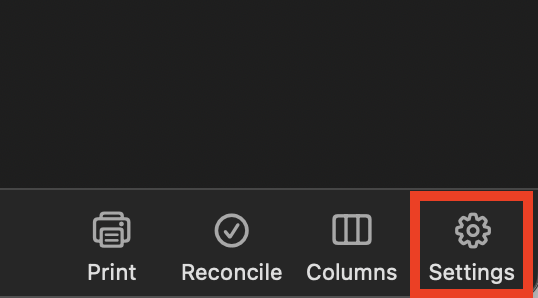
- Click the Settings icon in the bottom right corner of the screen.
- Select the Downloads tab.
- Click on Disconnect Account.
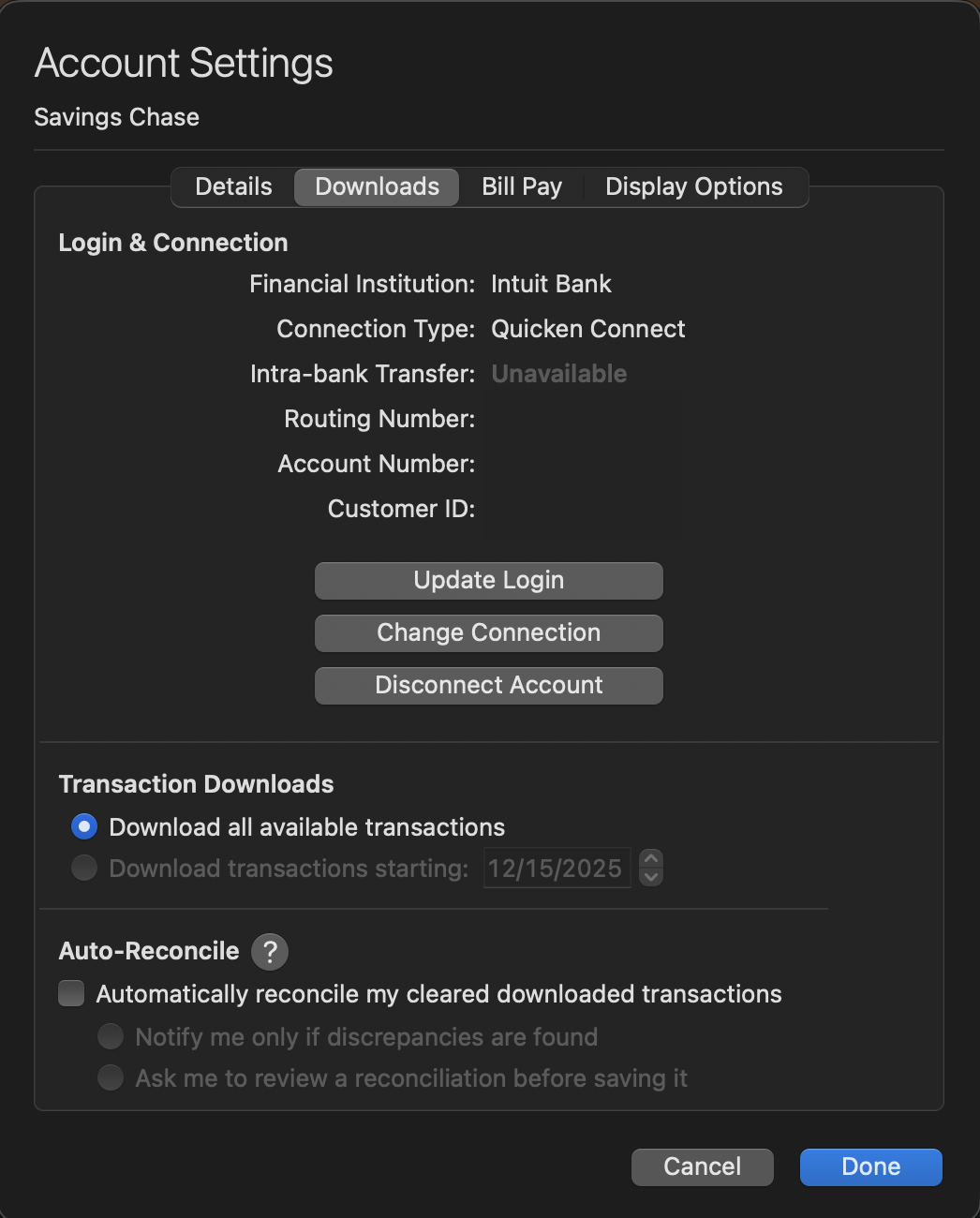
- Click Done. Do this on each account with this FI.
- Quit Quicken.
Please continue the remaining steps in the linked article. If they do not resolve the issue, reach out to Quicken Support directly for assistance. They can investigate the issue further and process an escalation if needed.
Thank you!
Quicken Alyssa
Make sure to sign up for the email digest to see a round up of your top posts.
-1 -
Hi Quicken Alyssa,
Target Red Card changed its name to Target Circle Card about a year ago. There isn't a Target Red Card anymore, but it's still the same log-in credentials, same website, same bank, etc. Sorry for any confusion there, but the issue still remains and has been this way on/off, mostly off, for several months.
My Banana Republic Card credentials are correct, and I'm using bananarepublic.barclaysus.com as my selection in Quicken, so there is some other issue preventing things from working. No idea what that might be.
1 -
Customer support sent me an e-mail with some steps to re-connect Target, and it has FINALLY been fixed! YAY! Fingers crossed it stays working.
Now I just have to figure out Banana Republic Card.
1 -
Thank you for following up to let us know you got your Target card reconnected. Very happy to hear that!
As of today, it looks like you successfully connected ot Banana Republic as well, is that correct?
Looking forward to your response!
Quicken Alyssa
Make sure to sign up for the email digest to see a round up of your top posts.
0 -
Just checking in, we haven't heard back from you in a while.
Do you still need assistance?
Thank you!
Quicken Alyssa
Make sure to sign up for the email digest to see a round up of your top posts.
0 -
Hello again,
Checking in once more before this thread is closed.
Let us know if you still need assistance.
Thank you!
Quicken Alyssa
Make sure to sign up for the email digest to see a round up of your top posts.
0 -
Due to the lack of response, I went ahead and closed this post.
If you still require assistance, please feel free to start a new post.
Thank you!
Quicken Alyssa
Make sure to sign up for the email digest to see a round up of your top posts.
0
