My main page with my accounts is gone.

Have Quicken Windows, Computer rebooted, now I just have a dashboard view with some cards. The whole page that listed my accounts and holdings is gone.
I have the small account list on the left side of the page, but I no longer have the main page with account, holding, shares, prices etc.
What happened and how do I fix it??
Comments
-
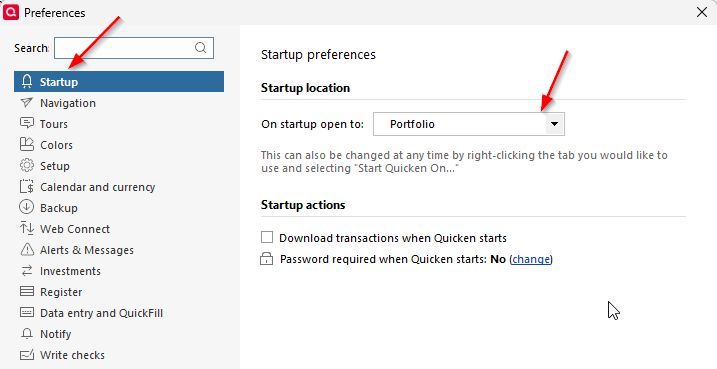
Check the setting in Preferences (Edit menu) for which screen/page that Quicken displays at startup.
-splasher using Q continuously since 1996
- Subscription Quicken - Win11 and QW2013 - Win11
-Questions? Check out the Quicken Windows FAQ list2 -
You were right. I actually found that a bit after posting the question. I have no idea how it changed on it's own, but it did.
I need to find how to just get a new copy of Quicken on my computer. I'm having too many glitches now.
0 -
Somehow it also went to "classic" menu's on its own as well. Still doesn't feel like it's working right.
0 -
FWIW after the most recent Quicken update, I noticed a few of my toolbar icons were removed (specifically Home and Quotes).
It's not the first time an update messed with settings. I've gotten in the habit of checking them after an update.
Changing settings without telling the user is really bad form.
1 -
I have no proof of this, but it seems like sometimes one of the many different Quicken configuration files is included with the patch release when it shouldn't be.
-splasher using Q continuously since 1996
- Subscription Quicken - Win11 and QW2013 - Win11
-Questions? Check out the Quicken Windows FAQ list0


Categories
- All Categories
- 24 Product Ideas
- 34 Announcements
- 248 Alerts, Online Banking & Known Product Issues
- 19 Product Alerts
- 265 Welcome to the Community!
- 301 Before you Buy
- 1.5K Product Ideas
- 55.8K Quicken Classic for Windows
- 16.9K Quicken Classic for Mac
- 1K Quicken Mobile
- 834 Quicken on the Web
- 129 Quicken LifeHub