Venmo - CC-502 (QWIN) - Again

The fix was 2 days ago, just tried syncing account, I do Venmo manually since I get a 2FA.
Again the error, It may be temporary BUT …
Also, come to find out my "Macy's" is doing this error since 2 days ago, guess it felt slighted!
Comments
-
Hello @Pete Menti,
Thank you for reporting the issues you are seeing.
After checking your connections internally, it appears you are getting a CC-506 error with Venmo and a CC-502 with Macy's.
A CC-506 means Quicken is unable to identify the account in Quicken to which your downloaded information belongs. This could be because the account at your financial institution is closed, or because the account number or nickname was changed on the financial institution's website. This error also occurs if there is an older account still activated in the file that is no longer available at the financial institution.
It's worth a try to follow the steps outlined in the support article, but keep in mind we do still have a Known Issue ongoing with Venmo.
Here are the steps you can start with in the article:
Refresh your account information
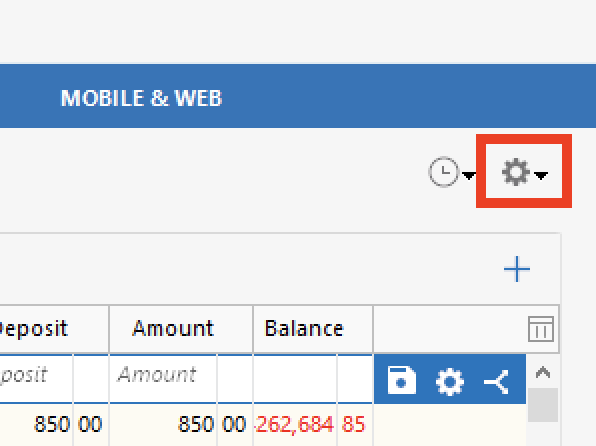
- From your account register, select the Actions gear icon at the very top of your register (Ctrl + Shift + N).
- Then select Update Now.
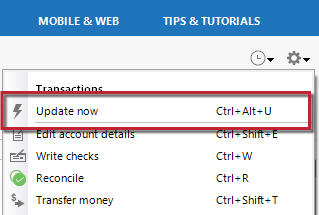
- Follow the on-screen instructions to complete the update.
- If the problem persists, continue with the procedures below.
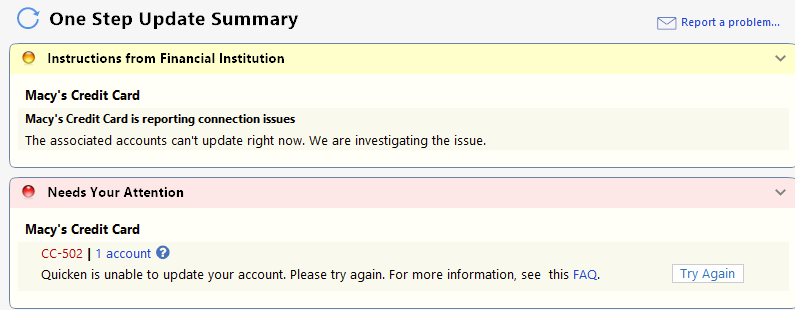
As for the CC-502 with Macy's, this error is caused by maintenance on the bank's servers that Quicken uses to download transactions. The recommended steps are to refresh your account information. Please see the steps given directly above.
If the steps in the articles don't resolve the issue, wait 24 hours. If the issue persists, please contact Quicken Support for further assistance.
Thank you!
Quicken Alyssa
Make sure to sign up for the email digest to see a round up of your top posts.
0 - From your account register, select the Actions gear icon at the very top of your register (Ctrl + Shift + N).
-
Macy's first. I.tried a "reset account" but when it completed the same error occurred - and then deactivated. I'll try Macy's in a few days
Venmo now.I do not use Mobile and Web, I will deactivate the Venmo and wait until tomorrow to try.and reconnect. I'm more concerned about my next question;
"Thank you for reporting the issues you are seeing." Where did you get that info FROM?
Pete..0 -
Thank you for following up.
In the section you quoted, I was simply thanking you for coming to the Community to report issues you are seeing from your end. Doing so can help us get ahead of issues as they emerge.
I am unclear on what info is in question. If you are referring to the errors I was able to see, we do have internal tools that show us if you are getting an error or if you are having failed login attempts, things like that.
If I have not answered your question, please clarify, and I will do my best to explain.
Thanks again!
Quicken Alyssa
Make sure to sign up for the email digest to see a round up of your top posts.
0 -
Venmo is working for me.
Macy's has had an issue for the past three days. This happens often over weekends and it tends to get fixed.
 0
0 -
Hello All,
Thank you for adding to this discussion.
The CC-502 with Macy's is now a Known Issue. This has been escalated internally, and our teams are working to resolve it. We do not have an ETA as to when it will be resolved.
Please bookmark the linked alert to be notified of progress/changes as they occur.
Thank you!
Quicken Alyssa
Make sure to sign up for the email digest to see a round up of your top posts.
0


Categories
- All Categories
- 6 Product Ideas
- 34 Announcements
- 250 Alerts, Online Banking & Known Product Issues
- 19 Product Alerts
- 265 Welcome to the Community!
- 301 Before you Buy
- 1.5K Product Ideas
- 55.8K Quicken Classic for Windows
- 16.9K Quicken Classic for Mac
- 1K Quicken Mobile
- 834 Quicken on the Web
- 129 Quicken LifeHub