Automatic downloads not working properly.

Automatic downloads not working properly. When set to "I will review and accept transactions individually" the flag comes on but no transactions show up. The only way to get my transaction is to set "Automatically add transactions"
Answers
-
Hello @arnie29,
Thank you for sharing what you are encountering.
We do have a similar Known Issue for the flag remaining even though all transactions have been accepted. However, it sounds like your scenario is slightly different.
Please review this Support Article we have for the issue you have described.
Before you begin
Ensure the Search bar above the register is cleared. Text in the Search bar will adjust the register to only show transactions that match that text.
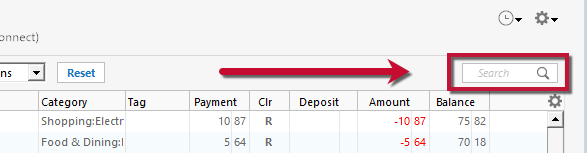
First, turn automatic entry off
1. Press Ctrl+A on the keyboard to bring up the Account List, then click the Edit button next to the affected account in the list.
2. In the Account Details window, click on the Online Services tab then click Automatic entry is.
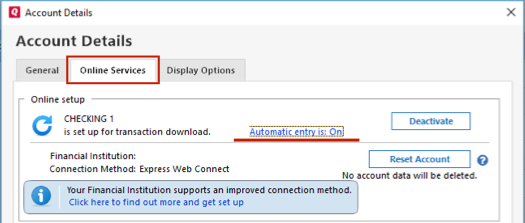
3. Select No on the next dialog box and click OK. Automatic entry should show as "Off" now.
4. Click OK to close the Account Details window, then click Done on the Account List.
5. Close Quicken, wait a few seconds, then re-open it. The transactions should appear upon re-opening Quicken.
Note: If you have multiple accounts affected by this issue, you can make the change outlined above to all the accounts at once by going to Edit > Preferences, then going to Downloaded transactions and unchecking the box next to Automatically add to banking registers.
Please refer to the article linked above for the rest of the steps.
Let us know how it goes!
Quicken Alyssa
Make sure to sign up for the email digest to see a round up of your top posts.
0 -
No, this did not fix the problem, I have done this several times. With Automatic entry is off, and set to "No -Never automatically add transactions for this account. I will review and accept transactions individually" No transactions appear in the register, and the red flag comes on for this account. I have the same problem with all my accounts. I have had to set all my accounts to automatically entry to get my transactions. I have went to Preferences, and the box next to Automatically add to banking register is not checked.
0 -
I have went to Preferences, and the box next to Automatically add to banking register is not checked.
0 -
Thank you for following up.
I have some follow-up questions for you.
- How long has this issue been happening?
- Where is your data file located?
- You can check this by going to File. The first file listed is the one you are currently in. The file pathway will be displayed there. That's what we are looking for.
- Is your file being backed up/synced by any third-party services like Carbonite, OneDrive, or Backblaze?
One thing we can try is validating your data file.
To do this:
- Go to File.
- Select Validate and Repair file…

- Check the first box for Validate file.
- Click Ok.
Once that is done, check to see if the issue persists, and let me know how it goes.
Thank you!
Quicken Alyssa
Make sure to sign up for the email digest to see a round up of your top posts.
0 -
Just checking in, we haven't heard back from you in a while.
Do you still need assistance?
Thank you!
Quicken Alyssa
Make sure to sign up for the email digest to see a round up of your top posts.
0 -
Hello again,
Checking in once more before this thread is closed.
Let us know if you still need assistance.
Thank you!
Quicken Alyssa
Make sure to sign up for the email digest to see a round up of your top posts.
0

Categories
- All Categories
- 6 Product Ideas
- 34 Announcements
- 248 Alerts, Online Banking & Known Product Issues
- 19 Product Alerts
- 265 Welcome to the Community!
- 301 Before you Buy
- 1.5K Product Ideas
- 55.8K Quicken Classic for Windows
- 16.9K Quicken Classic for Mac
- 1K Quicken Mobile
- 834 Quicken on the Web
- 129 Quicken LifeHub