Bank Transactions are not all uploading

Frustrated that my balance is off because not all transactions are being uploaded from my bank. It had been working fine until the end of 2025. Frustrated. :(
Comments
-
Hi @Mary.Nimon,
I’m sorry to hear that you’re experiencing this issue — I understand how frustrating that can be. To help us identify the cause and provide the most accurate solution, could you please share the following details?
- The name of the financial institution for the affected account
- The type of account
- The date of the most recent transaction that successfully downloaded into Quicken
- Are you receiving an error message when updating the account?
Thank you for your assistance — this information will help us investigate more effectively. I'll be waiting for your response.
Quicken Laura
Make sure to sign up for the email digest to see a round up of your top posts.
0 -
I'm having a similar problem with the updates for all my accounts stopped working since updating to R65.29 in Quicken Classic Premiere.
All the banks are listing to share with Quicken.
I'm having to manually enter each transaction now since end of January by logging into each bank and enter the transaction. Last successful update was January 30. In my brokerage Schwab accounts the current stock values are updated to current market price in the holdings tab. That works but the share balance buy and sells are not updated. Have to do that manually.
The one step update does execute the login to each account and "update Data" and Sync with cloud with no errors. But none of the recent transactions as seen in the banks listing is updated.
0 -
Hi @DonLandis22,
Thank you for providing these additional details. I’m sorry for the ongoing trouble. It looks like your accounts may need to be fully reset to correct the connection issues. To help resolve this, I recommend deactivating and then reactivating your accounts by following the steps below.
1. Deactivate accounts
For each related account:- Select Tools > Account List
- If present, select the Show Hidden Accounts checkbox at the bottom of the Account List
- Select Edit on each account with this error and Deactivate them on the Online Services tab
- When finished, close the Account List.
2. Reactivate accounts - Select Tools > Add Account
- Complete the flow of re-adding the deactivated accounts to Quicken, using your bank login credentials and answering any security questions.
- When you reach the screen listing the accounts discovered at the financial institution, use the Action drop-downs to re-link your accounts:
- For accounts you want to re-link, select Link to existing account and choose the corresponding account to re-link with.
- Select Add to Quicken for new accounts you didn't previously track in Quicken.
- For accounts you don't want to link or add, select Don't add to Quicken.
- Since this issue is affecting multiple users, your logs will help our teams pinpoint the cause.
You can submit them by going to: Help → Report a Problem
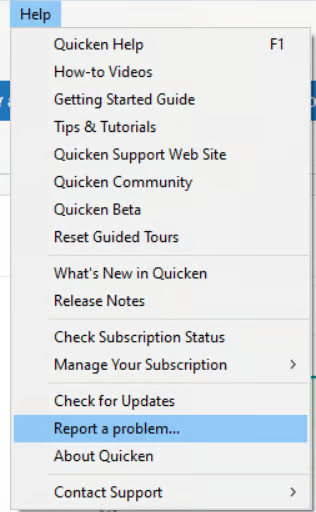
We’ll keep an eye out for your update and the log submission so we can assist you further.
(CTP-16114)
Quicken Laura
Make sure to sign up for the email digest to see a round up of your top posts.
0 -
I deleted Wells Fargo with 3 accounts and Reactivated but Quicken would not log back in to my bank. I kept getting an error message that my password and user ID is not recognized. So I selected another option and downloaded a QFX file "web connect" to my computer from the bank for each of the accounts, checking, savings, and VISA. I found where to import and the import worked fine manually. It appears the root problem for the updates is Quicken is not able to add my credentials, ID and password. That should give your people a clue why the one step update is not working. Also, today I got a Quicken update 66.12 but this did not fix the problem.
0 -
Also, Now that I deactivated and reactivated with manual QFX import the WF account no longer appears in the one step update. I thought all accounts would be listed there but it does not appear. Not sure how to add it back, or is this yet another bug your people caused with these latest updates? Hope my testing gives your people some clue where to look.
0 -
Update- I went to the URL wellsfargo.com/fmssetup and that allowed me to put the WF accounts into one step update and it now recognized my password. I'll work on the others next.
0 -
Hi @DonLandis22,
Thank you for letting us know about the issue with your Wells Fargo accounts not downloading transactions — we’re here to help.
Even though you’ve already followed the initial steps, it’s possible that Quicken attempted to connect your accounts using Direct Connect by default. When this happens, the system may not recognize your credentials, which can prevent your transactions from downloading.
To resolve this, the best approach is to reconnect your Wells Fargo accounts using Express Web Connect+ (EWC+). This method is supported and allows your accounts to appear in One Step Update (OSU) again.
Below are the steps to correct the connection:
Step 1: Deactivate the current connections
- Go to Tools > Account List.
- For each Wells Fargo account showing the issue, click Edit, then go to the Online Services tab.
- Select Deactivate.
- After all affected accounts are deactivated, close the Account List.
Step 2: Reactivate using Express Web Connect+
- Go to Tools > Add Account.
- Select Wells Fargo from the list of financial institutions.
- At the bottom, click Advanced Options.
- Choose Express Web Connect to ensure Quicken uses EWC+.
- Follow the prompts to sign in with your Wells Fargo credentials and answer any security questions.
- When the list of discovered accounts appears, use the Action dropdown to re-link each one:
- Select Link to existing account and choose the matching account already in Quicken.
Why the accounts aren’t appearing in One Step Update
Right now, the accounts are connected through Web Connect (QFX), which is a manual download method. Because of this, they don’t show up in OSU.
Quicken Laura
Make sure to sign up for the email digest to see a round up of your top posts.
0 -
Hi @Mary.Nimon and @DonLandis22,
Just checking in to see if you still need assistance.
Quicken Laura
Make sure to sign up for the email digest to see a round up of your top posts.
0

Categories
- All Categories
- 6 Product Ideas
- 34 Announcements
- 248 Alerts, Online Banking & Known Product Issues
- 19 Product Alerts
- 265 Welcome to the Community!
- 301 Before you Buy
- 1.5K Product Ideas
- 55.8K Quicken Classic for Windows
- 16.9K Quicken Classic for Mac
- 1K Quicken Mobile
- 834 Quicken on the Web
- 129 Quicken LifeHub