Schwab SWVXX Cost Basis Discrepancy

SWVXX shows a lower cost basis and small capital gain even though all transactions are at $1. This is when viewing "Holdings" in my investment account register. The Schwab online and Quicken register balance holdings match each other ("Shares" and "Market Value" columns in the Quicken register.)
Please provide instructions for finding a potentially hidden placeholder or transaction and rectifying the discrepancy.
Quicken Classic R66.12 Build R27.1.66.12 Windows 10
Answers
-
Have you clicked on TOOLS, Security List, clicked on the fund name, clicked MORE and "Edit Price History" to see if there's any non-$1 prices?
Do you hold the fund directly in the Investment account, or do you use the "Show Cash in a checking account" feature?
To show placeholders, click EDIT, Preferences, Investments and check "Show Hidden Transactions".
Q user since February, 1990. DOS Version 4
Now running Quicken Windows Subscription, Business & Personal
Retired "Certified Information Systems Auditor" & Bank Audit VP1 -
Hi NotACPA, thanks for the reply! Answers follow.
- There are no non-$1 prices, but the "Edit Price History" windows looks like this…
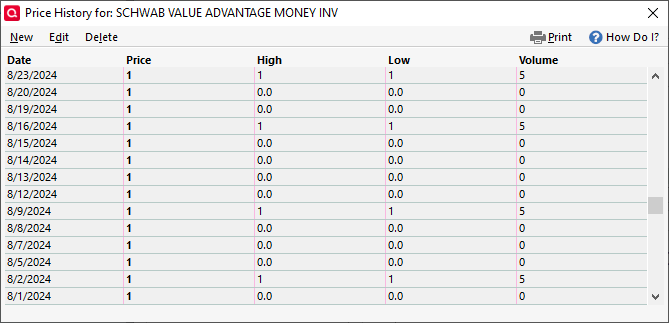
…and this, going back further before I owned the fund. What does "Volume" mean in this table?
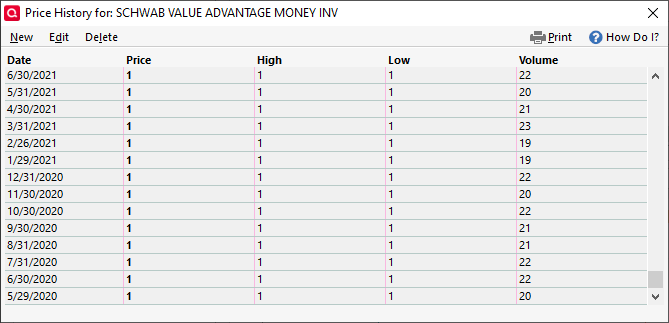
The "0.0" entries in the first screenshot seem to correspond with dividend/interest payments.
- I hold the fund directly in the investment account. I selected "treat as a security" when offered the option.
- The "show hidden transactions" box was already checked.
0 -
For an MMF, I have no idea what Volume means … but it's something that Q is getting from it's quotes provider, which MAY be Schwab, but there are others.
For an MMF, with a constant $1 NAV, the Cost Basis should always equal the qty of shares. So, where are you seeing the lower cost basis? In the Portfolio?
And, I have to admit that I'm grasping at straws here, but (since you're holding this as a security and not cash) have there been any transactions OTHER than BUY/Sell/Div for this security?
Q user since February, 1990. DOS Version 4
Now running Quicken Windows Subscription, Business & Personal
Retired "Certified Information Systems Auditor" & Bank Audit VP1 -
I'm looking in the investment account → holdings → "+" to see all transactions.
The overall "Shares" and "Market Value" match my online account while the overall "Cost Basis" is about $200 less. Expanding to see all transactions shows a $1 "Quote/Price" for all rows, matching "Shares", "Market Value", and "Cost Basis" numbers for all entries, and $0 "Gain/Loss" for every row other than the overall one.
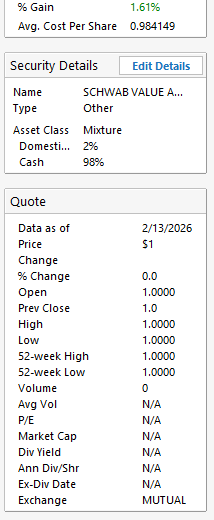
The "My Holdings" box in the Security Detail View window shows an even lower cost basis and much larger gain, apparently because I hold SWVXX in two different accounts. Could Quicken be using reinvestment purchases in its math?
There are no transactions other than buy/sell/div. I started using SWVXX as a cash substitute in 2024, so there aren't that many transactions.
Thanks again for the replies.
EDIT: I can post only this part of the Security Detail View window. See "% Gain" and "Avg. Cost Per Share" at the top:
 0
0 -
OK, 2 more things to try (I'm stretching here). Take a backup before either/both.
In the account(s), click CTRL-Z to recalculate the account. Did that help anything?
Do FILE, Validate and Repair and check ALL of those 1st 3 options (the printer settings option can be ignored)
Q user since February, 1990. DOS Version 4
Now running Quicken Windows Subscription, Business & Personal
Retired "Certified Information Systems Auditor" & Bank Audit VP1 -
CTRL-Z did the trick!
I could probably use a file validate and repair, but I'll save that for another day.
Thanks for your help!
0

Categories
- All Categories
- 6 Product Ideas
- 34 Announcements
- 249 Alerts, Online Banking & Known Product Issues
- 19 Product Alerts
- 266 Welcome to the Community!
- 301 Before you Buy
- 1.5K Product Ideas
- 55.8K Quicken Classic for Windows
- 16.9K Quicken Classic for Mac
- 1K Quicken Mobile
- 834 Quicken on the Web
- 129 Quicken LifeHub