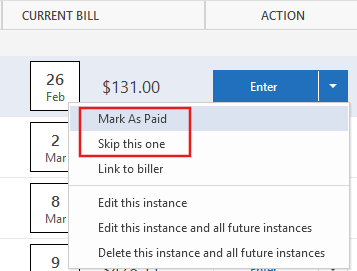
What is the difference between Mark as Paid vs Skip this one?

What is the difference between Mark as Paid vs Skip this one in manual bills? I don't use bill pay, have not setup any online billers, and all my bill reminders are setup manually without auto-entry. So my bill reminders are purely cosmetic and I have used both options interchangeably to dismiss the current reminder after a bill is paid, with no impact to my banking registers. I am just curious to learn the details of what else happens behind the scenes and their differences if any (specific to a manual bill with no auto-entry). TIA
- Q Win Deluxe user since 2010, US Subscription
- I don't use Cloud Sync, Mobile & Web, Bill Pay
Best Answer
-
It affects what is shown on the Stack view. If you use Mark as Paid, "Paid" will be put on the bill card.
1

Answers
-
It affects what is shown on the Stack view. If you use Mark as Paid, "Paid" will be put on the bill card.
1 -
Aha! Took me a while to test it and figure it out but I now see the difference in the stack view. Thank you @Chris_QPW
- Q Win Deluxe user since 2010, US Subscription
- I don't use Cloud Sync, Mobile & Web, Bill Pay1