Category entries no longer showing predictive choices

After downloading transactions, I sometimes need to change or add a category. Previously when I would start typing a category, I would receive predictive choices from my typing. A few months ago, the predictive choices stopped. If what I type is not close to an existing category it is accepted. To fix I need to find a previous transaction with the desired category, copy the category and then paste it in the new transaction. A very unproductive and time wasting procedure.
Answers
-
Hi @galebinder,
Thank you for sharing your concern, and I’m sorry you’re experiencing this issue. I’d be happy to help you troubleshoot.
First, we need to make sure your global settings are properly configured (even if they worked before).
- Click Edit > Preferences.
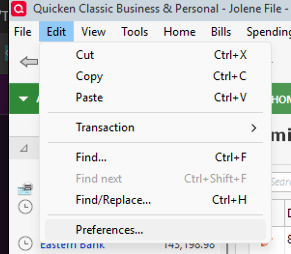
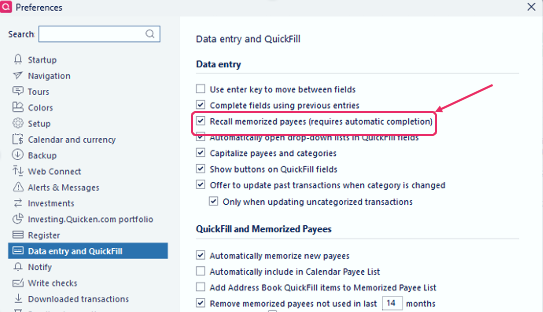
- Go to Data Entry & QuickFill.
- Make sure Recall memorized payees is checked.
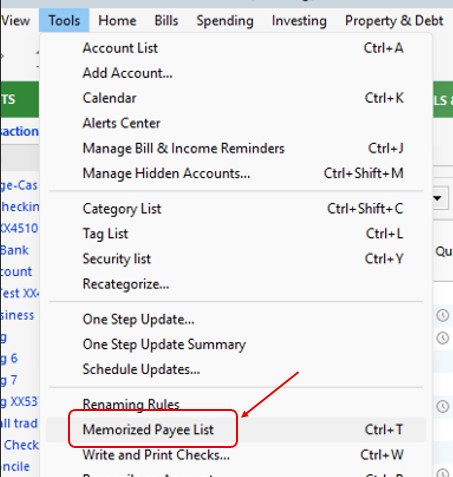
Next, confirm your payees are still memorized:
- Go to Tools > Memorized Payee List.
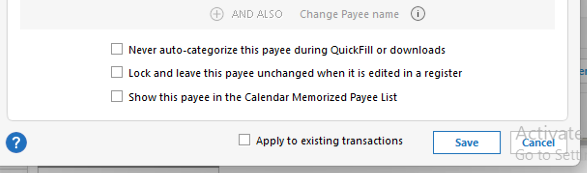
- If the issue affects specific payees, select the payee and click Edit.

- Make sure Never auto-categorize this payee during QuickFill or downloads is not checked.
Please try these steps and let me know how it goes. I’ll be happy to assist further if needed.
Quicken Laura
Make sure to sign up for the email digest to see a round up of your top posts.
0 - Click Edit > Preferences.
-
Look in Edit / Preferences / Data Entry & Quickfill.
Make sure that settings are checked for "Complete fields …", "Recall memorized …" and "Automatically open …"0


Categories
- All Categories
- 24 Product Ideas
- 34 Announcements
- 248 Alerts, Online Banking & Known Product Issues
- 19 Product Alerts
- 265 Welcome to the Community!
- 301 Before you Buy
- 1.5K Product Ideas
- 55.8K Quicken Classic for Windows
- 16.9K Quicken Classic for Mac
- 1K Quicken Mobile
- 834 Quicken on the Web
- 129 Quicken LifeHub