Transactions missing from Chase

I have been dealing with this issue for months.
I am a Quicken user since 1997 and I have never had issues like I do now.
Tired of manually entering transactions. Transaction downloads are the main reason I use Quicken.
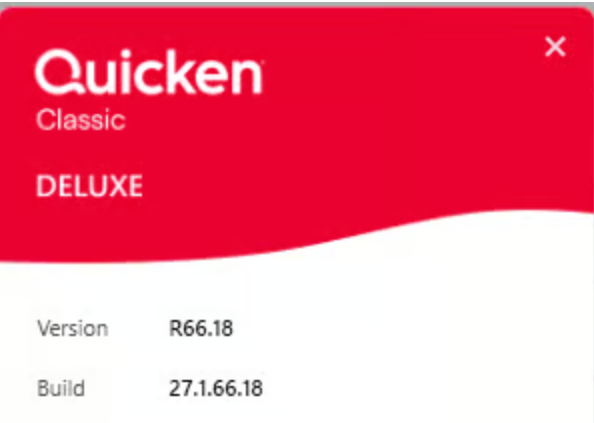
Also, why does it say my Subscription Expired on Feb 3, 2025?
I am actively looking at other personal finance software to replace Quicken.
Ed Osiecki
[Removed - Personal Information]
Comments
-
Hi @EOSIECKI,
Thank you for reaching out to us. I'm sorry to hear that you are experiencing these issues, but I'll be happy to help you troubleshoot them.
First, let’s refresh your subscription status to ensure your account connects properly.
Please sign out of Quicken using the steps below:
- Go to Edit
- Select Preferences
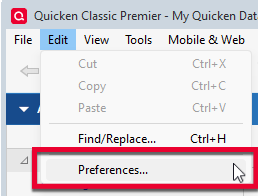
- Go to Quicken ID & Cloud Accounts.
- Click Sign in as a different user.
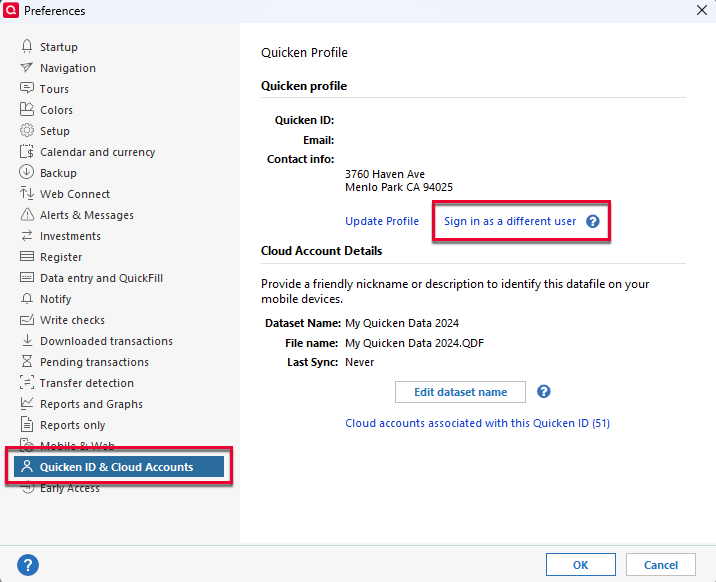
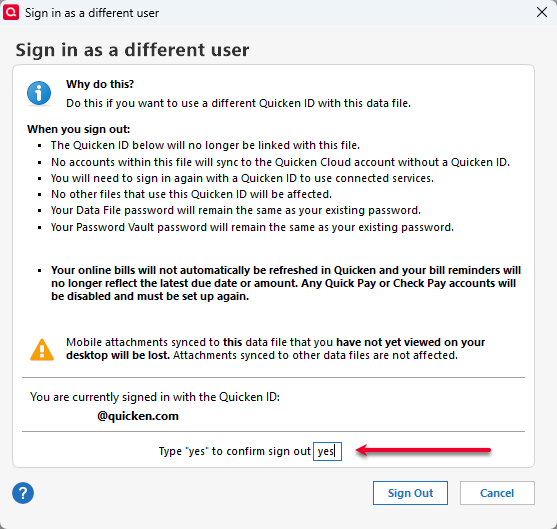
- Type yes to confirm and click Sign Out.
- After signing out, sign back in using the same Quicken ID.
Once you’re signed back in, please check your subscription status by going to Help> Check Subscription Status. Confirm that it shows the correct expiration date. If it does, run a One Step Update and check whether your Chase accounts download transactions properly.
Please let me know how it goes, and we’ll take the next steps if needed.
Quicken Laura
Make sure to sign up for the email digest to see a round up of your top posts.
0 -
OK. So I logged out of Quicken and then logged back in. Now, it looks like it is working. It downloaded the transactions I needed but also downloaded ones from last year marked as NEW and some marked as MATCH.
I was able to delete the ones that I did not want to accept, and the rest accepted.
So my question is, should I logout of Quicken instead of just ending the program? When I do that, the next time I launch it, it requires me to login.
I will see how my other accounts download and let you know.
Also, when I select Check Subscription Status it only says it's up to date. The About function displays the date.
Thanks,
Ed Osiecki
0 -
Hi @EOSIECKI,
That’s great news! I’m glad to hear your account successfully downloaded your transactions.
To answer your question, no, you do not need to sign out each time. You can continue closing Quicken as you normally would.
The sign-out/sign-in step is only needed in certain situations where the program needs to be refreshed. If that type of refresh is required again in the future, we’ll let you know.
I hope this helps! Please feel free to reach out if you have any other questions.
Quicken Laura
Make sure to sign up for the email digest to see a round up of your top posts.
0

Categories
- All Categories
- 6 Product Ideas
- 34 Announcements
- 248 Alerts, Online Banking & Known Product Issues
- 19 Product Alerts
- 265 Welcome to the Community!
- 301 Before you Buy
- 1.5K Product Ideas
- 55.8K Quicken Classic for Windows
- 16.9K Quicken Classic for Mac
- 1K Quicken Mobile
- 834 Quicken on the Web
- 129 Quicken LifeHub