Changes to Bill Reminder Not Saving When Entered [Edited]

Up until r66.18, I used to be able to just edit the instance of a bill, and the edit would be remembered whenever I entered the transaction into my register. Other future instances of the bill were not affected. I edited an instance of a bill on February 14. Today, I went to enter the edited bill and noticed that even though the amount shown on the current bill column was correct when the bill window (enter expense transaction window) opened, my bill reflected the regular bill and not the edited bill. Had to recalculate and re-enter the bill again.
[Edited - Readability]
Comments
-
Hi @lalvarez1,
Thank you for sharing what you’re experiencing.
First, could you please let me know whether this is happening with just one bill reminder or multiple reminders? If possible, try testing a different bill reminder to see if the issue occurs there as well. That will help narrow down the cause.
If the issue is affecting only one bill reminder, I recommend deleting that instance completely and then recreating it.
If the issue is happening with multiple reminders, please validate your data file using the steps below (be sure to create a backup first):
This clears errors and helps to fix possible file corruption.
- Go to File.
- Click Validate and Repair File.
- Select Validate file.
- Click OK.
Let me know what you find, and I’ll be happy to assist you further.
Quicken Laura
Make sure to sign up for the email digest to see a round up of your top posts.
0 -
Looks like it only affected the instances edited on the previous release. I only had two and I needed to enter the transactions so I had to correct them to do this. I then edited an instance, exited quicken, reopened quicken and entered the edited transaction and this time the edited transaction amounts were remembered. I’ll report if it happens again. Thanks for your response.
0 -
This morning I selected edit this instance of the next transaction, my paycheck. Quicken R66.18 only shows the amount and due date. I can’t edit the different categories that my paycheck has. Other transactions are shown with a details window where I can view and edit each category that makes up the reminder. I don’t remember not being able to view the paycheck categories before.
0 -
Hi @lalvarez1,
Thank you for coming back and providing more information. I appreciate it.
Are you receiving the same pop-up window shown below?
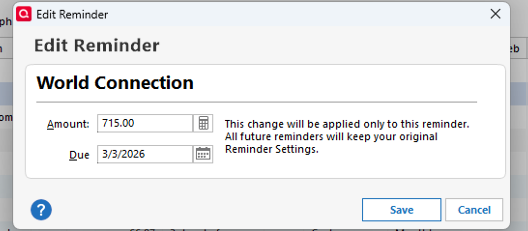
I look forward to your response!
Quicken Laura
Make sure to sign up for the email digest to see a round up of your top posts.
0 -
yes. I think it looks the same. I can edit the total amount but not the individual categories. I have to select enter to edit all the categories.
0 -
I have found that if editing only "this instance" it stays until sync to cloud, the it reverts to previous value. I thought something was not working as I kept having to adjust amounts at bill time. Experimented a bit and the sync seems to be the culprit.
0 -
Hi @lalvarez1,
Thank you for confirming that this is the window you’re seeing.
When editing a single instance of a paycheck transaction, Quicken is designed to initially allow changes only to the Gross Salary field. As you mentioned, once you press Enter, you can then modify the remaining categories. That behavior is expected and part of the program’s design.
Regarding the main issue, thank you as well to @Dougjtvh for sharing your experience, that insight is very helpful. I attempted to replicate the issue on my end, but was unable to do so.
To better understand the root cause, I have a few questions for both of you:
- Where is your Quicken data file stored?
To check, open Quicken and go to File. At the bottom of the menu under Recent Files, the file with the check mark next to it is the one currently open. Please share the full file path shown there. - Is your file being backed up or synced using any third-party services such as Carbonite, OneDrive, or Backblaze?
- When did you first notice this issue?
And a couple of additional questions specifically for you, @lalvarez1 :
- Do you sync your file to the Quicken Cloud?
- Have you noticed any specific pattern or action that seems to trigger the change, similar to what @Dougjtvh described?
I look forward to your response so we can continue narrowing this down.
Quicken Laura
Make sure to sign up for the email digest to see a round up of your top posts.
0 - Where is your Quicken data file stored?
-
Thank you for following up. My Quicken data file is store in my hard drive: C:\Users\<User Name>\Documents\Quicken\<data file>
I perform a daily data file back up using Quicken's Copy or Back Up file option. Then I use the Windows File Back up to back up my hard drive to an external drive every couple of weeks.
I noticed the issue the morning of March 1 when I went to enter an scheduled transaction that had been edited in February 14. I used the edit this instance because the bill instance had some one time only charges.
I don't think I am syncing my data file to the Cloud. I don't have sync to the Quicken Mobile and Web apps enabled because when I tried using the mobile app in my iPhone a couple of years ago there seem to be some file corruption/unwanted changes so I disabled the capability. However, I noticed that when I restore a data file back up that a window pops up notifying me of some cloud data transfers.
The only thing I noticed is that I just recently updated quicken to r66.18 and the transaction editing was done using the previous version. I have modified some scheduled transactions using the Edit this instance and the modifications are being remembered now. Once in a while I notice that my paycheck is shown as $0.00 in my calendar and when I select it and Edit the paycheck the amount is then corrected.
0 -
Hi @lalvarez1,
Thank you for providing the additional information. The file location looks correct, and your backup method is excellent; we can safely rule out file corruption related to file storage.
I’m glad to hear that your modifications are now being saved properly. However, based on what you’ve described, the paycheck reminder itself may be corrupted. If you haven’t already done so, I recommend recreating the paycheck reminder and deleting the existing one.
Steps to Delete the Paycheck Reminder:
- Click Tools.
- Select Manage Bills & Income Reminders.
- Locate and select the Paycheck reminder.
- Click Edit this instance and all future instances.
- In the pop-up window, click Delete in the bottom-left corner.
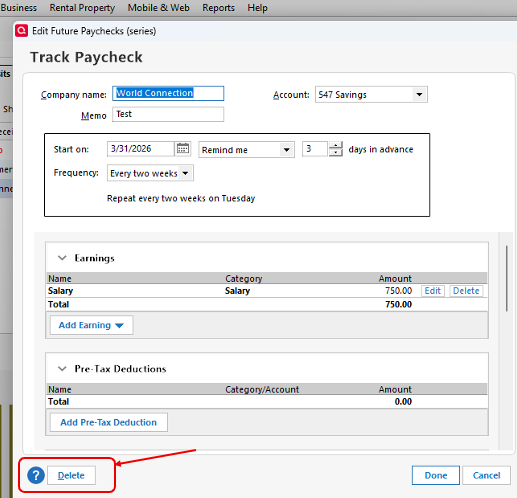
After deleting it, please create a new paycheck reminder and monitor whether the issue persists.
Let me know how it goes. I’m happy to continue assisting if needed.
Quicken Laura
Make sure to sign up for the email digest to see a round up of your top posts.
0 -
thanks I’ll try it and will let you know if it happens again. Hopefully I’ll remember to take screen shots.
0 -
one more thing I remembered. I also went through the Bank of America connection issue. Spent over an hour working with one of your coworkers trying to troubleshoot the issue. Deactivating, reactivating and attempting to reauthorize the accounts. Finally was able to fix it on my own by following a comment in this board. After the fix I tried to enter the edited transaction as a credit card, not Bank of America, transaction and noticed the issue I reported.
0 -
Hi @lalvarez1,
Thank you for coming back and for the update. I’m sorry to hear that you’re still encountering the same issue with the credit card entry.
Could you please let me know if you’ve tried creating a new bill reminder instead of using the existing one? This will help us rule out any possible corruption with the original reminder.
I’ll look forward to your update!
Quicken Laura
Make sure to sign up for the email digest to see a round up of your top posts.
0


Categories
- All Categories
- 6 Product Ideas
- 34 Announcements
- 248 Alerts, Online Banking & Known Product Issues
- 19 Product Alerts
- 265 Welcome to the Community!
- 301 Before you Buy
- 1.5K Product Ideas
- 55.8K Quicken Classic for Windows
- 16.9K Quicken Classic for Mac
- 1K Quicken Mobile
- 834 Quicken on the Web
- 129 Quicken LifeHub