Can't update 3 credit cards

One is CITI
One is a Barclay Card
One is a Chase
They have been updating for the past few weeks, & I didn't pay much attention to them last year. They simply stopped updating around Feb 2025, and they refuse to fill in all those transactions now. For Chase & CITI, I've jumped through all the reset /reactivate hoops. No improvement. I've tried QFX loads with 2 of 3 (don't know if Barclay will do that) - no luck. Quicken complains about the CITI card qfx - "Your financial institution has downloaded data for an account that does not exist in your Quicken data file [OL-362-A]" Oh yes, it does. But that's all the info I see. I don't really understand the log file and can't find anything helpful in there.
I mainly use this for the reporting features for tax purposes, and having to manually copy everything from statements makes that quite a job.
What can I do to fix these?
This is Quicken Classic R66.23 on Windows 10
[Edited - Readability]
Comments
-
Hi @cecinit2007,
Thank you for the detailed information, it’s very helpful. I’m happy to walk you through some troubleshooting steps.
First, let’s rule out the possibility that the transactions are hidden due to sorting or filtering.
1.Check the Sort Order
- Open the affected account register.
- Click the top of the Date column to ensure it’s sorted by date.
Sometimes transactions are present but appear out of order due to sorting changes.
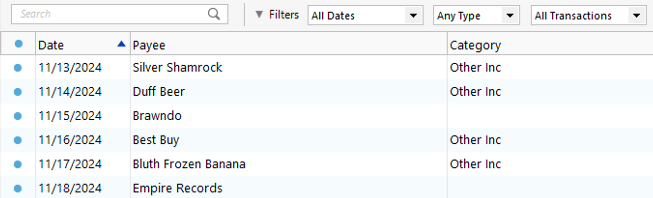
2. Reset Register Filters
- Click the Reset button at the top of the register.
This ensures no filters are hiding transactions.
3. Try refreshing your login session
- Go to Help > Refresh Sign In.
- Complete the login process.
- Run One Step Update again.
4. Check for Incorrectly Matched Transactions
It’s possible the missing transaction was matched to an existing one in the register. This commonly happens with recurring payments made to the same payee for the same amount.
5. Confirm No Backup Was Restored
If an older backup file was restored after accepting downloaded transactions, the restored file may not include those newer transactions.If everything looks correct with sorting, filtering, and backups, please check the account’s connection method:
Steps to check the connection method.
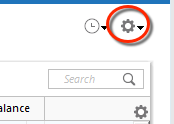
- Open the affected account.
- Click the Gear icon in the upper-right corner.
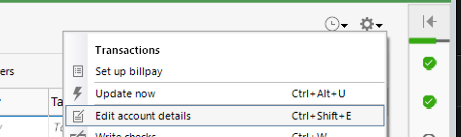
- Select Edit Account Details.
- Click the Online Services tab.
- The connection method will be listed below the Financial Institution name.
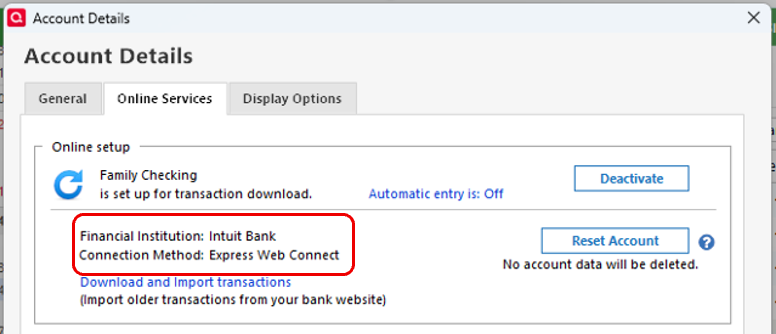
Please let me know what connection method is shown and how it goes after trying these steps. I’m here to help!
Quicken Laura
Make sure to sign up for the email digest to see a round up of your top posts.
1 -
They're all express web connect
I believe I've done all the steps you asked for (not %100 sure about #2 but I think they're filter-free).
No change. 2 of the 3 are updating now, but won't update the missing year. Barclay's I'm less sure of (it's used under special circumstances and hasn't been active lately).0 -
Hi @cecinit2007,
Thank you for following up and for trying the previous steps I appreciate your efforts. I have a few additional questions to help narrow this down:
- Which accounts are currently downloading updated transactions successfully?
- For the account that is not updating, are you receiving any error messages? If so, please share the exact error code(s).
- When attempting to import the QFX file, are you receiving the OL-362-A error on all three accounts?
- If you're unsure which Barclays account is affected, please compare the transactions and balances in Quicken with what appears on the Barclays website to confirm which account is out of date.
Additionally, I’d like to confirm a couple of file-related details:
- Where is your Quicken data file located?
To check, open Quicken and go to File. At the bottom of the menu under Recent Files, the file with the check mark next to it is the one currently open. Please provide the full file path shown there. - Is your file being backed up or synced using any third-party service such as Carbonite, OneDrive, or Backblaze?
I look forward to your response so we can continue troubleshooting.
Quicken Laura
Make sure to sign up for the email digest to see a round up of your top posts.
0 -
Many are updating: wells fargo mostly
A CITI credit card gets the OL-362-A message
The chase account gets nothing - nothing happens, no error messages
I don't currently know how to get a qfx from barclay - there's no question which account it is
C:\Users[name-removed]\Documents\Quicken\Esmond
No 3rd party syncing or backup
0 -
Barclay may be ok right now. I figured out how to get a qfx out of them, and quicken read it in and filled out the register. The process we're using that card for isn't active right now, so I can't be 100% sure it's working for the future, but there are no discrepancies.
0 -
I think chase is ok - I looked directly at the qfx and it looked truncated. I downloaded again, and it filled in the missing transactions. This account has been updating the past 2 months, it just didn't have any transactions from 2025 and wouldn't import them on reset.
CITI remains non working. It neither updates nor accepts qfx, hasOL-362-Aerror. reset/reactivation says all is well. It's not.
0 -
Hi @cecinit2007,
Thank you for coming back and providing more details. I'm glad we were able to download the Barclays and Chase information.
Okay, with the Citi Card account, I would recommend you to disconnect it and erase the Financial instituiton and account number with the following steps:
Deactivate account:
- Select Tools.
- Select Account List.
- In the Account List, locate the account and click Edit.
- In the Account Details window, select the Online Services tab.
- Click Deactivate next to the service you want to disable.
- Click Yes to confirm.
- Go to the General/Account Details tab.
- Remove the Financial Institution and Account Number fields.
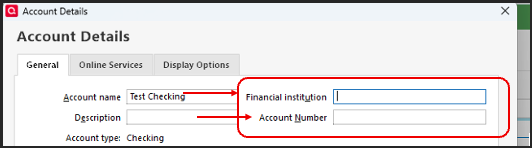
- Click OK to save the changes.
After that:
- Download a new QFX file from Citibank.
- Import the QFX file into Quicken.
When importing, it may ask you to select the account where you want to import the information, so please make sure to choose the correct one.
Please let me know how it goes!
Quicken Laura
Make sure to sign up for the email digest to see a round up of your top posts.
0 -
I don't have the option of removing the financial institution
0 -
Hi @cecinit2007,
You’ll need to deactivate the account first, then try removing the Financial Institution and account number. If, after deactivating the account, those fields remain grayed out, please close and reopen Quicken, then return to Account Details to remove the information.
Please keep the account name as it is.
I’ll be waiting for your update!
Quicken Laura
Make sure to sign up for the email digest to see a round up of your top posts.
0 -
No difference - cannot remove financial institution
(Also, quicken still rejects qfx import for this acct)0 -
Hi @cecinit2007,
Thank you for trying that.
Have you tried importing the information into a new account? If not, please follow the steps below (and make sure to save a backup before making any changes):
Steps to create a new offline account:
- Click the Add Account button (the + icon) at the top of the sidebar.

- On the Add Account screen, scroll to the bottom and select Offline Account.
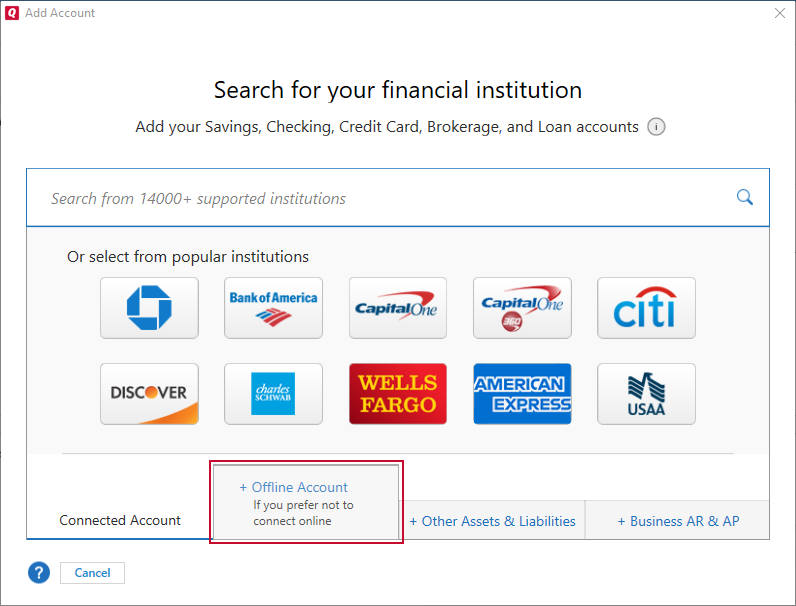
- On the Offline Accounts screen, choose the appropriate account type (for example, Checking under
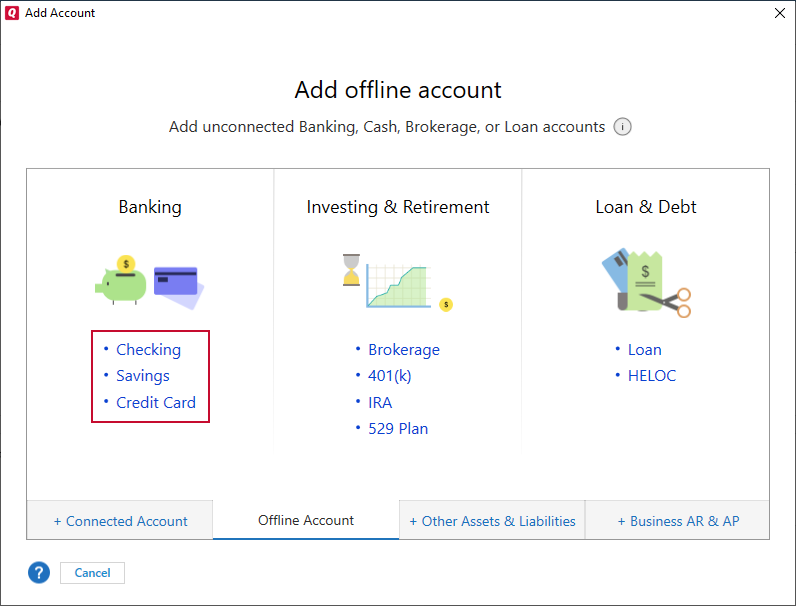 Banking). Please make sure to select the same account type as the old account.
 - Then try importing the information into the new account.
Please let me know if that works!
Quicken Laura
Make sure to sign up for the email digest to see a round up of your top posts.
0 - Click the Add Account button (the + icon) at the top of the sidebar.
-
Q wouldn't let me do that - it didn't offer this new account as a place to import to - but it would let me create a new account on import, so I did that.
This doesn't help me in the long run, because it's disconnected from its history, and it wont update.
I can at least do my tax reporting for 2025.0

Categories
- All Categories
- 6 Product Ideas
- 34 Announcements
- 248 Alerts, Online Banking & Known Product Issues
- 19 Product Alerts
- 265 Welcome to the Community!
- 301 Before you Buy
- 1.5K Product Ideas
- 55.8K Quicken Classic for Windows
- 16.9K Quicken Classic for Mac
- 1K Quicken Mobile
- 834 Quicken on the Web
- 129 Quicken LifeHub