Been Battling CC-800 Issues yesterday (15 Feb) and today (16 Feb)....

I am using the same QDF file that I used on 14 Feb. Using Quicken Premier Desktop on Windows 11. Quicken updated to R66.12 late last week.
I have over 40 accounts in Quicken. Everything was working as expected until yesterday.
Did an OSU and over 30 accounts showed the CC-800 error and with the red circle with the line through it. I followed the recommendations and reauthorized all 30 accounts - time consuming….
Now when I OSU, I get random CC-800 errors (i.e., not all accounts, but different). No red circle, just the Update summary that reports the error with a "Fix It" button. I "fix it" by re-adding the account.
So far, I have had to re-add 12 accounts - after two OSUs…BofA and Chase the fist time and Citi and AMEX the second time….
Frustrating!
Comments
-
Please see my post titled "One Step Update is STILL BROKEN…"
0 -
@JeffWeems , Thanks. I agree that OSU needs to be fixed, but it has been working for me for numerous years. It started to mess up for me with the recent update to R66.12. It reported a CC-800 on Merrill yesterday. Today I found a more disturbing issue. OSU reported Success on my Discover Card update. However, email from Discover stated that a payment was made. When I went to the account and issued the "Update Now" command, Quicken reported a CC-800 error. I did "Fix It" by re-adding the account!
It seems strange that OSU works fine on some accounts and reports success on others when there is really an issue.
0 -
I have been having the same CC-800 issues for three days now. Every time I sync, Quicken will throw CC-800 errors on every bank account causing me to have to reset every connection. All my windows software and system drivers are up to date. This has happened every few months to my Quicken for the last year even after clean installs of of Windows and Quicken. Each time it eventually temporarily resolves without any specific intervention on my part. I have been a Quicken Classic user for over 10 years and use it everyday. The frequency of these errors is causing me to look for or DIY another solution intsead of paying for frustration.
0 -
@Tim Bruhn , in the past CC-800 errors were rare for me. Now, in the past week, they have been the norm. I have been using Quicken for over 20 years. Like you I have all of the latest Windows 11 updates. Are you on R66.12? My gut says there is an issue with that update. It did change the account list for account creation (a "It's not broken, don't fix it" update to me). Maybe that introduced an error. When I have time I am going to cal Quicken support. I did file two problem reports already.
0 -
@tfhoughton I just checked my version, I am on 65.29 which Quicken says is the latest version for me. My issues usually occur following an update. Not just CC-800 errors, but lately quicken will randomly change the beginning balances on some accounts immediately after a Quicken update. It was so bad I documented what what the opening balance should be in the memo field of of the beg balance line for every account so I could quickly fix that issue. The CC-800 issue has been going on for about six months.
0 -
@tfhoughton So once again the CC-800 errors I was experiencing for the last three days went away on their own today after I reset all of my connections. Over the last three days, I reset these connections over six times. I look forward to the next Quicken update where they will appear again.
0 -
I did not get any CC-800 errors this morning, but one of my Fidelity accounts that did have outstanding transactions did not update via OSU even though OSU reported a Green status. I also tried "Update tranactions". No luck! I had to reset the account to get it to update the transactions. The recent updates have messed up OSU!!!!
0 -
I am constantly getting CC-800 errors on my Fidelity accounts. Over the last two weeks I've tried correcting this using every method posted. That being said lately I have been manually checking Quicken against each account on Fidelity website and all seem to agree.
The pull-down list shows the red dot next to each account with the error no new transaction to download??
Is this the problem? Is it reporting this as an error when it is not???
0 -
Hello All,
Thank you for reporting the CC-800 errors you are seeing.
Usually, this error occurs if you've deactivated or deleted an account and then restored a Quicken backup file. The article linked above outlines troubleshooting steps to resolve this issue. Here is the first:
First, you'll need to deactivate the affected accounts:
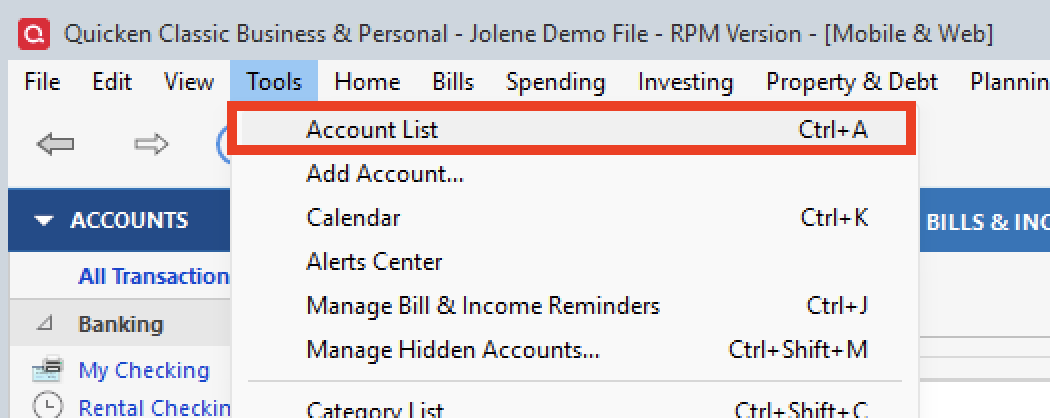
- Select Tools > Account List
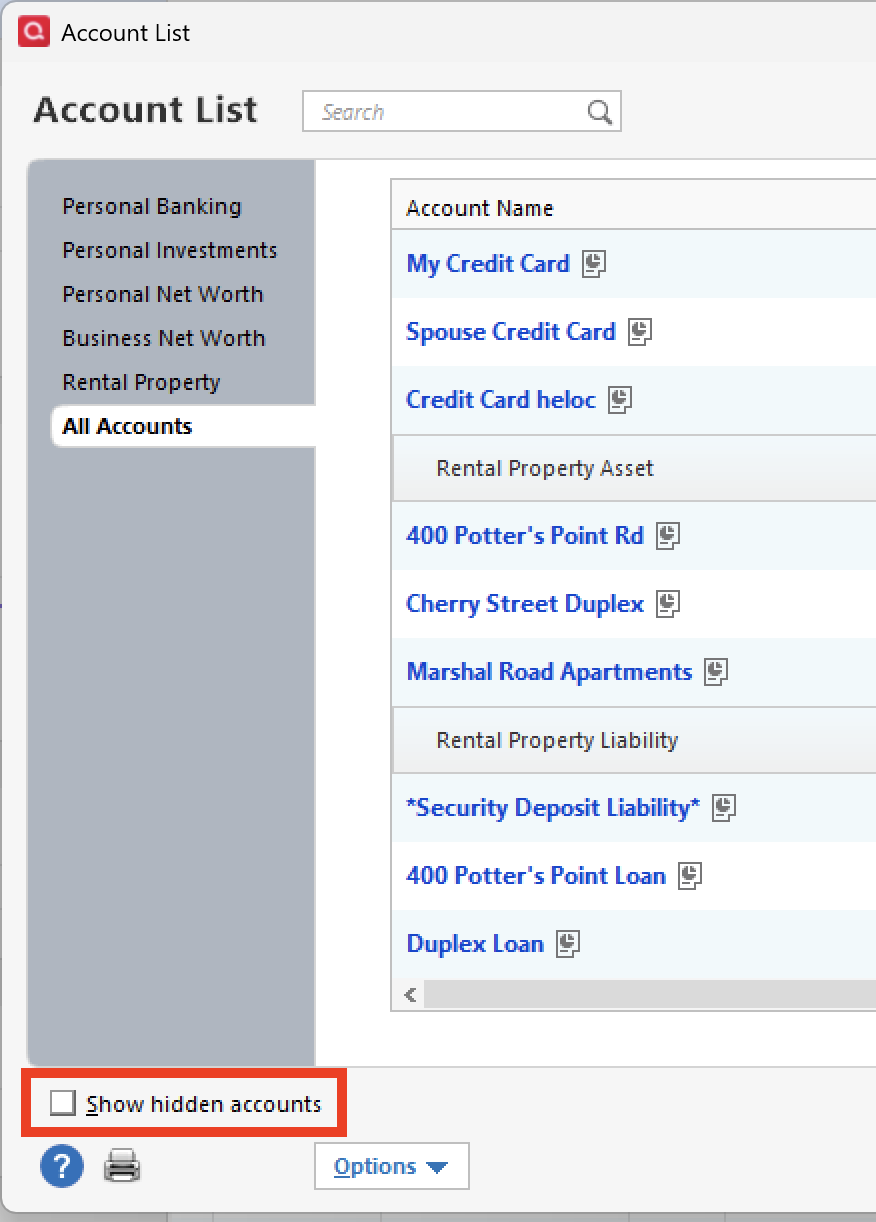
- If present, select the Show Hidden Accounts checkbox at the bottom of the Account List
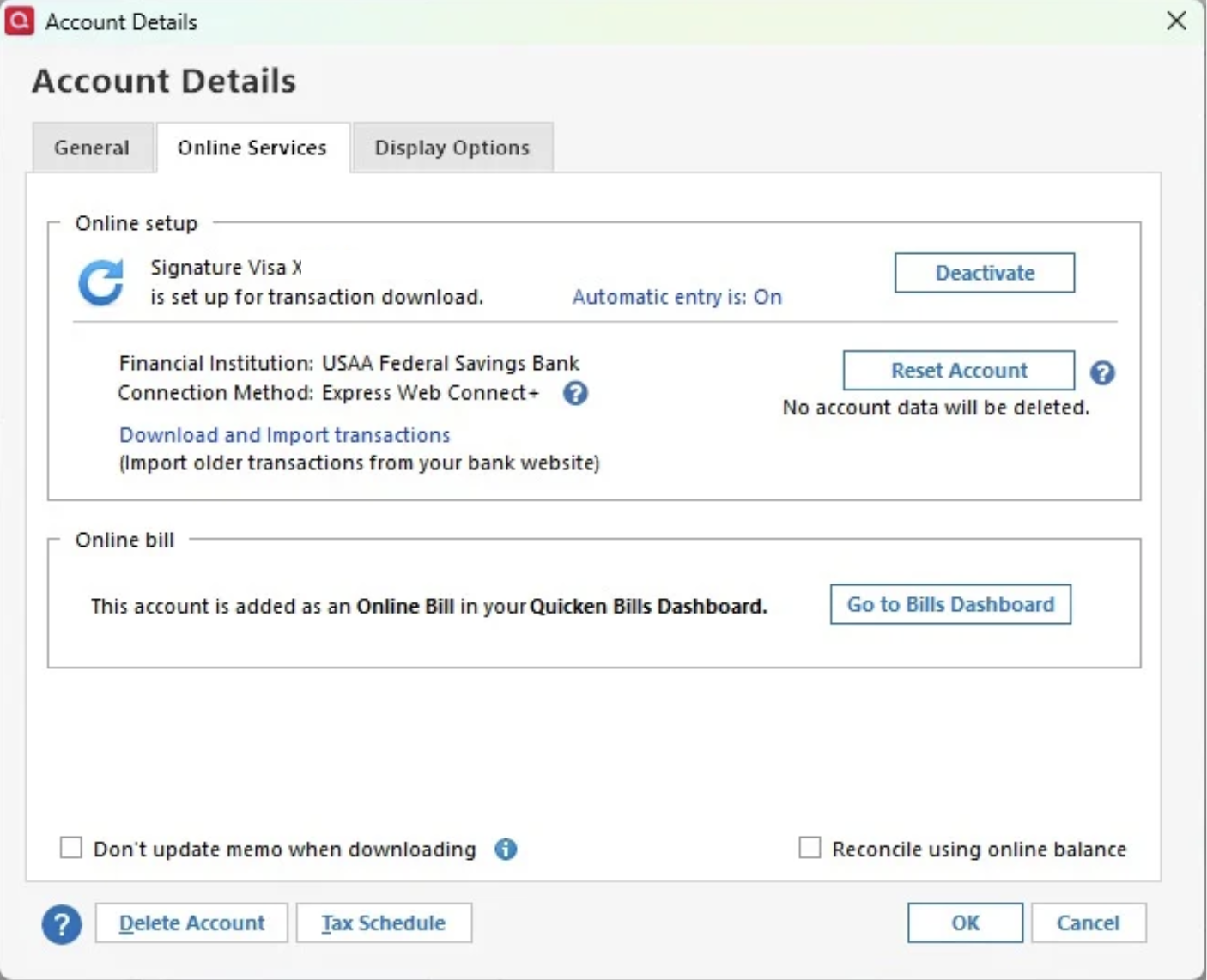
- Select Edit on each account with this error and Deactivate them on the Online Services tab
- When finished, close the Account List.
Please complete the remaining steps in the article. If the steps do not resolve the error, contact Quicken Support directly so they can investigate what could be causing this.
For anyone experiencing this issue specifically with Fidelity, we do have an Open Alert for this financial institution. It asks that you contact Quicken Support, so these can be handled on a case-by-case basis.
Hope this helps!
Quicken Alyssa
Make sure to sign up for the email digest to see a round up of your top posts.
0 - Select Tools > Account List
