Transactions for Today's date are not downloading with Quicken for Windows

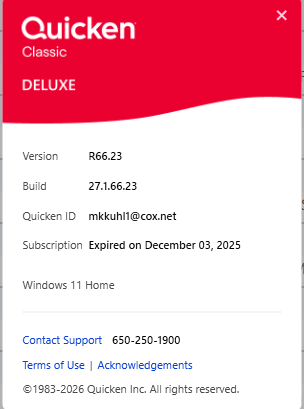
When I use the One-step update, I am not getting transactions for the current date.
I download transactions directly from my bank and it did include these transactions.
I am a member of Topside Federal Credit Union (https://www.topsidefcu.org/)
Comments
-
Hi @Kris Kuhl,
Thank you for sharing what you’re experiencing.
From the screenshot you provided, the expiration date appears to be incorrect. This suggests that Quicken may not be recognizing your current membership status, which could be contributing to the issue.
Please try signing out of the Quicken application and then signing back in by following these steps:
- Go to Edit > Preferences > Quicken ID & Cloud Accounts.
- If you are unable to see the Edit > Preferences menu, please proceed to the next step.
- Click Sign in as a different user.
- Type yes to confirm, then click Sign Out.
- After signing out, sign back in using the same Quicken ID.
Once you’ve completed these steps, please try updating your accounts again to see if new transactions download (please ensure there are new posted transactions available on the bank’s website).
Please let me know how it goes. I’ll be happy to continue assisting if needed.
Quicken Laura
Make sure to sign up for the email digest to see a round up of your top posts.
0 - Go to Edit > Preferences > Quicken ID & Cloud Accounts.

Categories
- All Categories
- 18 Product Ideas
- 34 Announcements
- 246 Alerts, Online Banking & Known Product Issues
- 19 Product Alerts
- 517 Welcome to the Community!
- 682 Before you Buy
- 1.5K Product Ideas
- 55.7K Quicken Classic for Windows
- 16.8K Quicken Classic for Mac
- 1K Quicken Mobile
- 834 Quicken on the Web
- 127 Quicken LifeHub