How to see sub-categories (Q Mac)

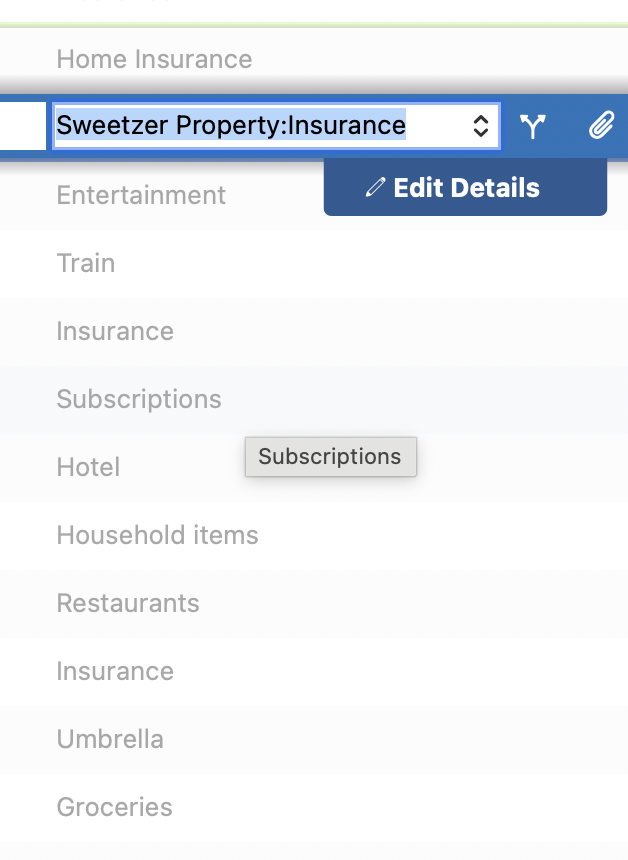
I have 6 accounts called Insurance:xxxxxx (e.g. Insurance:Umbrella, Insurance:Car, Insurance: property taxes. However, in the transaction register, I only see "Insurance" so it's difficult to match transactions since some of the amounts vary each month. I have to hover to see that instance item it is in particular.
Answers
-
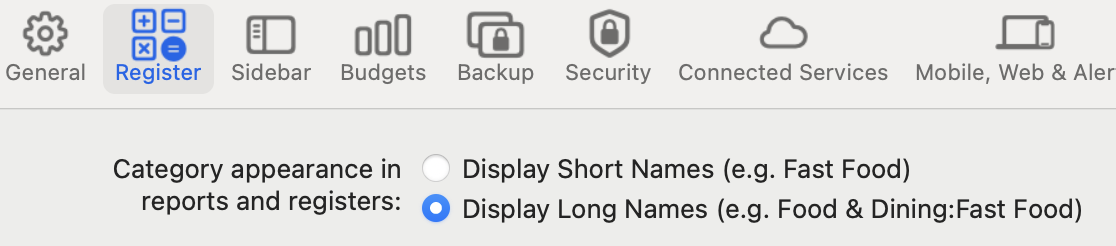
@deanhale818 There is a setting to control whether you see the full category (long name) or just the last level of subcategory (short name): Go to Settings > Register and the first two lines allow you to sset which you want to see:
 Quicken Mac Subscription • Quicken user since 19930
 -
If I'm understanding correctly, you have a top category for each property, e.g. Sweetzer Property. Then under each a subcategory "Insurance" and for each of these, sub-sub-categories of the type of insurance, eg. Car, Umbrella, etc. Do I have that right?
If so, using long name is truncating the name so you can't see the last part. If you switch to the short name, you're only going to see the last part, so you won't know which property it is.
One solution is to continue using the long name option, but widen the category field in the register as much as necessary in order to see the full category name. To adjust a column width, hover the cursor over the divider between columns on the column header and a symbol will pop up to let you adjust column width.
But a better solution would be to have just one category "Insurance:Car", "Insurance:Umbrella" etc. and use Tags to indicate which property the transaction applies to. Not only will this compact your register display, but it will make much more flexible reporting options available.
Quicken Mac Subscription; Quicken Mac user since the early 90s0 -
I agree with @RickO that tags might solve your problem. The one potential downside is that I don't see a way to incorporate tags into a budget - it appears you can only budget based on category so you wouldn't be able to set a budget for each property without having separate categories for each property.
0
