CC-929 Error from Multiple Financial Institutions

I was having an issue with a reconstructed/new Quicken data file. I noticed that my new file (unlike my existing Quicken data files) is unable to connect to any financial institution via Express Web Connect. At first, I was receiving a CC-503 (bad username and password), which was a false flag, as I could use the same userid/password to log in at the financial websites. After logging out of Quicken, exiting, reloading Quicken, and logging in again, the CC-503 error is gone.
The new error is CC-929. I am trying to save time: does anyone here know how to fix this, or do I need call Quicken support again? Thanks.
[Edited Readability]
Comments
-
Hi @erintell,
Thank you for reaching out. I’m happy to help you troubleshoot this issue.
To better understand what’s happening and provide the most accurate guidance, I have a few questions:
- In the new file, are you attempting to connect the same accounts that are already connected in other existing files?
- Which specific financial institutions are you experiencing issues with?
- Have you tried copying and pasting your login credentials directly into Quicken to rule out any typing errors?
- When did you first start encountering the CC-929 error?
I see that you previously submitted logs, and I appreciate that. However, please submit a new set of logs after attempting to connect your accounts one more time. This will allow me to review the most recent errors and better assist you.
I look forward to your response!
Quicken Laura
Make sure to sign up for the email digest to see a round up of your top posts.
0 -
I'm having a very similar experience - since late February - spent a couple of hours on the phone with support 2 days ago - he said that my file (with decades of data) was probably irretrievably corrupted - but then seemed to walk that back when we created a brand new empty file & had the same connection issues. Suggested I wait and try again in 24 hours. Tried again today & problem only got worse (more institutions impacted) No idea where this leaves me as it impacts more than half of my accounts - looking at similar threads on this site, I can't see that anyone has resolved. It's kinda making Quicken unusable for my purposes.
0 -
Thank you for sharing what you are experiencing as well.
I was able to review the previous support ticket, where it was suggested to reset the passwords for the affected financial institutions and then try connecting again after 24 hours. Were you able to reset any of those passwords?
It also appears that you have more than one data file associated with your account. Are you experiencing the same issue in both files?
Additionally, your account shows multiple successful connections today. Could you please confirm whether the issue is affecting only certain financial institutions? If so, please let us know which ones.
Lastly, could you please submit your log files so I can review them?
To send your logs:
- Open Quicken.
- Click Help.
- Select Report a Problem.
- Click Send to Quicken.
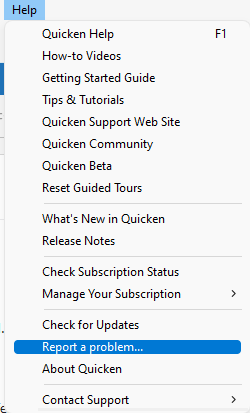
Once submitted, please let us know. I look forward to your response!
Quicken Laura
Make sure to sign up for the email digest to see a round up of your top posts.
0 -
Sorry, just saw this message - I just submitted logs - from a new/empty data file - which is what the support suggested I try - there are SOME banks that work and some that do not. For my credit union, I cannot reconnect my accounts - or set up new - BUT I do have a data file that I use to track my late father's bills, and that connects to the credit union just fine (notably, I never tried restoring that file from a backup).
[Edited Readability]
0 -
No problem at all, and thank you for sending your log files.
A few quick clarifications so we can better assist:
- When you mention “Credit Union,” are you referring to Logix FCU or another financial institution?
- Are you still seeing the CC-929 error, or has any other error message appeared?
- It wasn’t clear if you’ve had a chance to reset your passwords as suggested by support; could you please confirm?
I’ll look forward to your reply and will be happy to assist further once we have these details.
Quicken Laura
Make sure to sign up for the email digest to see a round up of your top posts.
0 -
yes Logix - re: password, I did, but for good measure, I just reset it again. and still failed - seems to fail without barely even trying - prompts me for username & password and then immediately says "oops we're having a problem" and CC-929
same issues with barclays bankFWIW, some of the accounts that DO work, redirect me to their website to sign-in (& approve sharing data with quicken)
barclays & Logix just take me to the old style quicken pop-up window that says "add account" (repeatedly)
uploading my logs again rn - so you can see what happened just now after I reset the password. I also tried enabling 2FA to see if that mattered, but no change in behavior. TY!0

Categories
- All Categories
- 23 Product Ideas
- 34 Announcements
- 247 Alerts, Online Banking & Known Product Issues
- 19 Product Alerts
- 265 Welcome to the Community!
- 300 Before you Buy
- 1.5K Product Ideas
- 55.8K Quicken Classic for Windows
- 16.9K Quicken Classic for Mac
- 1K Quicken Mobile
- 834 Quicken on the Web
- 128 Quicken LifeHub