Scheduled deposits disappearing?

Having a new issue where the next deposit (paycheck) is disappearing. Not the whole series, only the next one. For example, two paychecks, 15th and last day - I see April on with no issues, but 3/31 for both continually disappear. I can edit the series and they will show but then after an update or a period of time they again disappear.
[Edited Readability]
Answers
-
Hi @Ben McMahan,
Thank you for sharing what you are experiencing. To better understand and address this issue, I’ll need a bit more information from you.
- How long have you been having this problem with your paychecks?
- Is this happening only with paychecks, or does it also affect other types of reminders? If so, please specify the type (bill, income, transfers, etc.)
- Where is your Quicken file located? You can check by opening Quicken, going to File > Show "File's Name" in Finder, right-clicking the highlighted file, selecting Get Info, and noting the path under Where
- Have you tried restoring a backup from a date prior to when the issue started?
I look forward to your response!
Quicken Laura
Make sure to sign up for the email digest to see a round up of your top posts.
0 -
Hi @Quicken Laura
1. It has been happening for about 3 days now. Actually this morning I took the step of deleting both series and recreating them thinking that might resolve the issue; it didn't. It is still randomly dropping a future check out of the series (this time it was the 4/15 check)2. So far I have only noticed these 2 specific scheduled Income items (which is what I have used for my paychecks)
3. /Users/xxxx/Library/Application Support/Quicken/Documents
4. I have not tried a restored - that has historically been a pretty disruptive measure
Thanks!
0 -
Hi @Ben McMahan,
Thank you for providing those details; they’re very helpful. We’ve received similar reports of reminders behaving incorrectly on the Windows version, and to assist further, we’d appreciate it if you could send your log files so we can forward them to the appropriate team for investigation.
To send your logs:
- Open Quicken.
- Click Help.
- Select Report a Problem.
- Click Send to Quicken.
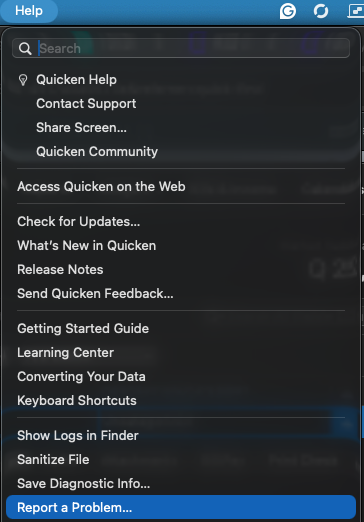
Once you’ve submitted the logs, please let us know. I look forward to your response!
Quicken Laura
Make sure to sign up for the email digest to see a round up of your top posts.
0

Categories
- All Categories
- 18 Product Ideas
- 34 Announcements
- 247 Alerts, Online Banking & Known Product Issues
- 19 Product Alerts
- 518 Welcome to the Community!
- 682 Before you Buy
- 1.5K Product Ideas
- 55.7K Quicken Classic for Windows
- 16.8K Quicken Classic for Mac
- 1K Quicken Mobile
- 834 Quicken on the Web
- 128 Quicken LifeHub