Quicken software not updating stock option prices (Edited)

Once again I have renewed my quicken classic without a fix for options prices! I think this is a problem that's been going on 4 or 5 years without a solution! I wish there was a descent alternative investing platform for tracking my portfolios without the hassle of connecting to the Financial Institutes!
Comments
-
Hi @iriddles,
Thank you for contacting the Quicken Community. I’m sorry to hear you’ve been having trouble updating stock prices for a while. I know how frustrating that can be.
Before we proceed with troubleshooting, I’d like to ask a few questions to better understand the situation:- Which troubleshooting steps have you tried so far?
- Is your Quicken file being backed up or synced by any third-party services, such as Carbonite, OneDrive, or Backblaze?
- Are you using a VPN, firewall, or antivirus software? If so, please let me know which one(s).
I’m here to help and look forward to your reply!
Quicken Carlos
Make sure to sign up for the email digest to see a round up of your top posts.
0 -
I have been having the same problem. The problem is not stocks, but stock options. When I have an option, I enter the "Option Contract Name" for the Symbol , which is how Options are tracked. An option contract name is always:
- The symbol of the underlying stock in upper case
- The expiration date of the option in yymmdd format (6 digits)
- The letter "C" for a call option or the letter "P" for a put option
- The strike price of the option, 8 digits, expressed in thousandths of a collar (00099000 would be $99).
This contract name can be used to lookup prices on various public websites (Yahoo, etc.)
0 -
correct! listing options that way in quicken worked for all the years I've traded options until several years ago after an update!
0 -
Quicken Carlos… I will answer your questions when I have more time. Thank you.
0 -
Thanks for sharing the details. Here’s the recommended way to track Stock Options in Quicken:
- Go to Tools, then click on Security list
- Click on Add Security in the lower left
- Enter the Ticker Symbol for the Stock Option
- If it doesn’t appear, select Enter Manually.
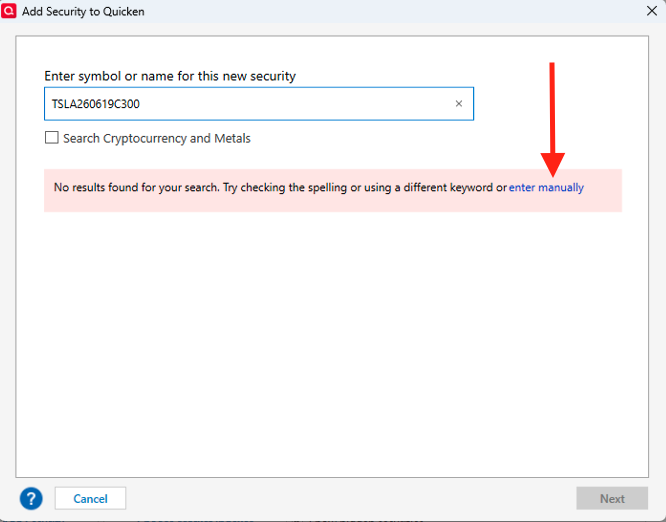
- Enter the Ticker Symbol, Name, and Security Type.
- Click on the Next lower Right.
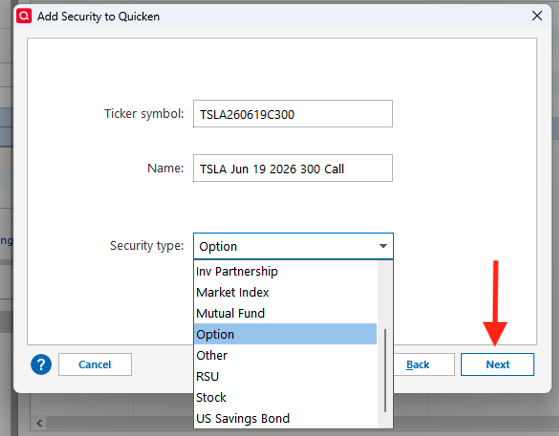
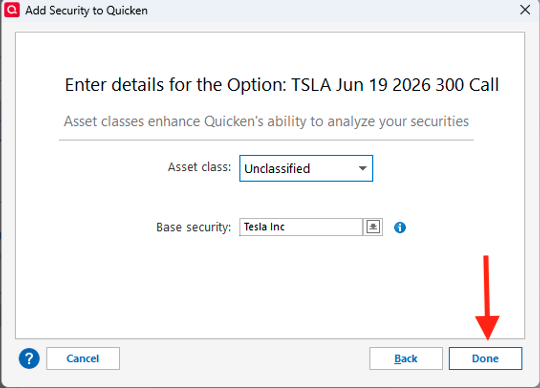
- Enter Details for the Stock Option using the dropdown menu.
- Click on Done.
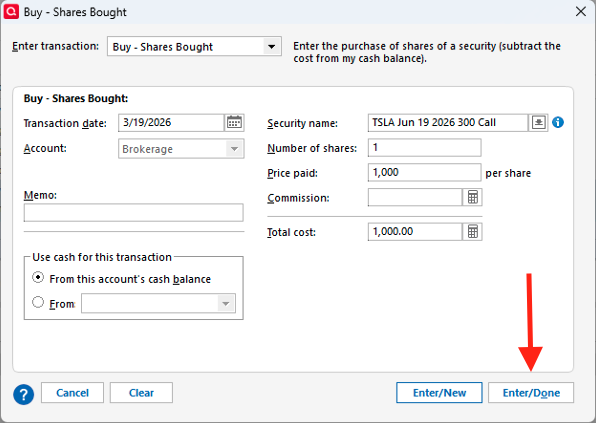
To record the transaction
- Go to your Investment Account, Click on Enter Transaction
- Choose Buy as the transaction type.
- Fill in the required information.
- Keep in mind that Quicken tracks the total contract cost, not the cost per share.
- Click on Enter/Done.
Check Your Portfolio
- Go to the Portfolio view.
- Check the Quote/Price.
- For Stock Options, prices should be updated manually, as the Quotes/Price feature is mainly for Stocks, ETFs, and Mutual Funds.
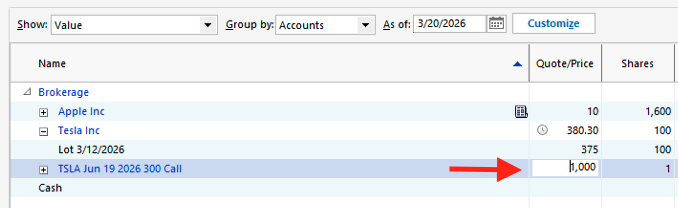
Hope this information helps you manage your Stock Options.
Quicken Carlos
Make sure to sign up for the email digest to see a round up of your top posts.
0 -
Quicken Carlos…I have been tracking my options trades on Quicken since 2013. Their prices were updated along with all other securities each time I used the "one step update" button until several years ago, after a Quicken software update. After that update, I contacted Quicken support, and I/we did everything they could think of. I spent hours on the phone with them, and their having access to my computer screen, only to realize that the tech guys didn't know what option trading was! They kept telling me the options price wouldn't update because the ticker symbol I had entered was incorrect. (example: I entered TSLA 260619P00300000, they kept telling me the ticker was TSLA).
Interestingly, the Tesla option in your example above is how Quicken recommends listing option contract numbers? Also, I think you may have answered the burning question inadvertently above as well. "For Stock Options, prices should be updated
manually, as the Quotes/Price feature is mainly forStocks, ETFs, and Mutual Funds".My guess is that someone or some entity started charging for option update prices, and Quicken decided not to pay!
[Edited-Readability]
0 -
Hi @iriddles,
Thank you for taking the time to reply.
We’ve submitted a feature request for this (CTP-16730). While we don’t have an ETA at this time, the request is under review.
Please let me know if you have any additional questions. I’m happy to help!
(CTP-16730)
Quicken Carlos
Make sure to sign up for the email digest to see a round up of your top posts.
0

Categories
- All Categories
- 23 Product Ideas
- 34 Announcements
- 248 Alerts, Online Banking & Known Product Issues
- 19 Product Alerts
- 265 Welcome to the Community!
- 301 Before you Buy
- 1.5K Product Ideas
- 55.8K Quicken Classic for Windows
- 16.9K Quicken Classic for Mac
- 1K Quicken Mobile
- 834 Quicken on the Web
- 129 Quicken LifeHub