2 chase accounts with 2 logons in the same file. when i activate 1 the other is deactivated

I saw Angi had the identical problem in 2022. it is now 2026 and this is still an issue. Is there now a solution? If so, I cannot find it. See:
https://community.quicken.com/discussion/7917757/new-chase-update-method-wont-allow-different-accounts-with-different-logins-to-be-active?utm_source=community-search&utm_medium=organic-search&utm_term=i+have+2+chase+logons+if+i+activate+one+the+other+is+deactivated
Answers
-
Hi @luisadelavoce,
Thanks for taking the time to contact the community.
Before following any troubleshooting steps, I recommend creating a backup file
Next, I suggest deactivating all accounts associated with Chase:
To deactivate an account:
- Select the Tools menu and choose Account List.
- In the Account List, select the account you want to deactivate, then click Edit.
- In the Account Details window, click the Online Services tab.
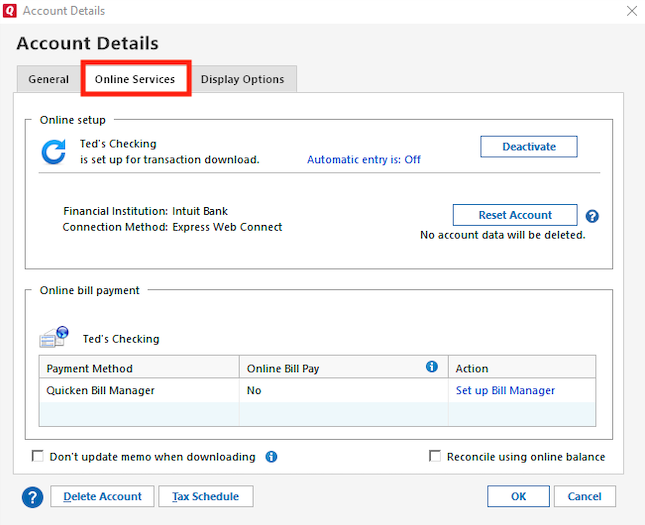
- Click Deactivate next to the service you want to disable.

- Click Yes to confirm that you want to disable this service.
Once all accounts are deactivated, you can reactivate them:
To reactivate accounts:
- Go to Tools > Add Account.
- Select the bank for the deactivated account(s).
- Click Continue, then Sing in.
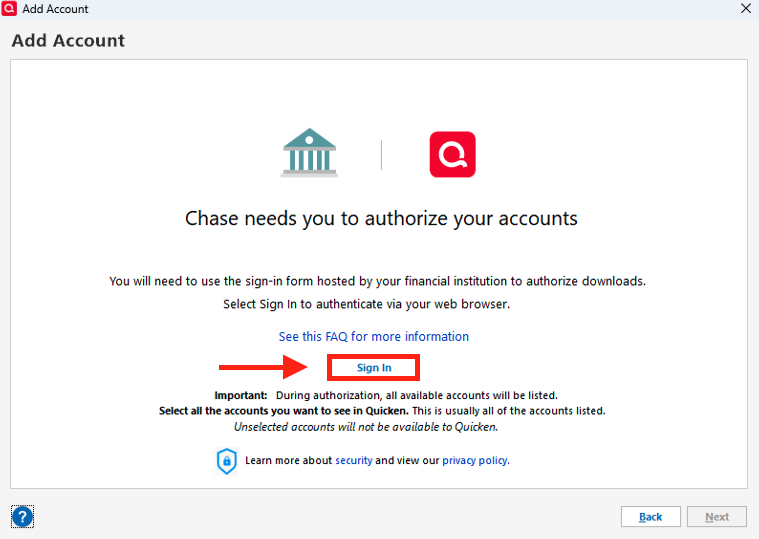
- Enter your credentials.
During the authorization process, you’ll see a list of accounts available to add. If the accounts are joint, I recommend using the primary account holder’s credentials.
Let me know how it goes. I’ll be happy to assist further!
Quicken Carlos
Make sure to sign up for the email digest to see a round up of your top posts.
0
