Recent Mac Update Changes Blue Dots

Is there any way to undo the recent update? I don't want the new 'features' and now my blue dots are screwed up.
Yes, it's a small thing but it frustrates me now every time I view my files in Quicken. I've used Q software for decades.
Comments
-
@Qunbee The only way you could go back would be, if it's even practical, to restore your previous version of the program (version 8.4.x) and restore a backup of your data file from prior to the upgrade to the 8.5 version. But that would leave you permanently stuck on version 8.4, and I don't think that's desirable.
I think a better approach would be for you to explain what is screwed up with your blue dots.
The blue dot has always denoted a transaction which has been downloaded and not reviewed. It still does, but they have added two new icons to offer more detail about a downloaded transaction. The new "blue pencil with blue dot" icon shows that not only is this a downloaded transaction which hasn't been reviewed, but it has been automatically matched by Quicken to a manual transaction which had previously been entered. And the new "orange pencil with blue dot" icon shows that not only is this a downloaded transaction which hasn't been reviewed, but it has been manually matched by you to a manual transaction which had previously been entered.
So aside from there being three variants of a blue dot now, it should not have changed anything in your registers. Can you explain what is screwed up?
Quicken Mac Subscription • Quicken user since 19930 -
Thank you for responding. #1 the new blue pencil/blue dot icon appears on every transaction, not just the manually entered, the orange/pencil with blue dot does not appear in any of my transactions - I still have just the orange pencil icon for transactions I've entered which haven't been 'matched' by the download from the institutions.
Oddly, the bank accounts display the new icon combo but not the credit cards (with under 10 transaction exceptions!) Today's downloaded transactions used the old blue dot.
Does that help? It is confusing. This change in icons is unwanted and not necessary for me….I must just be in a small minority.
0 -
Let's take a step back to the basics: blue always denotes a downloaded transaction and orange always indicates a manually-entered transaction. So a downloaded transaction is a blue dot; if the downloaded transaction has been auto-matched to an existing manual transaction, it's a blue pencil/blue dot icon to convey it is both downloaded and auto-matched; if the downloaded transaction has been manually-matched to an existing manual transaction, it's an orange pencil/blue dot icon to convey it is both downloaded and manually matched.
Today's downloaded transactions used the old blue dot.
The plain ol' blue dot is still a current icon. It appears when a transaction is downloaded, is not matched to a manual transactions, and hasn't been marked as reviewed. Are you saying that you have any transactions which downloaded today and show a plain blue dot icon, but were actually matched with existing manual transactions? If they haven't been matched with an existing manual transaction, automatically or manually, then the plain blue dot is the correct icon to be showing.
I still have just the orange pencil icon for transactions I've entered which haven't been 'matched' by the download from the institutions.
That sounds correct. The orange pencil icon denotes a manually-entered transaction. It only changes if that transaction is auto-matched to a downloaded transaction (blue pencil/blue dot icon) or is manually matched to a downloaded transaction (orange pencil/blue dot icon).
the new blue pencil/blue dot icon appears on every transaction, not just the manually entered
This is the comment that puzzles me. You're saying your entire register shows only the blue pencil/blue dot icon? And this icon appears on transactions which were not matched to existing transactions? For instance, if you withdrew $50 from an ATM machine, and you hadn't entered that transaction manually, then it should have a plain blue dot icon. Are you saying this isn't the case? It might help if you could provide a screenshot or two to illustrate.
If you click on a plain blue dot, you should see a pop-up menu like this:
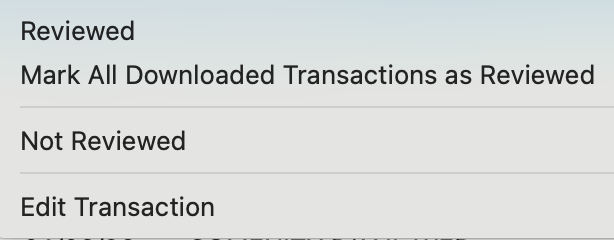
Whereas if you click on a blue pencil/blue dot icon, you should see a more detailed pop-up menu showing the downloaded transaction and the manual transaction it auto-matched with, like this:
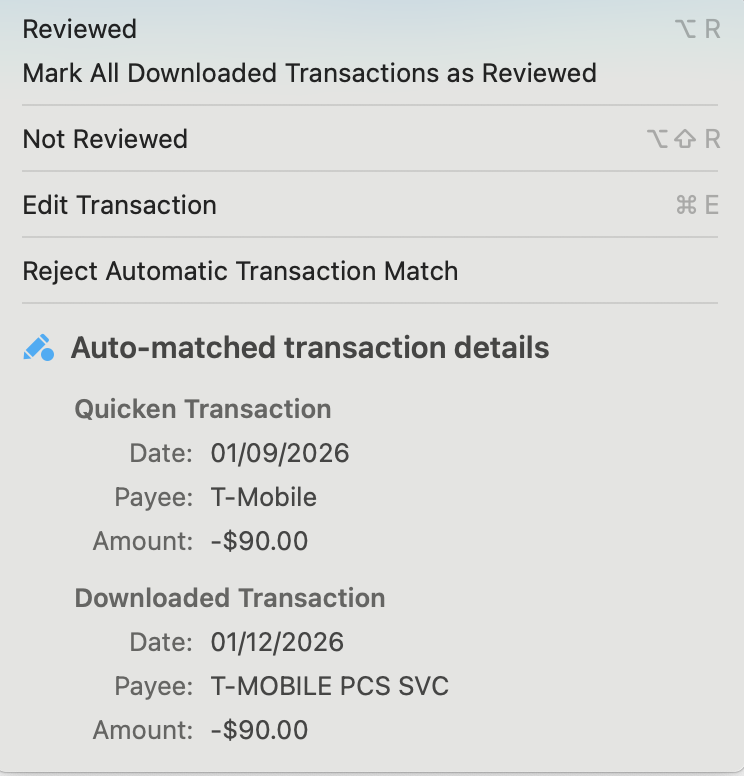
Are you saying that all your transactions with blue pencil/blue dot icons are NOT auto-matched as shown above?
Quicken Mac Subscription • Quicken user since 19930 -
Thank you for taking more time to try to help me Jacobs.
Re: first paragraph
#1 the blue pencil/blue dot icon began appearing in my registers after the latest update. Curiously a few older transactions (2025, 2024, 2023, 2022…) now have the duo. There is no way these are 'new' transactions. I reconcile all accounts every month. #2 I have zero orange pencil/blue dot icons in any of my current 11 registers or 29 closed registers. I've never seen it. What I have seen are 'duplicate' transactions (one manual + one downloaded) and I delete one of them.
For me the blue dot had indicated all transactions which have cleared their respective institutions. I could easily see if any transaction was not cleared or 'matched', monitor, and correct if necessary. I do not care whether any transaction was manually entered or downloaded - I just care if all are in the register, whether they've cleared and my balances reflect what the institutions show.
Re: second paragraph
Yes, before the most recent update my manually entered transactions WOULD get a blue dot after receiving a download from the institutions. After the update, the duo icons appear on most transactions as you described so well. Thank you.
Re: third paragraph - please see subject #2 above
Yes, the blue pencil/blue dot icon appeared in ONE register (changing ALL of the previously plain blue dotted entries). In frustration after searching for solutions to revert back to the single blue dot, I clicked "Mark All Downloaded Transactions as Reviewed" and poof! No more blue anything….(as I'm sure you guessed).
I don't know if it's worth your time to continue to go through this with me, although I'm very appreciative. For me it is another point of pain - Quicken updates which include changes I do not want or need.
0

Categories
- All Categories
- 22 Product Ideas
- 34 Announcements
- 247 Alerts, Online Banking & Known Product Issues
- 19 Product Alerts
- 518 Welcome to the Community!
- 682 Before you Buy
- 1.5K Product Ideas
- 55.7K Quicken Classic for Windows
- 16.9K Quicken Classic for Mac
- 1K Quicken Mobile
- 834 Quicken on the Web
- 128 Quicken LifeHub