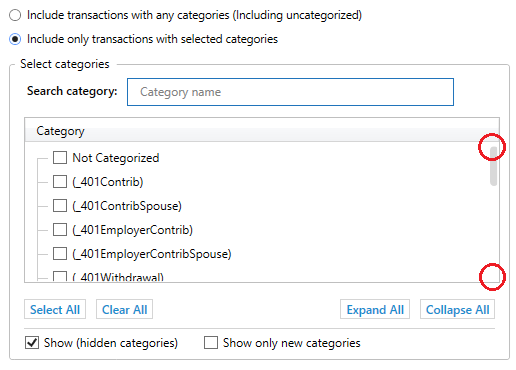
Add navigation arrows at top & bottom of scrollbars

This example is from report customization.

Quicken user since 1991
VP, Ops & Tech in the biometric space
Comments
-
Those navigation arrows would be nice to have, but I can still click where they should be and the list scrolls up or down a page.
To work around this issue, my mouse wheel works well to scroll up or down the list.
Clicking and holding the vertical grey block to drag the list up or down also works well.0 -
I see no particular use for this idea.
As, in addition to what @UKR has mentioned, you can also click in the white space above/below the gray bar to move it.
I'd vote no if that were possible, as the idea would provide only a graphic with no additional function over what already exists.
Q user since February, 1990. DOS Version 4
Now running Quicken Windows Subscription, Business & Personal
Retired "Certified Information Systems Auditor" & Bank Audit VP0 -
Clicking the whitespace or using the mouse scroll wheel jumps too far in the list of categories in report customization.
[Removed - Disruptive]
Quicken user since 1991
VP, Ops & Tech in the biometric space
0


Categories
- All Categories
- 24 Product Ideas
- 34 Announcements
- 247 Alerts, Online Banking & Known Product Issues
- 19 Product Alerts
- 265 Welcome to the Community!
- 300 Before you Buy
- 1.5K Product Ideas
- 55.8K Quicken Classic for Windows
- 16.9K Quicken Classic for Mac
- 1K Quicken Mobile
- 834 Quicken on the Web
- 128 Quicken LifeHub