Truist Bank makes processing change that results in double transactions

Quicken Classic on Windows 11 laptop
For the past 15 years, I have been reconciling my Truist (previously SunTrust) checking/savings accounts daily, so I notice any processing changes quickly.
Sometime in the last month, Truist Bank changed the way they process transactions. For some accounts, Truist is now. changing the date posted (ei, 3/21/2026; labeled pending) to the(ei, 3/23/2026). This is resulting in DOUBLE transactions in the Quicken register (the date posted pending (manually entered by me in Quicken via the home page Stay On Top of Monthly Bills section (properly categorized)) AND a 2nd transaction on the date cleared (new transaction, uncategorized). While this may be considered a small impact to me because I reconcile my accounts daily, it would be a large impact to anyone who does not reconcile their account daily. It is easy to locate the 2nd processed transaction because it is New, unclassified, and listed as cleared. You have to delete the new transaction and mark the original transaction as cleared.
As said in the beginning, this WAS a processing change made by Truist sometime in the last month that is impacting the way Quicken handles the data. In the words of the Truist over-the-counter rep, it must be a Quicken problem when obviously it was a change made by Truist, as it is ALSO reflected in the online Truist account info. Something that prior to a month ago DID not happen. Please do not confuse this with the normal pending/processing delay that has always existed in banking. Let me say it in a way that makes it simple. Think back to the old school checkbook register. You entered the transaction into your checkbook on the day it happened (helps you make sure you DO NOT overdraw your account). Now, in the old checkbook days, you also had a check number (non-existent in today's digital world) that you could track. Now Truist changes that to the date processed (cleared), resulting in double transactions in Quicken. I suspect this is going to be a big issue for corporate accounts with 1000's of transaction errors occurring per month.
Comments
-
Hi @textoy22,
Thank you for reaching out to the Quicken Community and bringing this to our attention.
Quicken can automatically match a transaction when the Date, Amount, and Payee are nearly identical. If no transactions meet these criteria closely enough, Quicken marks the transaction as New, which can sometimes result in duplicate transactions.
To resolve this, I recommend manually matching the transactions:
First, I suggest creating a backup file.
For transactions that should match an existing register transaction but do not:
- If the transaction is not currently marked as Matched but should be linked to one or more transactions in your Quicken register.
- Click the Edit button.
- then select Match Manually.
- Quicken will open a window where you can choose one or more transactions to match.
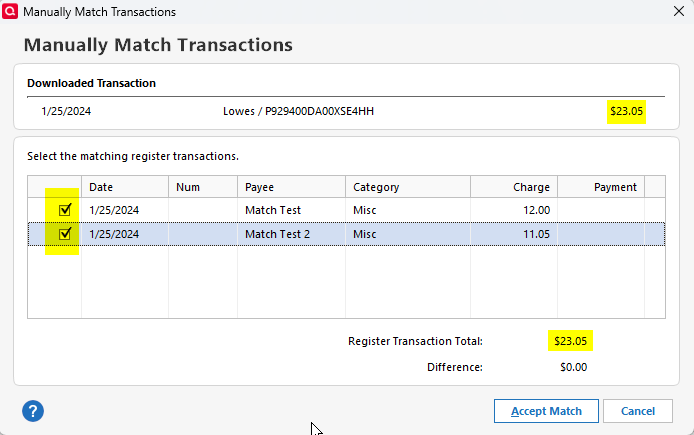
I hope this information helps!
Quicken Carlos
Make sure to sign up for the email digest to see a round up of your top posts.
0 -
I am well aware of how to reconcile accounts in Quicken. I do it daily. Been doing it for over 15 years, when Quicken Basic was only $39.00 a year.
Getting duplicate Truist transactions in Quicken for the same purchase only started in the last month, requiring me to delete the bogus transactions that were generated by Quicken due to the date change by Truist.
Manual matching:
How do you think I detected this issue happening? It was because of numerous bogus transactions appearing in my Quicken data that did not happen before a month ago. You are not saying anything that is not obvious to a long-time user who is reporting that Truist Bank is making a date change that is making the Quicken data get unreliable with duplicate transactions that have to be deleted.
As far as a backup file:
I also do that daily because I have Quicken set to back up after every 3 uses, which basically happens daily.
Trying to talk to Truist Bank is useless because they are either trying to blame the issue on the merchant or Quicken.
[Edited-Readability]
0 -
Hi @textoy22
Thank you for your reply.
To help us properly report and investigate this issue, I would appreciate it if you could upload screenshots of the duplicate transactions.
Additionally, I suggest sharing your logs with us by following these steps:
- Go to Help > Report a Problem
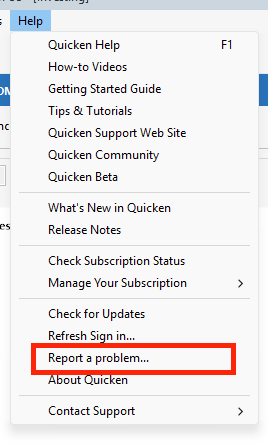
This information will help us better understand and address the issue.
I look forward to your reply.
Quicken Carlos
Make sure to sign up for the email digest to see a round up of your top posts.
0 - Go to Help > Report a Problem
-
I will do as you ask however, because my main interest is to keep my account balanced so I have already deleted the duplicate transactions so, I may have to wait a few days to allow Truist to screw the account up again. Might have to wait until Tuesday to allow Truist time to collect several tranasactions and screw up again.
Hopefull Quicken has more influence with Truist then a lowly user does.
Thanks - Dave Bailey
0 -
Hi @textoy22,
Thank you for your reply.
I understand how frustrating it can be.
I’ll be waiting for your reply.
Quicken Carlos
Make sure to sign up for the email digest to see a round up of your top posts.
0

Categories
- All Categories
- 24 Product Ideas
- 34 Announcements
- 247 Alerts, Online Banking & Known Product Issues
- 19 Product Alerts
- 265 Welcome to the Community!
- 300 Before you Buy
- 1.5K Product Ideas
- 55.8K Quicken Classic for Windows
- 16.9K Quicken Classic for Mac
- 1K Quicken Mobile
- 834 Quicken on the Web
- 128 Quicken LifeHub