My Comcast Stock account no longer allows MiscIncX

In January 2025, my COMCAST Stock account allowed the MiscIncX action to remove expenses associated with the quarterly dividend. This action is not available for the August dividend or later.
Any Suggestions?
I am using the Windows version of Quicken that has been kept up to date.
The COMCAST stock is in its own account and is manually updated when I receive each quarterly statement.
The options associated with Misc Exp require an account to transfer the money to.
[Edited-Readability]
Answers
-
Hi @Courtenay,
Thanks for taking the time to contact the Quicken Community!
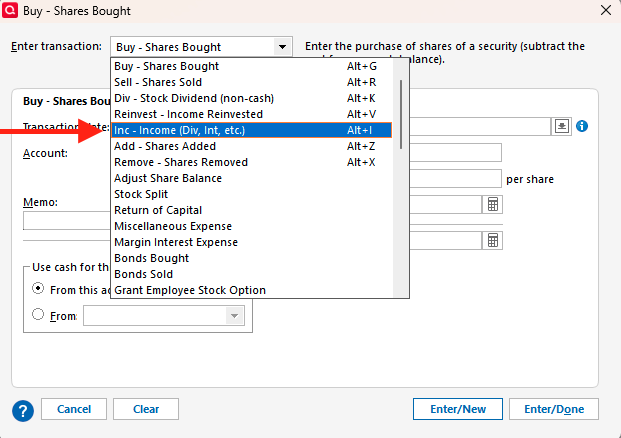
I recommend entering the transaction using the Inc - Income (Div, Int, etc.) option. To do this:
- Open the account in question.
- Click Enter Transactions.
- From the dropdown menu, select Inc - Income (Div, Int, etc.).
- Choose the account the money is coming from.
- Select the security name.
- Enter the amount in the Miscellaneous field.
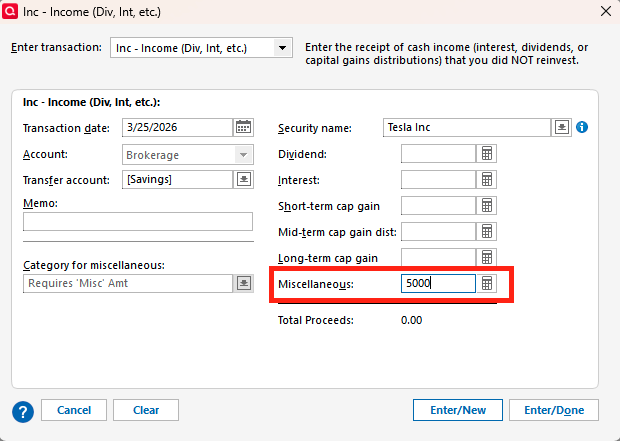
- Click Enter/Done.
- The MiscIncX will show in the Action field.
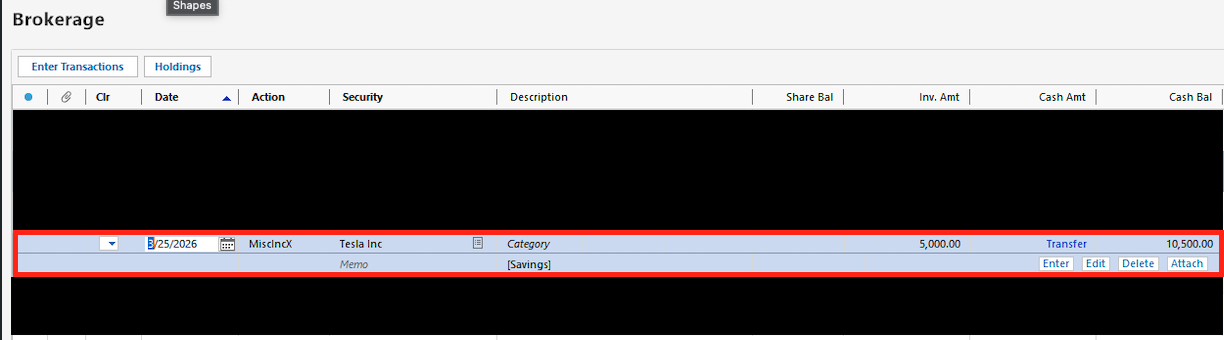
I hope this information helps!
Quicken Carlos
Make sure to sign up for the email digest to see a round up of your top posts.
0

Categories
- All Categories
- 23 Product Ideas
- 34 Announcements
- 248 Alerts, Online Banking & Known Product Issues
- 19 Product Alerts
- 265 Welcome to the Community!
- 301 Before you Buy
- 1.5K Product Ideas
- 55.8K Quicken Classic for Windows
- 16.9K Quicken Classic for Mac
- 1K Quicken Mobile
- 834 Quicken on the Web
- 129 Quicken LifeHub