Scheduled deposits disappearing? (Q Mac)

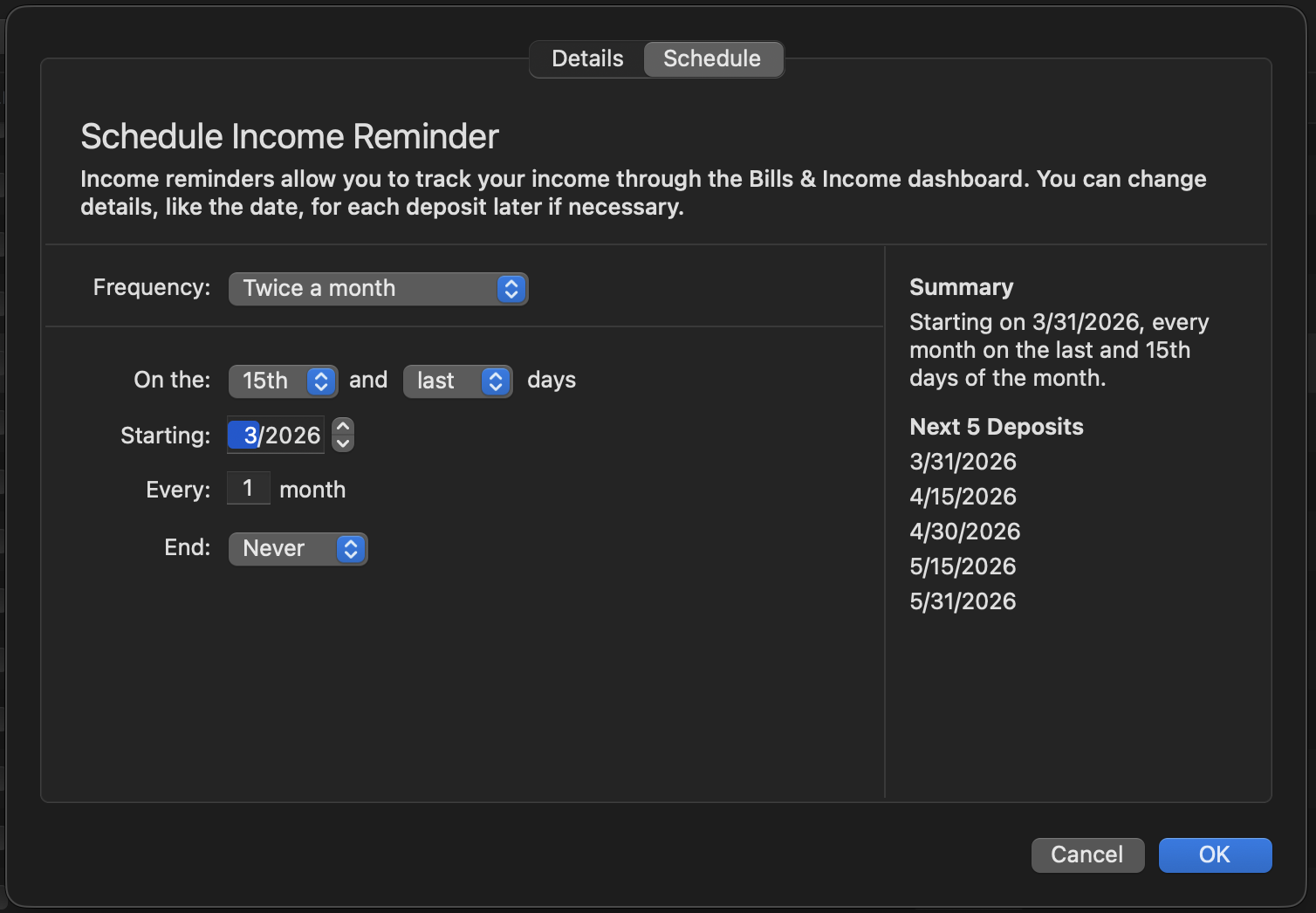
Having a new issue where the next deposit (paycheck) is disappearing. Not the whole series, only the next one. For example, two paychecks, 15th and last day - I see April on with no issues, but 3/31 for both continually disappear. I can edit the series and they will show but then after an update or a period of time they again disappear.
[Edited Readability]
Answers
-
Hi @Ben McMahan,
Thank you for sharing what you are experiencing. To better understand and address this issue, I’ll need a bit more information from you.
- How long have you been having this problem with your paychecks?
- Is this happening only with paychecks, or does it also affect other types of reminders? If so, please specify the type (bill, income, transfers, etc.)
- Where is your Quicken file located? You can check by opening Quicken, going to File > Show "File's Name" in Finder, right-clicking the highlighted file, selecting Get Info, and noting the path under Where
- Have you tried restoring a backup from a date prior to when the issue started?
I look forward to your response!
Quicken Laura
Make sure to sign up for the email digest to see a round up of your top posts.
0 -
Hi @Quicken Laura
1. It has been happening for about 3 days now. Actually this morning I took the step of deleting both series and recreating them thinking that might resolve the issue; it didn't. It is still randomly dropping a future check out of the series (this time it was the 4/15 check)2. So far I have only noticed these 2 specific scheduled Income items (which is what I have used for my paychecks)
3. /Users/xxxx/Library/Application Support/Quicken/Documents
4. I have not tried a restored - that has historically been a pretty disruptive measure
Thanks!
0 -
Hi @Ben McMahan,
Thank you for providing those details; they’re very helpful. We’ve received similar reports of reminders behaving incorrectly on the Windows version, and to assist further, we’d appreciate it if you could send your log files so we can forward them to the appropriate team for investigation.
To send your logs:
- Open Quicken.
- Click Help.
- Select Report a Problem.
- Click Send to Quicken.
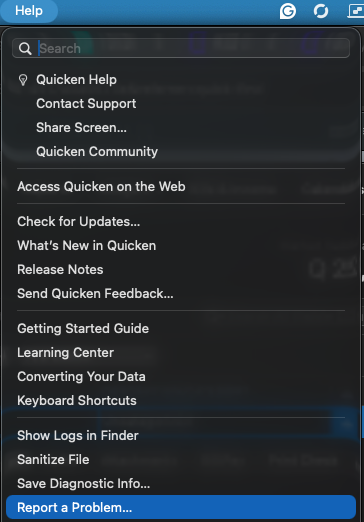
Once you’ve submitted the logs, please let us know. I look forward to your response!
Quicken Laura
Make sure to sign up for the email digest to see a round up of your top posts.
0 -
Thank you, I just submitted the logs.
0 -
Hi, @Ben McMahan I am glad you submitted reports. This is not an issue being reported by others. So, I wonder if it is unique to you.
Is this scheduled transaction a single instance for your paycheck? (I.e., you have it setup as occurring on the 15th and last day) versus two separate schedtransx?
Often, it is user interpretation that causes confusion, but I am not so sure here-it sounds like you are more familiar with this. But, I have to ask where are you viewing the upcoming reminders? We have to determine if it is a skipped instance or hidden reminders. But, a recreated schedtransx causes similar issues with random issues.
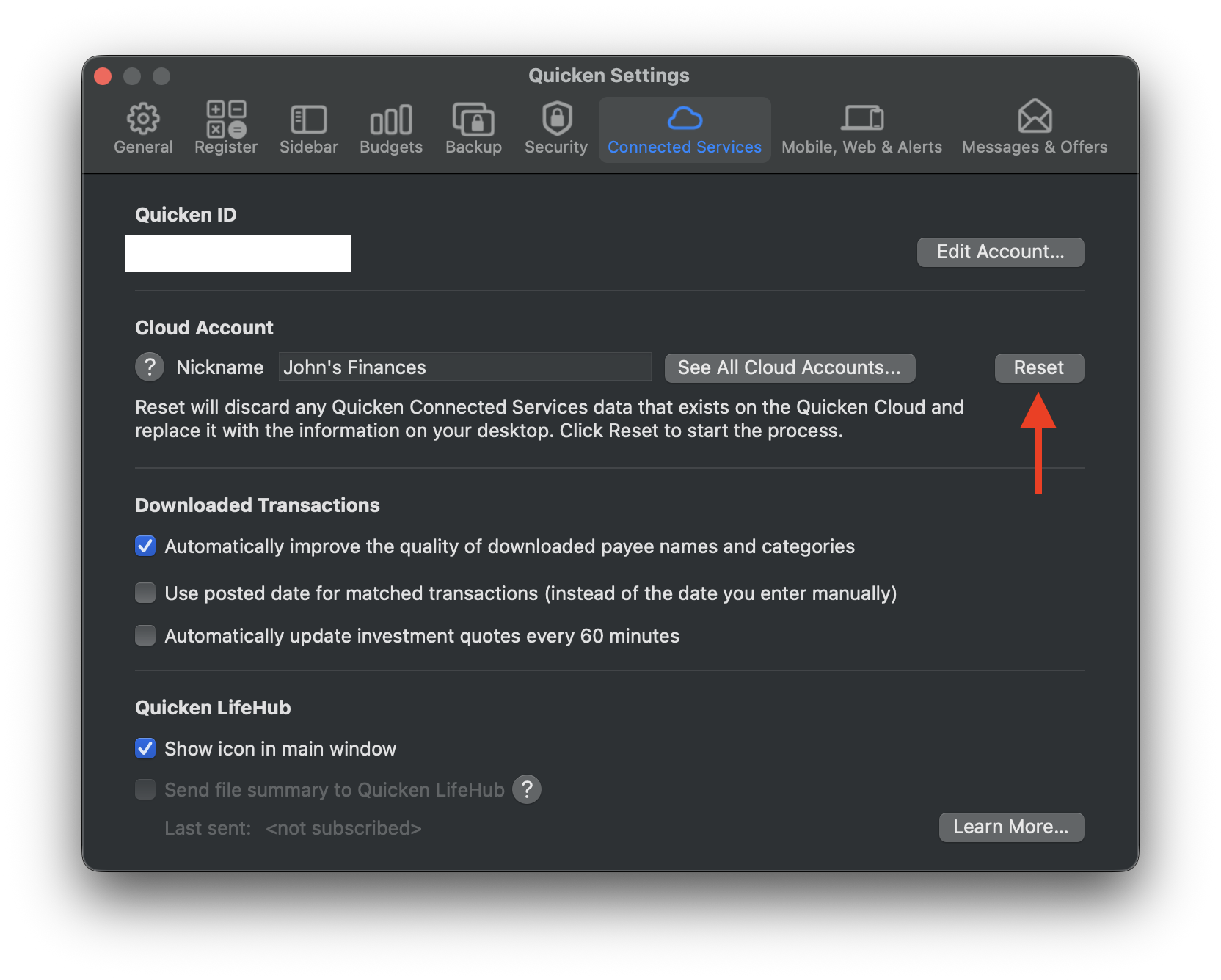
If it were I, I would go to Settings: Connected Services, and click Reset. (You won't lose anything-it just erases your cloud data and uploads a fresh copy from your desktop.) You might not use Mobile/Sync, but some things get synced surreptitiously behind the scenes.
 0
0 -
Tried the reset @John_in_NC still having scheduled reminders dropping; however, this time 03.31 is there and 04.15 is dropping with the rest of the series showing up as expected.
To me the most curious thing is it is happening to BOTH scheduled income reminder series and it isn't dropping a reminder wholesale it is only 1 reminder in the entire series - looking ahead for the remainder of the year in the register each month shows 15th/last day for both reminders as one would expect to see based on the set up.
 0
0 -
Hi @Ben McMahan,
Thank you for providing the log files; I appreciate you taking the time to share more details. I’ve forwarded them to the appropriate team for further investigation, as this issue appears to be affecting Windows users as well.
Please feel free to reach out if you have any additional questions or need further assistance.
(CTP-15510)
Quicken Laura
Make sure to sign up for the email digest to see a round up of your top posts.
0 -
Hi @Ben McMahan,
Thank you for your continued patience. I really appreciate it. I just have a couple more questions, as this issue appears to be affecting only Quicken for Windows users so far.
Would you be able to try replicating the issue in a new data file to help rule out possible file corruption? Also, have you had a chance to restore a backup from before the issue began?
Steps to Create a New Quicken File (Mac):
- Open Quicken for Mac.
- Navigate to the menu bar and select File > New.
- Select Start from scratch and click Next.
- Set your mobile and web sync preferences, including a nickname for your new cloud account, and click Next.
- The Add Account dialog will appear, allowing you to begin setting up your financial accounts.
- As a final step, please add a scheduled paycheck and test whether it behaves the same way.
I look forward to your response!
Quicken Laura
Make sure to sign up for the email digest to see a round up of your top posts.
0 -
@Quicken Laura I have not tried to restore, I can't remember how far back this might have started, I've had to restore backups before and it is always a problem.
As far as starting fresh - that might be a bridge too far, this is an annoying bug - but I dont know that it is worth starting completely over with budgets and the whole works.0 -
Hi @Ben McMahan,
Thank you for your reply. We’ve created an investigation ticket regarding this issue. At this time, there’s no ETA.
For reference, here is the ticket: CBT-1088
Please feel free to reach out if you have any additional questions or need further assistance.
(CBT-1088)Quicken Carlos
Make sure to sign up for the email digest to see a round up of your top posts.
0


