Can't print from Quicken Windows 2006

Hi
I work for a tiny church and still run Quicken 2006. Money is tight. I went from an old window computer to Windows 11. Successfully transfered all Quicken files (Held my breath) but now I can't print. I get a dialoge box from Intuit Library "The PDF driver cannot be found. To restore it please make sure you are in admin mode and run restore PDFDriver.bat from C:\ProgramFiles (x86)\Qickien\PdfDrv
I have done this so many times, the window that comes up disappears and no file was restored/added. I thought of downloading Quicken 2013, but I been reading, people have issues with even 2016.
PLEASE help me with a fix so I don't have to completely ditch Quicken. In time I want to buy a subscription, but the congregation needs to grow to have funds.
Thank you in advance Quicken Family
Christiane
Comments
-
How did you reinstall Quicken 2006 on your new Windows 11 computer? From the original CD or a saved downloaded installation file?
Did you also install the patch files (bug fix floppies) that were sent to you in 2006 or 2007?On both old and new computers, please do this: In Quicken click on Help / About Quicken. This will tell you what the installed release levels are.
As far as I can determine, for Q 2006, the latest available patch level should be release 5.If you don't have the patches installed, please try this:
Go to the Patches folder which another Community user has made available.
Locate, download and install the file QW06R5Patch.exeWhen done, try setting up your printer again: File Menu / Printer Setup / For printing reports
0 -
Printer drivers are very low level, and old ones aren't designed for the newer versions of Quicken. They are the first thing that fails to be compatible with new versions of Windows.
Instead of trying to use Quicken's old PDF driver, use Windows 11's instead.
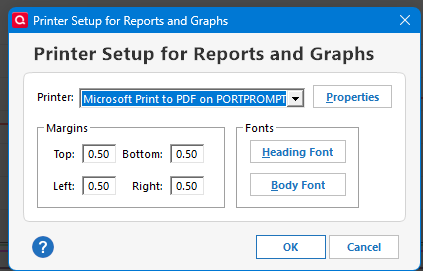 0
0 -
Thank you for the printer setup comment. I did change that to no avail. I get the same msg as before. I know I am on a hail mary with this old version. I am old and don't comprehend the ins and outs. No IT help either. I appreciate you.
0 -
I installed from a copy from the old computer. I loaded the files on USB and trf to Windows 11. Quicken loaded great and all works as it should, except I can't print. I need it to print checks for the Church and graphs. Any help is appreciated. Thank you.
0 -
I took the path for the bug fix, it seemed promising since I found the file and downloaded, however it did not fix the issue. I continue to get the same printing error. I am at a loss. Anymore ideas are so appreciated. TY
0 -
Thank you for the printer setup comment. I did change that to no avail. I get the same msg as before. I know I am on a hail mary with this old version. I am old and don't comprehend the ins and outs. No IT help either. I appreciate you.
0 -
Sorry to hear that the bug fixes didn't help.
That seems to indicate that your next step out of this hole needs to be the upgrade to Quicken 2013 Deluxe.
Quicken Inc. offers a free upgrade to this version within the text of this webpage:
In a nutshell, what you have to do is to download and install Q 2013 on your Windows 11 system.
After installation, Q 2013 will be able to open you last used Q 2006 - format data file and convert it to the Q 2013 format.And that, hopefully, will solve your printing problem, provided, of course, that W 11 still supports your printer(s).
0

