Investment expenses

The program has never had the option to have investment expenses recorded in one account (Account B) that are paid by another account (Account A).
My workaround has been to transfer cash from Account A to B, then change the transfer IN in account B to misc. expense.
This workaround no longer works after the March 2026 update, so i have reverted to the prior version.
Consider this a caution, and the and ongoing questions:
- Why is there no Management Fee expense in investment expenses?
- Why is the Transfer account option not available for investment expenses>
Comments
-
In the US version of QWin, you can click on Enter Transactions in the investing account where the fee was charged and select Miscellaneous Expense, and you get this dialog:
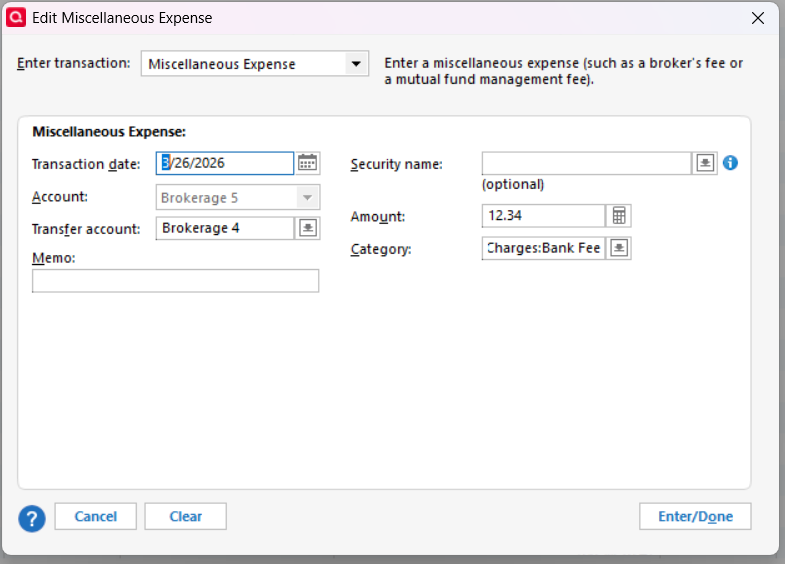
There you can enter the amount, a Category of your choice, and next to Transfer account, the account the money comes from if it is paid from another account.
Does that work for you? If not, what happens?
QWin Premier subscription0 -
That is what I do now, except that I have created a separate expense called "Management fees", as i do not want to group these with other bank charges. The only advantage to your method is that you can copy and past this transaction; I can not.
All of which still begs the question as to why this category does not exist in investment transactions to begin with? And does not address my expenses paid from another account issue that arises from the current update.
0 -
There are lots of types of income and expenses that Quicken supports but does not have built-in investment actions or Categories for. Social Security income is one that comes to mind. But it is easy to create your own Categories when the need arises.
Please describe the issue you are seeing with this transaction in more detail. Are you trying to edit the transaction after it has been entered or something?
QWin Premier subscription0
