Fidelity FDRXX - Placeholder, ReinvDiv, XIn, XOut, Bought, Sold transactions
Ever since Quicken changed from DC to EWC+ around August 2025, Fidelity downloads have contained incorrect transactions. I have two accounts using FDRXX for cash representation. With difficulty, I was able to reconcile the cash balances each month in both accounts. In February, it got a little worse.
In March, Quicken wasn't even close to matching the cash balance in Fidelity's statement. Fidelity’s website had nearly 100 transactions in my account for March. Quicken has 74 because it combines Div and ReInvest into a single ReinvDiv transaction. For the first time, it had 7 placeholders, 3 XIn, 3 XOut, 4 Bought, and 3 Sold for FDRXX.
I opened the reconciliation panel, cleared all checkmarks, then checked each transaction in Fidelity's March statement. When finished, the Difference in the reconciliation panel was off by the amount of the FDRXX dividend, $12.92. As the 20 transactions weren’t in the statement, they remained unchecked. The screenshot shows the checkmarks.
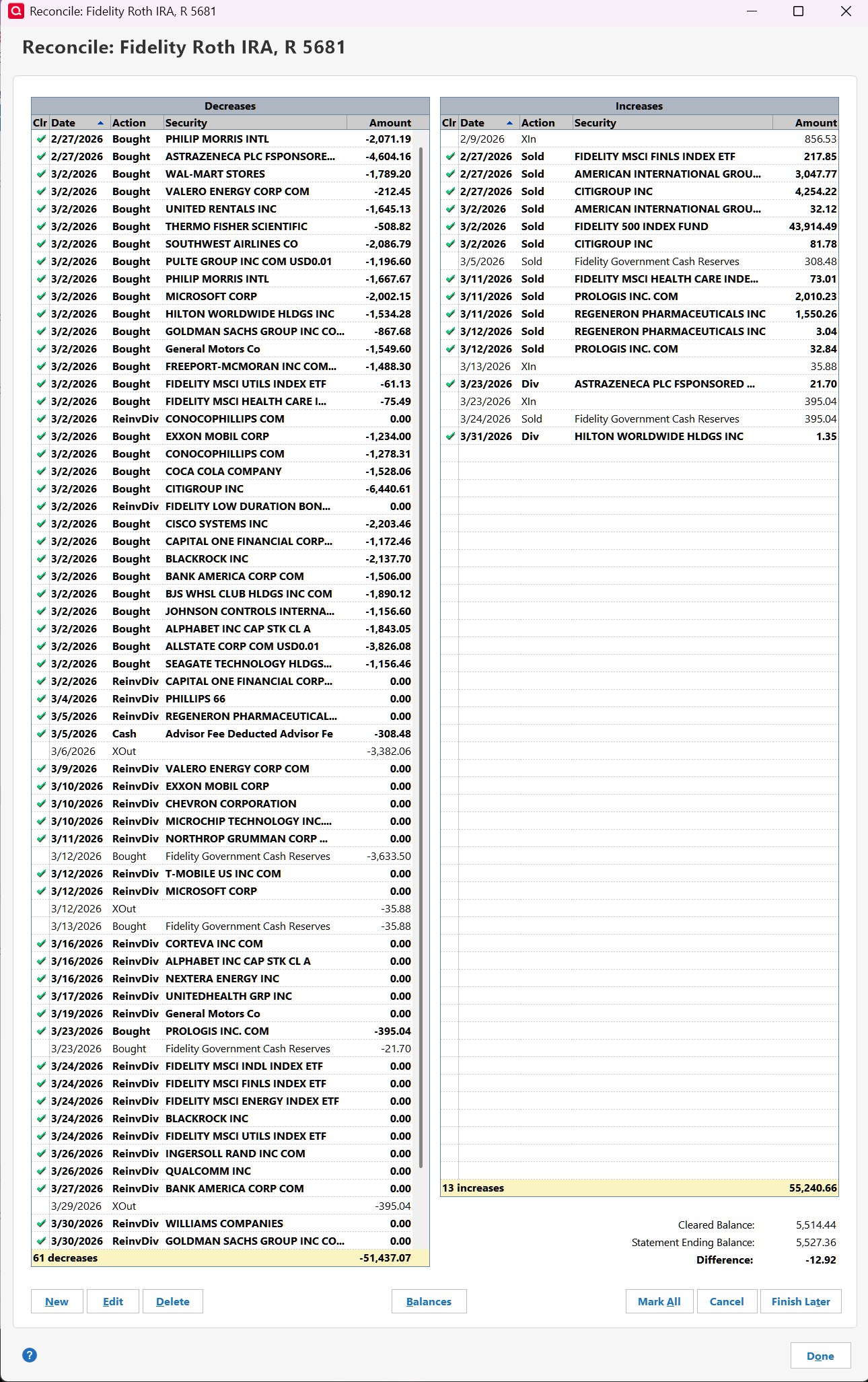
The statement cash balance was $5,527.36. BUT, Quickens register was $-12.92. I downloaded the register to a spreadsheet. I added a column next to the balance with a formula to compute the running balance by adding each transaction's amount to the preceding balance. When I deleted the amount from each of the 20 unreconciled transactions, the register balance returned to $5,527.36 less $12.92. The 20 transactions needed to be deleted.
In Quicken I deleted all the placeholders. Then, deleted all of the unreconciled transactions. The final balance was short by the dividend. Reinvesting the FDRXX divided into itself should increase the cash balance but it doesn’t. I changed the dividend from ReinvDiv to Div, which is how it was downloaded until February. Now, the balance is correct.
Quicken Cash Representation algorithm is bizarre. Why is it creating these 20 transactions? They are appearing this month too. After 8 months, I'd expect everything to work correctly. My Schwab account still has problems with cash representation after 8 years.
Caution: Make sure you back up your data file before deleting. One time, deleting became whack-a-mole with new Placeholder, Xin, and/or XOut transactions appearing elsewhere. That’s why I deleted all placeholders before starting this last time.
Reference Quicken support ticket number 1234861.

Comments
-
To have that many buy transactions in such a short period suggests that you have a financial manager who's running the account. Is that the case?
If so, I'd suggest that you turn OFF Complex tracking and turn ON Simple tracking in the account, so that only the positions and quantities show … and not all of the transactions.
BTW, I'm having no problems with downloading from Fidelity into 7 accounts, 6 days a week … and my Q accounts always reconcile easily to Fidelity. But then I have but a few transactions a month, except in my MMF, which is shown in Q via the "Show cash in a checking account" option. The MMF is my main checking account.
Q user since February, 1990. DOS Version 4
Now running Quicken Windows Subscription, Business & Personal
Retired "Certified Information Systems Auditor" & Bank Audit VP0 -
Thanks for the suggestion. I do have an account manager. I plan to talk with him to reducing the number of securities and trades.
Fidelity was ok until Quicken switched from DC to EWC+. Since then, Quicken can't make Fidelity's or Schwab's cash representation work correctly. Frankly, I don't see why it's so difficult. Their latest approach is to add these correcting transactions. If you study the screenshot, you'll see they are nonsense.
As I understand it, Simple tracking downloads the value of each security in the portfolio plus cash. It should reconcile easily (unless there are trades that haven't cleared by the statement date). Once I start simple tracking, there are no trade details, so there's missing tax information. Switching back would require placeholder or manually entering all the trade details. Reconciliation would be horrible!
I've been using Quicken for years without these investment issues. I'm holding out for them to fix them.
0 -
@NotACPA Quicken's behavior differs in the Windows version vs the Mac version. The Mac version does not have any options as to how to represent cash and the Mac version is not properly handling money market funds and cash positions.
"I'd suggest that you turn OFF Complex tracking and turn ON Simple tracking in the account, so that only the positions and quantities show … and not all of the transactions." … what's the purpose of Quicken if you can't track transactions and categorize them? I can look at my financial institutions websites for balances and positions.
-1 -
@jblevy01 This was posted in a QWin forum and I provided a QWin response.
Your reply re: QMac is irrelevant.
If you're having the same, or similar, issue … I'd suggest you start a new thread in the QMac forum.
Q user since February, 1990. DOS Version 4
Now running Quicken Windows Subscription, Business & Personal
Retired "Certified Information Systems Auditor" & Bank Audit VP0 -
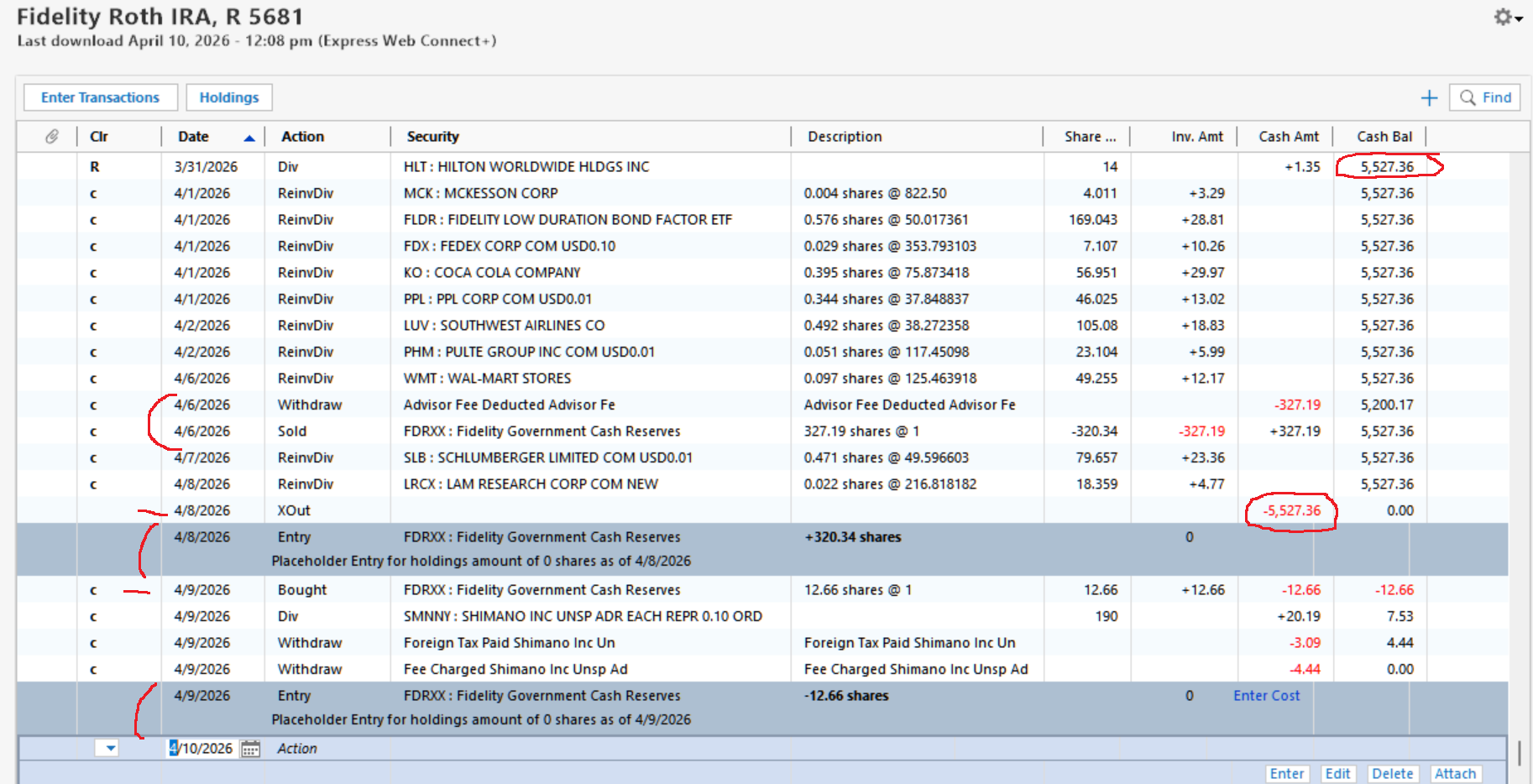
On 3/31, my cash balance was correct at $5,527.36. In April, Quicken continues to create FDRXX transactions that aren’t from Fidelity, again causing cash balance errors.
Why is Quicken creating these entries?
- On 4/6, my account advisor withdrew his fee, which correctly decreased the cash. Quicken then sold FDRXX to put the fee back.
- On 4/8, Quicken took $5,527.36 out, making the balance zero. Then, added a placeholder for 320.34 shares of FDRXX.
- On 4/9, Quicken bought 12.66 shares of FDRXX. Then later, added a placeholder for them.
If I ignore these, the balance becomes $5,212.83. This matches the amount on the Fidelity website.
Quicken hides the cash equivalent transactions. You won’t find FDRXX using the account’s Holdings button or in any report. But you will find it in the Tools > Security list and the Tools > Online Center.
The Tools > Security list each security with transactions from all accounts. Curiously, Total shares for FDRXX is zero. Using the Security Report button, the exported spreadsheet shows monthly Div transactions and the FDRXX Sold and Bought transactions from April. The total is only $80.37.
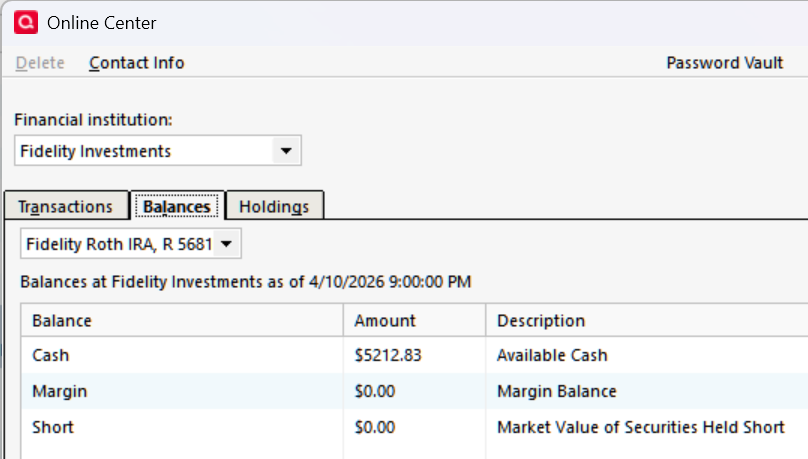
The Tools > Online Center Balances tab shows Cash of $5,212.83. The Tools > Holding tab has FDRXX at the bottom with $5,212.83. Interestingly, these are the correct balance. The Compare to Portfolio button says, “Your Quicken account and your Brokerage Holdings are in agreement.”
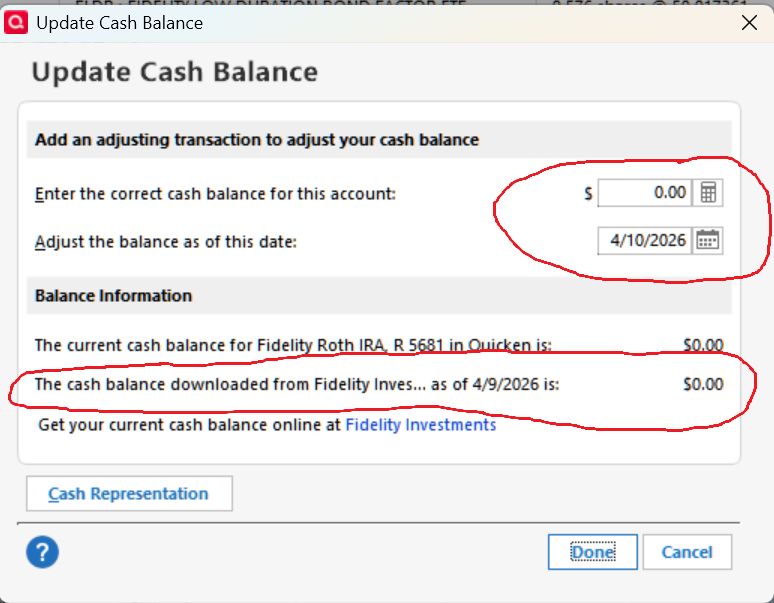
Each account has a gear in the upper-right corner with “Update cash balance” in the list. The screenshot shows that the Quicken and Fidelity cash are zero. Quicken uses the account register for its amount. In my Fidelity accounts, it shows zero. In my Schwab accounts, it’s correct. I tried entering the correct balance of 5,212.83 on 4/8. It added a Xin which cancelled the one added by Quicken. It’d be better to just delete it.
I've spoken with Quicken support many times. They say, Fidelity's isn't sending the correct data, it's a known issue, I have to create a test account to verify it, or I have to reconnect the accounts. They ignore the fact that I get nearly identical downloads on 3 data files, that Schwab has similar issues but not a bad, and that others report issues on this forum. I'm hoping these details might help Quicken development fix the issues.
0 -
I decide to create a new data file for just the Fidelity and Schwab accounts. The Schwab accounts have the same problems handling cash representation as my working data files. Fidelity didn't create the strange transactions. Most important is that Update Cash Balance show the correct cash in Fidelity instead of zero. Fidelity accounts are definitely better.
I called support with this information, and my case was escalated to higher level support. (This has never happened before.) The fellow was very knowledgeable. We spent a few hours trying to update Fidelity in my primary working account. Super validate didn't show any issues. We Deactivated the Fidelity accounts, then added them as new accounts. The new accounts had the same strange transactions as the deactivated accounts. Fidelity's Update Cash Balance panels still showed zero cash at Fidelity. Worse, it did not have the Cash Representation button. (Later, I repeated the above but first I delete the Fidelity account, ran Super Validate to clear any residual Fidelity date, then added Fidelity. Results were identical.) The problem is the internal cash representation handling.
The other solution was to export all my working file's accounts except Schwab and Fidelity as a QFX file. Then import it into the new file. That might work, but I'd have to recreate all my Categories, Memorized Payees, Renaming Rules, Scheduled Transactions, and Reports for 44 accounts. I expect that transactions between accounts would be broken and the tax basis of securities corrupted. I've created new data files from scratch before. It literally takes weeks with lots of screenshots and notes. Until I trust the new file, I'd have to continue to update both data files.
BOTTOM LINE: Quicken still has serious cash representation issues even with the new data file. Schwab doesn't handle SWGXX or SWVXX correctly and the Cash Representation button is missing in one account. Fidelity doesn't handle FDRXX correctly. Much of the cash representation security data is hidden so I can't tell what it's doing. In my working file, Quicken so far hasn't repair anything.
0 -
I need to redo this post.
0 -
I am also having these problems and am very discouraged. I have already lost a lot of time and data. I need to track individual transactions. Like others, since has not been a problem until August of last year. What is going on? I gave up trying to manually reconcile, something I have been able to do successfully until the changes last year. Now the balances are off by huge amounts.
I tried recreating an account from scratch, that is creating a new account for the one that was most off today and the balance was still off by the same amount.
0 -
Support said to export all my existing accounts as a QXF file and import it into a new data file. Before doing this, I deleted all the strange investment transactions and reconciled the accounts.
The new data file's accounts and their data were mostly ok. I was pleased that the account list with reconciliation status, categories, memorized payees, renaming rules, and scheduled transactions were imported too. No custom reports were imported. They'll take several hours to reconstruct them.
It did take a day to set up my custom toolbar, reordered sidebar accounts (46), enable One Step Updates (9) and to find and fix a few transactions to obtain correct account balances. (I export the data as a spreadsheet from the old and new file. Then compare running balances to find the error.)
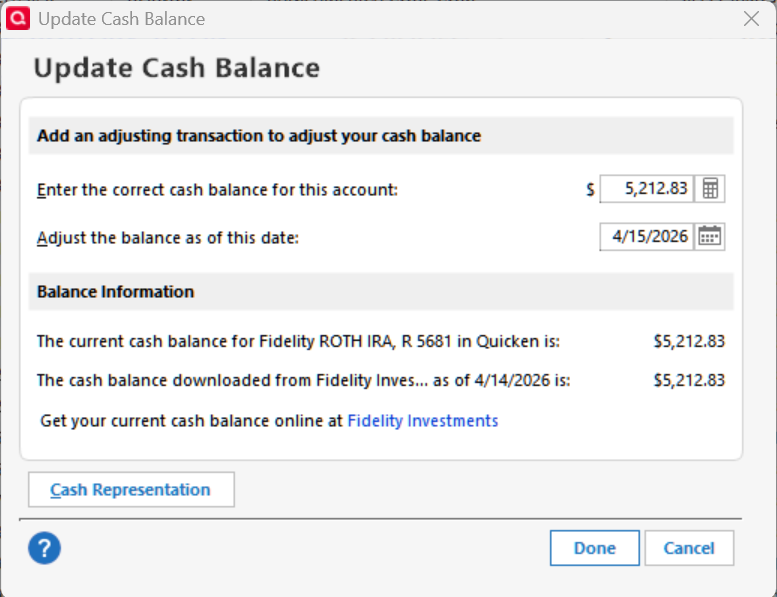
The good news is that the above strange transactions no longer appear in updating. The Online Services tab (editing the account) and Update cash balance (gear dropdown) are now available to configure cash representation.
0