Can't Update American Express Accounts
I haven’t been able to update my American Express accounts for some time now. I called Quicken tech support last week and was told that it was a known issue and that it should be resolved within a few days. It has been over a week. When is Quicken going to resolve this issue??
Answers
-
Hi @craigtaz,
Thank you for reaching out. I completely understand how frustrating this situation can be. The team is actively working on it, though we don’t have a specific timeline for a fix just yet. In the meantime, you can bookmark the Community Alert for this issue to get notifications as soon as any updates are posted.
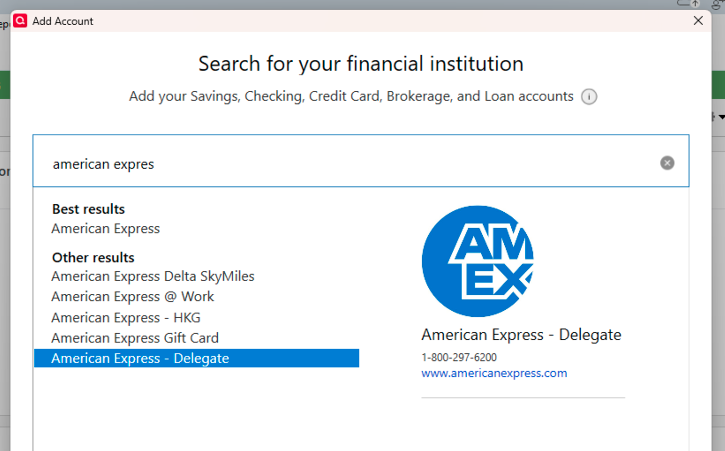
While we are still working on a permanent fix, as a workaround, you can try connecting your accounts using American Express – Delegate instead of the regular American Express option.
To do this, first deactivate all affected accounts and then reconnect them using American Express – Delegate.
Step 1: Deactivate all affected accounts
- Select the Tools menu and select Account List...
- In the Account List, select the account you want to deactivate, and then click Edit.
- In the Account Details window, click the Online Services tab.
- Click Deactivate next to the service you want to disable.
- Click Yes to the message confirming if you want to disable this service.
- Repeat these steps for each affected account.
- Log in to your bank’s website and revoke Quicken’s third-party access (if applicable).
Step 2: Reactivate and link the accounts
- Go to Tools > Add Account.
- Search for and select the Financial Institution.
- If prompted, choose the appropriate connection method.
- Follow the on-screen instructions to sign in.
- When the list of found accounts appears, make sure to select Link to connect them to your existing accounts (do not choose Add, as that would create duplicates).
Please don’t hesitate to reach out if you have any additional questions or need further guidance!
Quicken Laura
Make sure to sign up for the email digest to see a round up of your top posts.
0 -
Quicken Laura
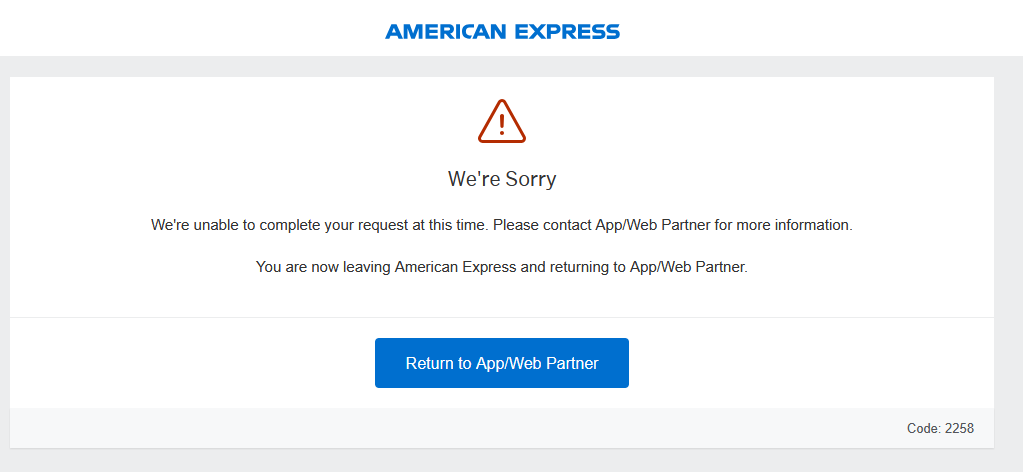
Add me to the list. After following your recommended steps, I get the following message from AmEx.
I tried switching browsers from Edge to Firefox to no avail.
Please advise
0 -
Hi @gtgerbo,
Thank you for joining the thread. I’ve checked your account on our end and see an FDP-350 error, which is not related to the known issue currently being tracked. The error you’re seeing during the authorization process typically indicates a connection failure between the financial institution and Quicken’s aggregation service.
As a possible workaround, I recommend trying to connect your account using American Express – Delegate instead of the standard American Express connection option, as some users have reported success with this method.
You can follow the steps provided in my previous response to complete the deactivation and reconnection process.
Please let me know if you run into any issues or need further assistance!
Quicken Laura
Make sure to sign up for the email digest to see a round up of your top posts.
0 -
Quicken Laura,
Thank you. It's working using American Express – Delegate.
0 -
Hi @gtgerbo,
I’m glad to hear that worked for you!
Please don’t hesitate to reach out if you have any other questions.
Quicken Laura
Make sure to sign up for the email digest to see a round up of your top posts.
0 -
Quicken Laura,
An update: I'm now being prompted by AmEx for 2FA.
0 -
Just to clarify, are you being prompted for MFA (multi-factor authentication) each time you update the account in Quicken?
Quicken Laura
Make sure to sign up for the email digest to see a round up of your top posts.
0 -
I'm being prompted for MFA for AmEx (and only AmEx) each time I run One Step Update.
0 -
Hi @gtgerbo,
Could you please confirm whether MFA is enabled on your American Express profile?
If it is enabled, would you be able to temporarily disable it and then check whether the account updates in Quicken successfully?
Thank you, and I look forward to your response.
Quicken Laura
Make sure to sign up for the email digest to see a round up of your top posts.
0 -
Quicken Laura
It does not appear that I'm allowed to disable MFA in my AmEx Profile. The system will allow me to change the contact information related to MFA. But it will not let me disable it.
0 -
Thank you for checking that.
Could you please try the following steps on your financial institution’s website:
Visit your financial institution's website
- Sign in to your financial institution's website.
- Navigate to the page where you view your account information.
- When you encounter the new web page that requires your response, fill out the requested information and dismiss the screen. If you have the option to not display the page or ask you again, select that option. If you do not, the error may continue to occur.
Note: Some financial institution websites may have this new security requirement located in your inbox or message center.
Please let me know if this helps or if the issue continues.
Quicken Laura
Make sure to sign up for the email digest to see a round up of your top posts.
0 -
Quicken Laura
I was able to deactivate 2FA on my AmEx account via the mobile app. As a result, Quicken was able to update the account without prompting me to go through the 2FA process.
So, if I'm reading you correctly, with American Express - Delegate comes a choice between two options. Option 1: Reduce the level of security on my AmEx account by disabling 2FA so that Quicken can update without having to go through the 2FA process. Option 2: Leave 2FA enabled on my AmEx account and go through the 2FA process every time I run an update in Quicken.
True?
This is not an award-winning choice.
0 -
Hello @gtgerbo,
Thanks for following up—this is a good question and I understand why it feels like an “either/or” situation.
Just to clarify, Quicken itself doesn’t control whether MFA/2FA is required or how often it is triggered. That is fully determined by American Express security settings and how they’ve configured third-party access for aggregation connections.
What we’re seeing in cases like this is:
- If MFA is enabled on the AmEx profile, it will typically prompt during updates depending on how the institution enforces authentication for third-party connections.
- If MFA is disabled (where allowed by the financial institution), the prompts may stop—but that setting is entirely controlled on the AmEx side, not within Quicken.
So unfortunately, there isn’t a Quicken-side setting that can bypass MFA prompts while keeping MFA active at the institution level.
Using American Express – Delegate can sometimes change how the connection is routed, but it still ultimately follows whatever authentication rules AmEx enforces.
Hope this helps!
-Quicken Anja
Make sure to sign up for the email digest to see a round up of your top posts.0 -
Quicken Anja
Thank you for your response.
I guess we need to circle back to the original post by craigtaz at 4/23/2026... The original question was "When is Quicken going to resolve this issue??"
Is there an update?
0 -
@gtgerbo At this time, there is no new update or ETA to share regarding the resolution of this issue.
We recommend continuing to monitor the Community Alert for the latest updates, as any new information will be posted there as it becomes available.
We appreciate your patience while this is being worked on.
Thank you!
-Quicken Anja
Make sure to sign up for the email digest to see a round up of your top posts.0 -
FWIW - I noticed the OSU connection issue may be with the Amex savings acct, and not with Amex credit cards.
A week ago I disconnected online OSU for all Amex accounts (savings + 4 credit cards), reconnected OSU for the 4 credit cards, and since that time had no issue with OSU for the 4 Amex credit cards.
Today I tried to reconnect OSU just for the savings account. Result - not only did the savings acct OSU not work but it broke the OSU for the 4 credit cards.
So I (again) disconnected online OSU for all Amex accounts (savings + 4 credit cards), reconnected OSU just for the 4 credit cards, and again it appears there is not an issue with the OSU for the 4 Amex credit cards.
PS - to connect I used 'American Express', not delegate.
- Deluxe R67.7 on Win 10 Pro 22H2. I don't use Bill Pay, Online Backup, Mobile & Web. Cloud Sync is off.
0 -
Hi @TangledWeb,
Thank you for letting us know; this is very helpful.
I’ll make sure to share this information with the appropriate team.Quicken Laura
Make sure to sign up for the email digest to see a round up of your top posts.
0